AI Agents · AI Agent Frameworks
OpenHands CodeActAgent
OpenHands CodeActAgent internals: design principles, tools, context engineering, and workflow.
Exploring AI Agent Frameworks: Deconstructing OpenHands (8) --- CodeActAgent Table of contents Exploring AI Agent Frameworks: Deconstructing OpenHands (8) --- CodeActAgent 0x00 Summary 0x01 Background 1.1 Core Capabilities of the Agent 1.2 Agent Design Principles 1.3 Agent in OpenHands 1.3.1. Event-driven execution 1.3.2. Skill- and cue-based agent context customization 1.3.3. Sub-agent Delegation Mechanism 1.4 CodeAct 1.4.1 Concept 1.4.2 Mode 1.4.3 Features 0x02 Definition 2.1 Configurability 2.2 Plug-in System 2.3 Tools System 2.3.1 Toolset 2.3.2 BrowserTool 2.4 Context 2.4.1 Requirements 2.4.2 Core Features 2.4.3 Flowchart 2.4.4 Code 2.5 Prompt 2.6 Iterative Modification 0x03 Workflow 3.1 Decision-making process 3.2 Message Processing 3.3 Historical Condensation 3.4 Memory Management 0xFF Reference
0x00 Summary
Large models are uncontrollable. It’s not about ‘giving an LLM a bunch of tools and letting it run wild,’ but rather about largely consisting of deterministic code, subtly integrating LLM capabilities at key decision points. A good agent application is a sophisticated combination of engineering design and AI capabilities, not a blind relinquishment of AI power.
Within the OpenHands intelligent framework ecosystem, CodeActAgent occupies a central position, serving as the core agent module built upon the CodeAct concept. Its design is ingeniously conceived: to unify various complex tasks into a unified “code execution” process, while simultaneously accommodating the interactive characteristics of natural language dialogue. This design ensures both the accuracy and efficiency of task execution and provides flexible space for collaboration between humans and intelligent agents, making it the core carrier within the framework for handling complex scenarios such as automated programming and data processing.
Because this series draws on a large number of articles, there may be some articles missing from the references. If so, please point them out.
0x01 Background
1.1 Core Capabilities of the Agent
According to the definition in Google’s eBook, a true AI agent possesses four core capabilities:
Agent-rules
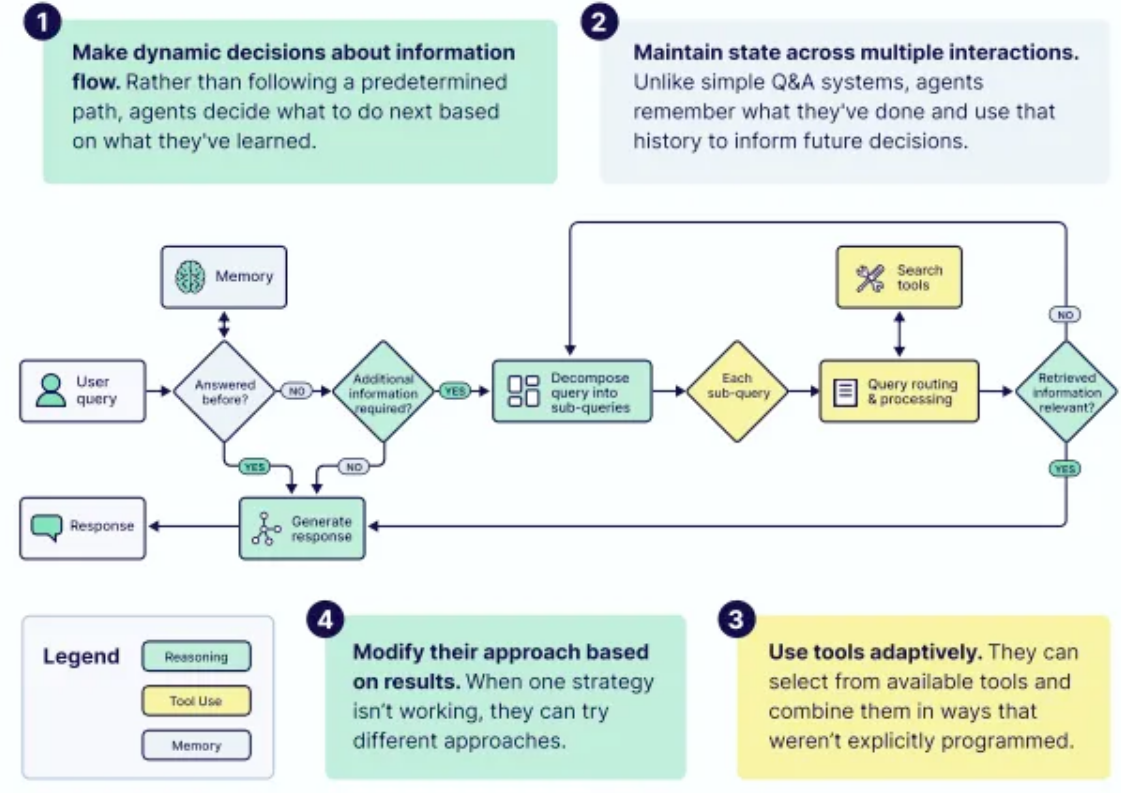
- Make dynamic decisions: These decisions do not follow a predetermined path, but rather determine what to do next based on what they have learned.
- Maintaining state across multiple interactions: They can remember what they have done and use this history to inform future decisions.
- Use tools adaptively: These tools can be selected from the available tools and combined in a non-pre-programmed manner.
- Based on results, they can modify their approach: when one strategy doesn’t work, they can try different approaches.
1.2 Agent Design Principles
How to design an agent? Different people have different understandings; this may be a philosophical question.
We use https://github.com/humanlayer/12-factor-agents as our starting point, as detailed below:
- Principle 1: Organizational planning, tool usage, and the working paradigm of complex agents.
- Principle Two: Tool Executor – Agent’s “Thinking” and “Action” are separated, decoupled, and evolve independently.
- Principle Three: Connecting with humans through tool calls; “human-machine collaboration” in Agents.
- Principle 4: Prompts should be debuggable, iterable, rollback-friendly, scenario-oriented, and A/B tested.
- Principle Five: Establish contextual assessment and arbitration to break free from the constraints of limited context and improve the “quality of generation”.
- Principle Six: Compress errors into a context window, allowing the agent to learn from them and attempt self-correction.
- Principle Seven: Unify execution status and business status, giving the Agent the ability to “self-recover”.
- Principle 8: Use simple APIs to start, pause, and resume tasks, achieving full lifecycle management of tasks.
- Principle Nine: Finite State Machines, with Autonomous Control Flow of the Agent.
- Principle Ten: Multiple small, focused agents together form an “intelligent organization”.
- Principle Eleven: Trigger Agents from Anywhere to Build “Ubiquitous Intelligent Productivity”.
- Principle Twelve: View the Agent as a “stateless reducer”.
The paper “From Storage to Experience: A Survey on the Evolution of LLM Agent Memory Mechanisms” also outlines the design principles for agents:
Design Principle 1: Memory as Experience, Not Storage
- Incorrect approach: pursuing larger storage capacity and faster retrieval speed.
- The right direction: Pursue deeper experiential abstraction and stronger pattern transfer.
Design Principle 2: Proactive over Reactive
- Incorrect direction: Optimize response speed and accuracy.
- Correct direction: Enhance proactive exploration and self-improvement capabilities.
Design Principle 3: Cross-trajectory Learning
- Incorrect approaches: Single-task optimization, in-depth cultivation of vertical domains.
- Correct direction: Cross-task abstraction, generalization of common capabilities.
Design Principle 4: Continual Learning without Catastrophic Forgetting
- Incorrect approach: Regular retraining, version iteration.
- Correct direction: Incremental updates, experience accumulation.
1.3 Agent in OpenHands
The agent abstraction separates configuration from execution state. An agent is defined as a stateless, immutable specification object that includes LLM settings, tool specifications, security policies, and agent core logic. It can be serialized and transmitted across processes.
1.3.1. Event-driven execution
The agent processes the dialogue state step by step through an event-driven loop, without directly returning results. Instead, it outputs structured events (such as messages, actions, and observations) through the callback function on_event(event: Event) -> None, thus separating event generation from execution control. This design supports:
- Security intervention – Reviewing or intercepting actions before execution based on risk analysis.
- Incremental execution – the agent advances tasks step by step, supporting pause/resume, context overflow recovery, and long dialogue compression.
- Event streaming – Real-time output of intermediate results (such as observation data and inference trajectories) for interface updates and monitoring.
1.3.2. Skill- and cue-based agent context customization
The AgentContext centrally manages all inputs affecting LLM behavior, including prefixes/suffixes for system/user messages and user-defined Skill objects. Skills can be defined programmatically or loaded from Markdown files (such as .openhands/skills/, and compatible formats like .cursorrules and agents.md).
- Permanently activated skill (
trigger=None): Continuously enhances system prompts. - Conditional activation skills: triggered based on keyword matching from user input, and may include MCP tools.
This design supports rich context and behavior customization without requiring modification to the core logic of the agent.
1.3.3. Sub-agent Delegation Mechanism
The SDK implements layered agent collaboration through delegation tools, fully demonstrating the scalability of tool abstraction. Child agents exist as independent dialogues, inheriting the model configuration and workspace context of the parent agent, achieving structured parallel processing and isolation without modifying the core SDK. The current implementation provides blocking parallel execution capabilities. As a standard tool in the openhands.tools package, the parent agent creates and monitors child agents until all tasks are completed. This pattern proves that complex collaborative behaviors such as asynchronous delegation, dynamic scheduling, and fault tolerance recovery can all be implemented through user-defined tools without modifying the core framework, highlighting the SDK’s scalable design principle of “advanced agent orchestration without changing the core.”
1.4 CodeAct
1.4.1 Concept
The core breakthrough of CodeAct lies in elevating the action space of intelligent agents to the level of general programming—by enabling large language models (LLMs) to directly generate executable code, it breaks the limitations of traditional tool calls. Previously, intelligent agents were often constrained by fixed tool interfaces, only able to mechanically call preset functions. CodeAct, however, provides agents with a unified, “programmable” action interface, much like equipping a craftsman with a set of flexibly combinable precision tools, opening up entirely new paths to solving complex tasks.
The essence of this concept is to deeply leverage the inherent coding capabilities of LLM. It allows the agent’s “actions” to move beyond simple atomic API calls, instead generating complete Python code that is executed by the Python interpreter to accomplish complex tasks. In this way, the agent can encapsulate a complete logical flow within a single action: including calling multiple functions or tools, controlling the execution order, processing intermediate results, and storing them, greatly improving the coherence and autonomy of task processing.
1.4.2 Mode
CodeAct Agent is a minimalist intelligent agent that, following the ReAct model, determines the next action based on the existing trajectories of several Action-Observation pairs. In each round of interaction, CodeActAgent possesses two core operational modes, which complement each other and jointly support task progression:
-
Converse Mode: Using natural language as a communication bridge, it enables efficient collaboration with humans. For example, when task requirements are ambiguous, the agent will proactively request the user to clarify details; before performing critical operations, it will also confirm with the user to avoid risks, fully demonstrating the flexibility of human-machine collaboration.
-
CodeAct: Relying on a set of standardized tools to carry out specific operations, covering multiple task scenarios:
The execute_bash function is called to execute bash commands on the Linux system, enabling system-level operations.
Run Python code in the IPython environment using execute_ipython_cell to handle core tasks such as data computation and logic execution.
By using browser and fetch tools to interact with web browsers, we can fulfill requirements such as information crawling and page manipulation.
Use the str_replace_editor or edit_file tools to edit file content, enabling functions such as document modification and code writing.
This dual-track model of “dialogue + code” not only simplifies the operation system of intelligent agents, but also significantly improves task processing performance in practical applications.
In fact, the implementation of CodeAct Agent in OpenDevin is not exactly the same as the original CodeAct. The former is an improvement on the original CodeAct and largely draws on SWE-Agent.
1.4.3 Features
The features of CodeActAgent are as follows:
- Unified Action Space: Breaking away from the fragmented design of traditional agents with multiple action types, all tasks (file operations, data processing, system interactions, etc.) are unified into “code execution” actions, simplifying the architecture and improving execution efficiency.
- Dual-mode interaction capability: Supports both “natural language dialogue” and “code action” modes. It can collaborate with humans through natural language (such as requesting clarification) and autonomously complete complex tasks through code, adapting to diverse scenarios.
- Plug-in sandbox dependencies:
sandbox_pluginsdefine the plugins required for the sandbox environment, initialize them in sequence to ensure the correctness of dependencies, and support flexible extension of skills (such asAgentSkillsRequirementadding utility functions). - Comprehensive memory and context management: Integrated
ConversationMemorymanagement of “action-observation” history, coupled withCondensercompressed long contexts, balancing context relevance with model input length limitations. - Flexible model routing support: By
LLMRegistry.get_routerobtaining the routing LLM, the appropriate model can be dynamically selected according to the task complexity, balancing performance and cost. - Minimalist design: The core logic focuses on “code execution”. The single action space makes the architecture simple and easy to understand, while maintaining high scalability to facilitate subsequent feature iterations and customized development.
0x02 Definition
The definition of CodeActAgent is as follows.
class CodeActAgent(Agent):
    """
    CodeActAgent:极简主义的智能代理,基于 CodeAct 理念实现。
    核心逻辑:将模型的行动统一到“代码执行”这一单一行动空间,通过传递“行动-观察”对列表,
    引导模型决策下一步操作,兼顾简洁性与执行性能。

    核心理念(源自论文:https://arxiv.org/abs/2402.01030):
    打破传统代理多行动类型的复杂设计,用代码执行统一所有行动,既简化架构又提升效率。
    """
    VERSION = '2.2'  # 代理版本号

    # 沙盒环境所需插件依赖(按初始化顺序排列)
    sandbox_plugins: list[PluginRequirement] = [
        # 注意:AgentSkillsRequirement 需在 JupyterRequirement 之前初始化
        # 原因:AgentSkillsRequirement 提供大量 Python 工具函数,
        # Jupyter 环境需要依赖这些函数才能正常工作
        AgentSkillsRequirement(),  # 提供代理核心技能函数的插件
        JupyterRequirement(),      # 提供交互式 Python 执行环境的插件
    ]

    def __init__(self, config: AgentConfig, llm_registry: LLMRegistry) -> None:
        """
        初始化 CodeActAgent 实例。

        参数:
            config (AgentConfig):当前代理的配置对象(包含模型路由、记忆策略等)
            llm_registry (LLMRegistry):LLM 注册表实例,用于获取所需 LLM 或路由 LLM
        """
        # 调用父类 Agent 的初始化方法,完成基础配置(如 LLM 注册、提示词管理器初始化)
        super().__init__(config, llm_registry)

        self.pending_actions: deque['Action'] = deque()  # 待执行的行动队列(双端队列,支持高效进出)
        self.reset()  # 重置代理状态(初始化行动历史、观察记录等)
        self.tools = self._get_tools()  # 获取代理可使用的工具集(从插件或配置中提取)

        # 初始化对话记忆实例:存储“行动-观察”对,支持记忆压缩、上下文管理
        self.conversation_memory = ConversationMemory(self.config, self.prompt_manager)

        # 初始化上下文压缩器:根据配置创建 Condenser 实例,用于压缩长对话历史
        self.condenser = Condenser.from_config(self.config.condenser, llm_registry)

        # 覆盖父类的 LLM 实例:如需模型路由,优先使用路由 LLM(根据代理配置动态选择模型)
        self.llm = self.llm_registry.get_router(self.config)
2.1 Configurability
CodeActAgent allows for flexible enabling/disabling of various features via AgentConfig. The configurable features are as follows:
config.enable_cmd # 启用命令执行
config.enable_think # 启用思考功能
config.enable_finish # 启用完成功能
config.enable_browsing # 启用浏览器功能
config.enable_jupyter # 启用 Jupyter
config.enable_editor # 启用文件编辑器
2.2 Plug-in System
CodeActAgent sandbox_plugins ensures the correctness of dependencies by defining the plugins required for the sandbox environment and initializing them in sequence, while also supporting flexible extension of skills (such as AgentSkillsRequirement adding utility functions).
    sandbox_plugins: list[PluginRequirement] = [
        # NOTE: AgentSkillsRequirement need to go before JupyterRequirement, since
        # AgentSkillsRequirement provides a lot of Python functions,
        # and it needs to be initialized before Jupyter for Jupyter to use those functions.
        AgentSkillsRequirement(), # 提供Python函数
        JupyterRequirement(), # 提供Jupyter支持
    ]
2.3 Tools System
Tools are key to expanding the capabilities of intelligent agents. It is the existence of tools that allows LLMs to evolve from simple chatbots into intelligent agents with actual execution capabilities. CodeAct’s solution, however, takes the opposite approach, reconstructing the tool invocation logic with an extremely simple approach—it uses Python as the sole tool, allowing LLMs to implement various function calls by writing their own code, abandoning the complex design of traditional multi-tool integration.
In traditional tool invocation patterns, developers need to explicitly inform the LLM of available APIs via system prompts. The LLM then invokes the tool by generating a tool name and parameter list. Regardless of whether the output format is text or JSON, this approach is essentially limited by preset boundaries. CodeAct eliminates this cumbersome predefined step by using Python as a unified interface. The LLM directly generates code in each interaction and delivers it to the interpreter for execution. This design standardizes the action space, makes the tool invocation process concise and elegant, and fully unleashes the native potential of the LLM.
2.3.1 Toolset
CodeActAgent differs. It’s a hybrid agent that allows the model to execute arbitrary code while also providing specific tools for model use. Specifically:
Allows the model to execute arbitrary code. The core idea of CodeActAgent is to enable the model to execute arbitrary code.
- The model can execute any valid Linux bash command using the
create_cmd_run_tooltool. - The model can execute any valid Python code using the
IPythonTooltool. - This aligns with the concept of a unified code operation space proposed in the CodeAct paper, which aims to simplify and improve proxy performance.
Provides a specific toolset. CodeActAgent also provides some predefined tools for the model to use:
- ThinkTool: Allows models to record their thought processes.
- FinishTool: End interaction.
- CondensationRequestTool: Requests compression of the conversation history.
- BrowserTool: Interacts with the browser (non-Windows platform).
- LLMBasedFileEditTool or create_str_replace_editor_tool: Edit files.
- create_task_tracker_tool: Task management tool.
The flexibility of tool activation can be controlled through configuration, allowing you to decide which tools are enabled.
CodeActAgent supports a rich set of tools, including:
    def _get_tools(self) -> list['ChatCompletionToolParam']:
        # For these models, we use short tool descriptions ( < 1024 tokens)
        # to avoid hitting the OpenAI token limit for tool descriptions.
        SHORT_TOOL_DESCRIPTION_LLM_SUBSTRS = ['gpt-4', 'o3', 'o1', 'o4']

        use_short_tool_desc = False
        if self.llm is not None:
            # For historical reasons, previously OpenAI enforces max function description length of 1k characters
            # https://community.openai.com/t/function-call-description-max-length/529902
            # But it no longer seems to be an issue recently
            # https://community.openai.com/t/was-the-character-limit-for-schema-descriptions-upgraded/1225975
            # Tested on GPT-5 and longer description still works. But we still keep the logic to be safe for older models.
            use_short_tool_desc = any(
                model_substr in self.llm.config.model
                for model_substr in SHORT_TOOL_DESCRIPTION_LLM_SUBSTRS
            )

        tools = []
        if self.config.enable_cmd: # Bash命令执行工具
            tools.append(create_cmd_run_tool(use_short_description=use_short_tool_desc))
        if self.config.enable_think: # 思考工具,记录推理过程
            tools.append(ThinkTool)
        if self.config.enable_finish: # 完成工具,结束任务
            tools.append(FinishTool)
        if self.config.enable_condensation_request:
            tools.append(CondensationRequestTool)
        if self.config.enable_browsing: # 浏览器工具
            if sys.platform == 'win32':
                logger.warning('Windows runtime does not support browsing yet')
            else:
                tools.append(BrowserTool)
        if self.config.enable_jupyter: # IPython工具
            tools.append(IPythonTool)
        if self.config.enable_plan_mode:
            # In plan mode, we use the task_tracker tool for task management
            tools.append(create_task_tracker_tool(use_short_tool_desc))
        if self.config.enable_llm_editor: # 文件编辑工具
            tools.append(LLMBasedFileEditTool)
        elif self.config.enable_editor:
            tools.append(
                create_str_replace_editor_tool(
                    use_short_description=use_short_tool_desc,
                    runtime_type=self.config.runtime,
                )
            )
        return tools
2.3.2 BrowserTool
Here are some examples of BrowserTool:
BrowserTool = ChatCompletionToolParam(
    type='function',
    function=ChatCompletionToolParamFunctionChunk(
        name=BROWSER_TOOL_NAME,
        description=_BROWSER_DESCRIPTION,
        parameters={
            'type': 'object',
            'properties': {
                'code': {
                    'type': 'string',
                    'description': (
                        'The Python code that interacts with the browser.\n'
                        + _BROWSER_TOOL_DESCRIPTION
                    ),
                },
                'security_risk': {
                    'type': 'string',
                    'description': SECURITY_RISK_DESC,
                    'enum': RISK_LEVELS,
                },
            },
            'required': ['code', 'security_risk'],
        },
    ),
)
The _BROWSER_TOOL_DESCRIPTION is as follows.
_BROWSER_TOOL_DESCRIPTION = """
The following 15 functions are available. Nothing else is supported.

goto(url: str)
    Description: Navigate to a url.
    Examples:
        goto('http://www.example.com')

go_back()
    Description: Navigate to the previous page in history.
    Examples:
        go_back()

go_forward()
    Description: Navigate to the next page in history.
    Examples:
        go_forward()

noop(wait_ms: float = 1000)
    Description: Do nothing, and optionally wait for the given time (in milliseconds).
    You can use this to get the current page content and/or wait for the page to load.
    Examples:
        noop()

        noop(500)

scroll(delta_x: float, delta_y: float)
    Description: Scroll horizontally and vertically. Amounts in pixels, positive for right or down scrolling, negative for left or up scrolling. Dispatches a wheel event.
    Examples:
        scroll(0, 200)

        scroll(-50.2, -100.5)

fill(bid: str, value: str)
    Description: Fill out a form field. It focuses the element and triggers an input event with the entered text. It works for <input>, <textarea> and [contenteditable] elements.
    Examples:
        fill('237', 'example value')

        fill('45', 'multi-line\nexample')

        fill('a12', 'example with "quotes"')

select_option(bid: str, options: str | list[str])
    Description: Select one or multiple options in a <select> element. You can specify option value or label to select. Multiple options can be selected.
    Examples:
        select_option('a48', 'blue')

        select_option('c48', ['red', 'green', 'blue'])

click(bid: str, button: Literal['left', 'middle', 'right'] = 'left', modifiers: list[typing.Literal['Alt', 'Control', 'ControlOrMeta', 'Meta', 'Shift']] = [])
    Description: Click an element.
    Examples:
        click('a51')

        click('b22', button='right')

        click('48', button='middle', modifiers=['Shift'])

dblclick(bid: str, button: Literal['left', 'middle', 'right'] = 'left', modifiers: list[typing.Literal['Alt', 'Control', 'ControlOrMeta', 'Meta', 'Shift']] = [])
    Description: Double click an element.
    Examples:
        dblclick('12')

        dblclick('ca42', button='right')

        dblclick('178', button='middle', modifiers=['Shift'])

hover(bid: str)
    Description: Hover over an element.
    Examples:
        hover('b8')

press(bid: str, key_comb: str)
    Description: Focus the matching element and press a combination of keys. It accepts the logical key names that are emitted in the keyboardEvent.key property of the keyboard events: Backquote, Minus, Equal, Backslash, Backspace, Tab, Delete, Escape, ArrowDown, End, Enter, Home, Insert, PageDown, PageUp, ArrowRight, ArrowUp, F1 - F12, Digit0 - Digit9, KeyA - KeyZ, etc. You can alternatively specify a single character you'd like to produce such as "a" or "#". Following modification shortcuts are also supported: Shift, Control, Alt, Meta, ShiftLeft, ControlOrMeta. ControlOrMeta resolves to Control on Windows and Linux and to Meta on macOS.
    Examples:
        press('88', 'Backspace')

        press('a26', 'ControlOrMeta+a')

        press('a61', 'Meta+Shift+t')

focus(bid: str)
    Description: Focus the matching element.
    Examples:
        focus('b455')

clear(bid: str)
    Description: Clear the input field.
    Examples:
        clear('996')

drag_and_drop(from_bid: str, to_bid: str)
    Description: Perform a drag & drop. Hover the element that will be dragged. Press left mouse button. Move mouse to the element that will receive the drop. Release left mouse button.
    Examples:
        drag_and_drop('56', '498')

upload_file(bid: str, file: str | list[str])
    Description: Click an element and wait for a "filechooser" event, then select one or multiple input files for upload. Relative file paths are resolved relative to the current working directory. An empty list clears the selected files.
    Examples:
        upload_file('572', '/home/user/my_receipt.pdf')

        upload_file('63', ['/home/bob/Documents/image.jpg', '/home/bob/Documents/file.zip'])
"""
2.4 Context
Enabling AI to make decisions means it needs a deep understanding of the environment, and even a certain degree of “common sense.” Given the known capabilities of the model, this is often strongly correlated with high-quality prompts and context. To enable AI to fulfill this role, it must be provided with a clear action framework: a clear toolset, detailed tool usage scenarios, a fixed workflow, and even a detailed breakdown of the triggering timing for each decision node.
2.4.1 Requirements
In the Software 3.0 era, which uses natural language as an interface and large models as its core, AI Agents, as context-driven generative applications, need to break through the inherent limitations of traditional context windows. The traditional method of relying on context windows to maintain dialogue state and task memory has four major pain points: limited length, disordered organization, static knowledge, and high cost. It cannot carry extremely long historical information, is difficult to efficiently retrieve and dynamically update knowledge, and consumes a lot of computing resources due to long text processing.
Essentially, context is the entire set of information provided to the LLM for completing the next inference or generation task. From a system architecture perspective, an Agentic System can be likened to a new type of operating system: the LLM acts as the CPU, the context window is like RAM with limited capacity, and context engineering is the core “memory manager”—its core responsibility is not simply to populate data, but to dynamically determine the loading and swapping of context data through intelligent scheduling algorithms, ensuring efficient system operation and accurate results. Context engineering is illustrated in the diagram below.
Context Engineering
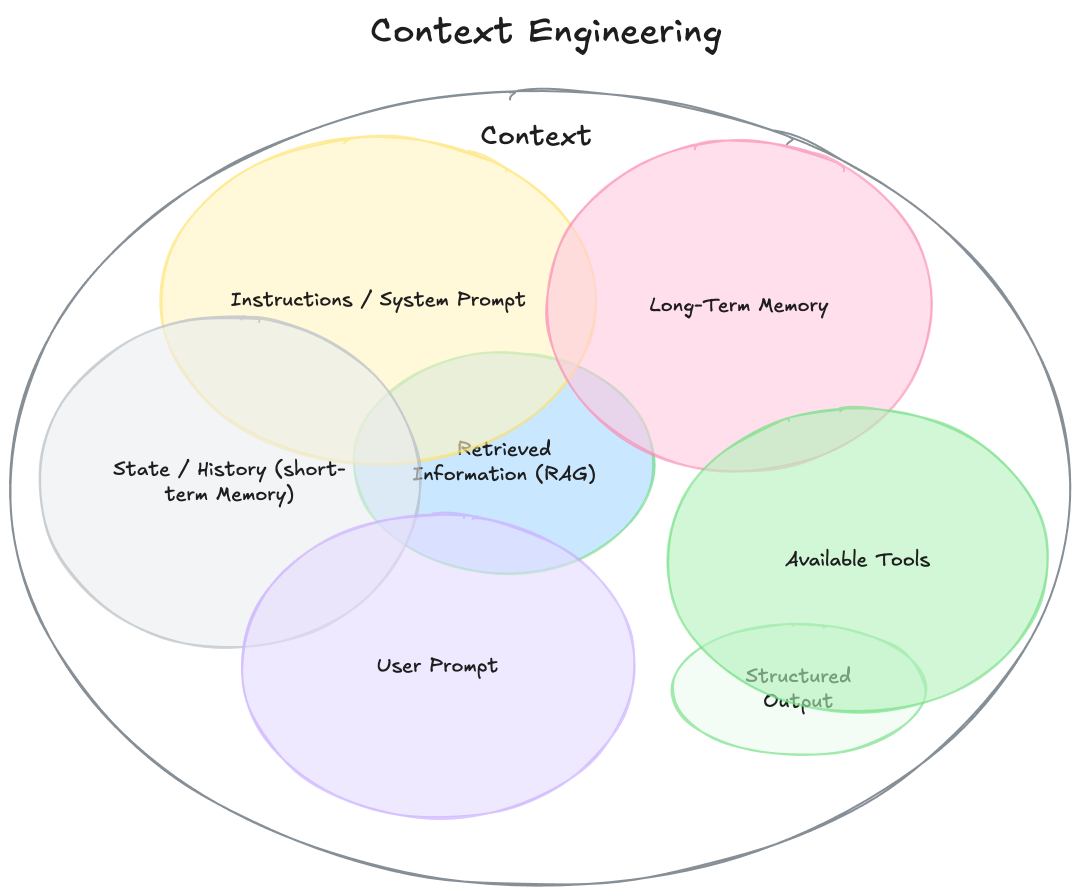
All modules in the diagram can be divided into two categories: “contextual input sources” and “output/tool support”.
| Classification | Module | Function Description |
|---|---|---|
| Contextual input source | Instructions / System Prompt | The model’s “rules/role definitions” determine the model’s behavioral patterns (e.g., “You are a meticulous assistant”). |
| Contextual input source | State / History (Short-term Memory) | Short-term memory: A record of the current conversation’s interactions, ensuring the continuity of the dialogue. |
| Contextual input source | Long-term Memory | Long-term memory: User/task information across sessions (such as user preferences, historical task results). |
| Contextual input source | User Prompt | The user’s current query is the core trigger point of the context. |
| Contextual input source | Retrieved Information (RAG) | Search-enhanced generation: Retrieving relevant information from external knowledge bases (documents, databases). |
| Output/Tool Support | Available Tools | External tools (such as calculators and search engines) that the model can call upon can extend the model’s capabilities. |
| Output/Tool Support | Structured Output | Structured output formats (such as JSON and tables) improve the usability of the results. |
2.4.2 Core Features
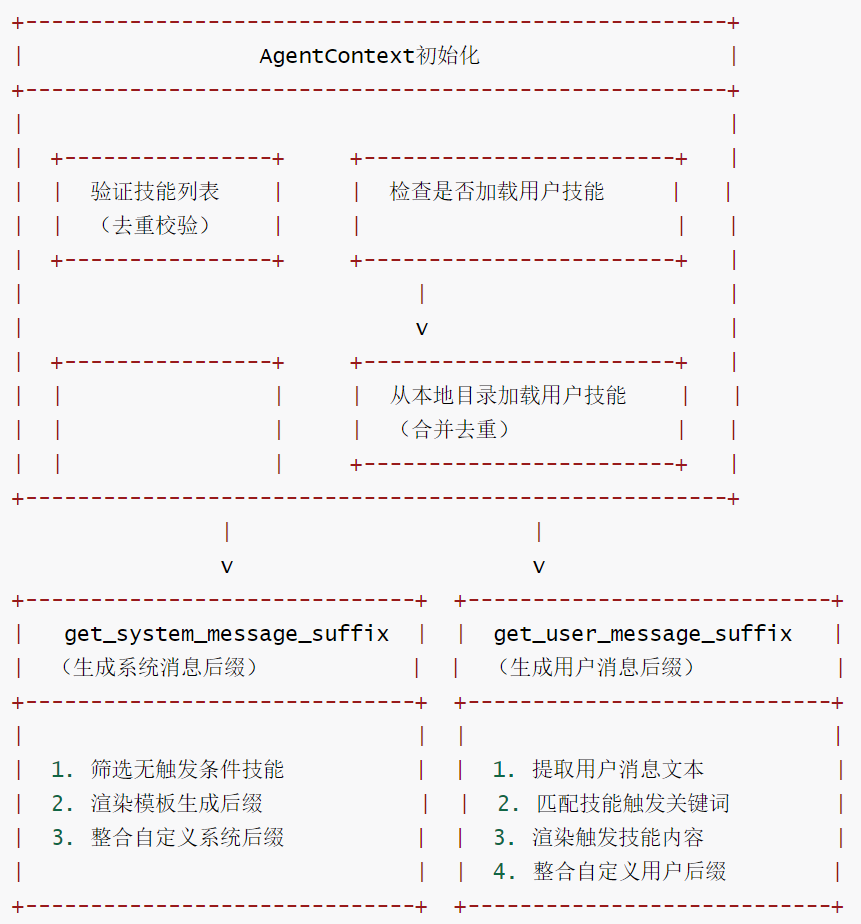
AgentContext is the core structure in the OpenHands framework that manages cue word extensions, responsible for integrating all contextual information that affects system extensions and the interpretation of user cues. It combines static environment details (such as codebase information) with dynamic user-activated extensions (such as skill components), providing a complete cue word context for Large Language Model (LLM) interactions. It is the main container for assembling, formatting, and injecting all cue-related information.
- Multi-dimensional context integration: Unified management of various types of information such as code repository context, runtime environment, dialogue commands, and knowledge skills, avoiding context fragmentation.
- Skill expansion mechanism: Supports dynamic expansion of prompt words through skills (
Skill). Skills can be triggered by user input and automatically inject domain knowledge or guidance information. - Flexible prompt word suffixes: Provides system message suffixes and user message suffixes, and allows for the addition of extra information (such as code repository details, runtime parameters) as needed.
- Automatic loading of user skills: Supports automatic loading of user-defined skills from the local directory, and avoids duplication with explicit skills.
2.4.3 Flowchart
CodeActAgent-1
2.4.4 Code
class AgentContext(BaseModel):
    """管理提示词扩展的核心结构。

    AgentContext 统一了所有影响系统扩展和解释用户提示的上下文输入,
    融合了静态环境细节和来自技能的动态用户激活扩展。

    具体包含:
    - **代码库上下文/代码库技能**:活跃代码库、分支信息及代码库技能提供的特定指令。
    - **运行时上下文**:当前执行环境(主机、工作目录、密钥、日期等)。
    - **对话指令**:约束或指导智能体在会话中行为的任务/渠道特定规则(可选)。
    - **知识技能**:可被用户输入触发的扩展组件,用于注入知识或领域特定指导。

    这些元素共同使 AgentContext 成为负责组装、格式化和注入所有提示相关上下文到
    LLM 交互中的主要容器。
    """  # noqa: E501

    skills: list[Skill] = Field(
        default_factory=list,
        description="List of available skills that can extend the user's input.",
    )
    system_message_suffix: str | None = Field(
        default=None, description="Optional suffix to append to the system prompt."
    )
    user_message_suffix: str | None = Field(
        default=None, description="Optional suffix to append to the user's message."
    )
    load_user_skills: bool = Field(
        default=False,
        description=(
            "Whether to automatically load user skills from ~/.openhands/skills/ "
            "and ~/.openhands/microagents/ (for backward compatibility). "
        ),
    )

    @field_validator("skills")
    @classmethod
    def _validate_skills(cls, v: list[Skill], _info):
        """验证技能列表,确保无重复名称。"""
        if not v:
            return v
        # 检查重复的技能名称
        seen_names = set()
        for skill in v:
            if skill.name in seen_names:
                raise ValueError(f"Duplicate skill name found: {skill.name}")
            seen_names.add(skill.name)
        return v

    @model_validator(mode="after")
    def _load_user_skills(self):
        """若启用,则从用户主目录加载自定义技能。"""
        if not self.load_user_skills:
            return self

        try:
            # 加载用户技能
            user_skills = load_user_skills()
            # 合并用户技能与显式技能,避免重复
            existing_names = {skill.name for skill in self.skills}
            for user_skill in user_skills:
                if user_skill.name not in existing_names:
                    self.skills.append(user_skill)
                else:
                    logger.warning(
                        f"Skipping user skill '{user_skill.name}' "
                        f"(already in explicit skills)"
                    )
        except Exception as e:
            logger.warning(f"Failed to load user skills: {str(e)}")

        return self

    def get_system_message_suffix(self) -> str | None:
        """获取包含代码库技能内容和自定义后缀的系统消息。

        自定义后缀通常包括:
        - 代码库信息(仓库名称、分支名称、PR编号等)
        - 运行时信息(如可用主机、当前日期)
        - 对话指令(如用户偏好、任务详情)
        - 代码库特定指令(从代码库技能收集)
        """
        # 筛选无触发条件的技能(始终激活的代码库技能)
        repo_skills = [s for s in self.skills if s.trigger is None]
        logger.debug(f"Triggered {len(repo_skills)} repository skills: {repo_skills}")
        # 构建工作区上下文信息
        if repo_skills:
            # TODO(test): 添加渲染测试确保功能正常
            formatted_text = render_template(
                prompt_dir=str(PROMPT_DIR),  # 模板目录
                template_name="system_message_suffix.j2",  # 系统消息后缀模板
                repo_skills=repo_skills,  # 代码库技能列表
                system_message_suffix=self.system_message_suffix or "",  # 自定义系统后缀
            ).strip()
            return formatted_text
        # 若无可激活的代码库技能,直接返回自定义系统后缀(非空时)
        elif self.system_message_suffix and self.system_message_suffix.strip():
            return self.system_message_suffix.strip()
        return None

    def get_user_message_suffix(
        self, user_message: Message, skip_skill_names: list[str]
    ) -> tuple[TextContent, list[str]] | None:
        """通过技能召回的知识增强用户消息。

        流程如下:
        - 提取用户消息的文本内容
        - 匹配查询中的技能触发词
        - 若有相关技能被触发,返回格式化的知识和触发的技能名称
        """  # noqa: E501

        user_message_suffix = None
        # 处理自定义用户消息后缀
        if self.user_message_suffix and self.user_message_suffix.strip():
            user_message_suffix = self.user_message_suffix.strip()

        # 提取用户消息中的纯文本内容
        query = "\n".join(
            c.text for c in user_message.content if isinstance(c, TextContent)
        ).strip()
        recalled_knowledge: list[SkillKnowledge] = []

        # 若查询为空,仅返回自定义用户后缀(如有)
        if not query:
            if user_message_suffix:
                return TextContent(text=user_message_suffix), []
            return None

        # 在查询中搜索技能触发词
        for skill in self.skills:
            if not isinstance(skill, Skill):
                continue
            # 匹配技能触发条件
            trigger = skill.match_trigger(query)
            if trigger and skill.name not in skip_skill_names:
                logger.info(
                    "Skill '%s' triggered by keyword '%s'",
                    skill.name,
                    trigger,
                )
                # 收集触发技能的知识
                recalled_knowledge.append(
                    SkillKnowledge(
                        name=skill.name,
                        trigger=trigger,
                        content=skill.content,
                    )
                )

        # 若有触发的技能,渲染知识内容
        if recalled_knowledge:
            formatted_skill_text = render_template(
                prompt_dir=str(PROMPT_DIR),
                template_name="skill_knowledge_info.j2",  # 技能知识模板
                triggered_agents=recalled_knowledge,  # 触发的技能知识列表
            )
            # 合并自定义用户后缀
            if user_message_suffix:
                formatted_skill_text += "\n" + user_message_suffix
            return TextContent(text=formatted_skill_text), [
                k.name for k in recalled_knowledge
            ]

        # 若无触发技能,仅返回自定义用户后缀(如有)
        if user_message_suffix:
            return TextContent(text=user_message_suffix), []
        return None
2.5 Prompt
The prompts for CodeActAgent are loaded from files via PromptManager. Specifically:
- Location of prompt words: The prompt word file is located in the
openhands/agenthub/codeact_agent/prompts/directory, and the main prompt word file is namedcodeact_agent_system_prompt.hbs. - Loading mechanism: Prompt words are managed through the
PromptManagerclass. The default system prompt word filename is determined by theresolved_system_prompt_filenameproperty ofAgentConfig.
2.6 Iterative Modification
CodeActAgent is designed to continuously modify its generated code. The system provides various tools and clear guidelines to support the iterative development process. Agents are encouraged to refine their solutions through multiple iterations, including modification, testing, and code rework, until a satisfactory result is achieved. This design aligns with the principles of the CodeAct paper, which unifies all operations within the code execution space, thereby simplifying and improving agent performance.
The system design explicitly encourages iterative code modifications to CodeActAgent:
- The system prompts provide clear guidelines: “When exploring the codebase, use efficient tools such as the find, grep, and git commands, and use filters where appropriate to minimize unnecessary operations.”
- The tip also emphasizes: “Before implementing any changes, first thoroughly understand the codebase through exploration.”
- “When reproducing bugs or implementing fixes, use a single file instead of creating multiple files with different versions.”
The file system guidelines in the system prompt explicitly support modifying existing code:
- “If you are asked to edit a file, edit the file directly instead of creating a new file with a different filename.”
- For global search and replace operations, consider using sed instead of opening the file editor multiple times.
- Never create multiple versions of the same file.
The problem-solving workflow defined in the system prompts explicitly supports iterative modifications:
- Explore: Thoroughly explore the relevant documents and understand the context.
- Analysis: Consider multiple methods and choose the most promising one.
- Testing: Create tests for bug fixes to validate the issue before implementing the fix.
- Implementation: Make targeted, minimal changes to resolve the issue.
- Verification: If the environment is set to run tests, thoroughly test the implementation, including edge cases.
CodeActAgent offers a variety of tools to support iterative code modifications:
- The file editing tools (
create_str_replace_editor_toolandLLMBasedFileEditTool) allow it to modify existing files. - The Bash command execution tool allows it to run tests, compile code, install dependencies, etc.
- The IPython execution tool allows it to test code snippets.
0x03 Workflow
Next, let’s take a look at the workflow of CodeActAgent.
3.1 Decision-making process
The step method is a decision-making process that returns various Actions:
- CmdRunAction(command) - The bash command to run.
- IPythonRunCellAction(code) - The IPython code to run.
- AgentDelegateAction(agent, inputs) - Delegation operations for (sub)tasks.
- MessageAction(content) - The message action to run (e.g., requesting clarification).
- AgentFinishAction() - End interaction.
- CondensationAction(…) - Compresses the conversation history by forgetting specified events and optionally providing a summary.
- FileReadAction(path, …) - Reads the contents of a file from the specified path.
- FileEditAction(path, …) - Edits the file using either an LLM-based (deprecated) or ACI-based editing method.
- AgentThinkAction(thought) - Records the agent’s thinking/reasoning process.
- CondensationRequestAction() - Requests compression of the conversation history.
- BrowseInteractiveAction(browser_actions) - Interact with the browser using the specified actions.
- MCPAction(name, arguments) - Interacting with MCP server tools.
The specific code is as follows:
    def step(self, state: State) -> 'Action':
        """使用CodeAct Agent执行一步操作。

        包括收集先前步骤的信息,并提示模型生成要执行的命令。

        参数:
        - state (State): 用于获取更新的信息
        """
        # 处理待处理操作(如果有)
        if self.pending_actions:
            # 返回并移除队列中的第一个待处理操作
            return self.pending_actions.popleft()

        # 如果任务已完成,退出
        # 获取最新的用户消息
        latest_user_message = state.get_last_user_message()
        # 若用户输入"/exit",则返回结束操作
        if latest_user_message and latest_user_message.content.strip() == '/exit':
            return AgentFinishAction()

        # 压缩状态中的事件。如果获得视图,将其传递给对话管理器处理;
        # 如果获得压缩事件,则返回该事件而非操作。控制器将立即要求代理使用新视图再次执行步骤
        condensed_history: list[Event] = []
        # 匹配压缩器返回的结果类型
        match self.condenser.condensed_history(state):
            # 若为View类型,提取事件列表作为压缩历史
            case View(events=events):
                condensed_history = events
            # 若为Condensation类型,返回其包含的压缩操作
            case Condensation(action=condensation_action):
                return condensation_action

        # 打印调试日志:显示处理的压缩事件数量和总事件数量
        logger.debug(
            f'从共{len(state.history)}个事件中处理{len(condensed_history)}个压缩事件'
        )

        # 获取初始用户消息(从状态历史中)
        initial_user_message = self._get_initial_user_message(state.history)
        # 构建用于LLM的消息列表(基于压缩历史和初始用户消息)
        messages = self._get_messages(condensed_history, initial_user_message)
        # 构建LLM调用参数
        params: dict = {
            'messages': messages,  # 消息列表
        }
        # 检查并添加可用工具(根据LLM配置过滤)
        params['tools'] = check_tools(self.tools, self.llm.config)
        # 添加额外元数据(从状态中提取,适配LLM格式)
        params['extra_body'] = {
            'metadata': state.to_llm_metadata(
                model_name=self.llm.config.model, agent_name=self.name
            )
        }
        # 调用LLM获取响应
        response = self.llm.completion(** params)
        # 打印调试日志:显示LLM返回的响应
        logger.debug(f'LLM返回的响应: {response}')
        # 将LLM响应转换为具体操作列表
        actions = self.response_to_actions(response)
        # 打印调试日志:显示转换后的操作
        logger.debug(f'response_to_actions转换后的操作: {actions}')
        # 将所有操作添加到待处理队列
        for action in actions:
            self.pending_actions.append(action)
        # 返回并移除队列中的第一个操作
        return self.pending_actions.popleft()
3.2 Message Processing
The _get_messages method is responsible for processing messages. This method performs the following steps:
- Check if
SystemMessageActionis present in the event; add it if it is missing (for backward compatibility). - Events (actions and observations) are processed as messages, including
SystemMessageAction. - Handling tool calls and their responses in function call mode.
- Manage message role switching (
user/assistant/tool). - Apply caching to specific LLM providers (such as Anthropic).
- Add environment reminders in non-function call mode.
    def _get_messages(
        self, events: list[Event], initial_user_message: MessageAction
    ) -> list[Message]:
        """为LLM对话构建消息历史。

        该方法通过处理状态中的事件并将其格式化为LLM可理解的消息,构建结构化的对话历史。
        它处理常规消息流和函数调用场景。

        参数:
            events: 要转换为消息的事件列表

        返回:
            list[Message]: 格式化的消息列表,可直接供LLM使用,包括:
                - 带提示的系统消息(来自SystemMessageAction)
                - 操作消息(来自用户和助手)
                - 观察消息(包括工具响应)
                - 环境提醒(在非函数调用模式下)

        注意:
            - 在函数调用模式下,工具调用及其响应会被仔细跟踪以维持正确的对话流程
            - 同一角色的消息会被合并,以避免连续出现相同角色的消息
            - 对于Anthropic模型,会根据其文档对特定消息进行缓存
        """
        # 若未实例化提示管理器,抛出异常
        if not self.prompt_manager:
            raise Exception('提示管理器未实例化。')

        # 使用对话内存处理事件(包括SystemMessageAction)
        messages = self.conversation_memory.process_events(
            condensed_history=events,  # 压缩后的事件历史
            initial_user_action=initial_user_message,  # 初始用户消息
            max_message_chars=self.llm.config.max_message_chars,  # 消息最大字符数限制
            vision_is_active=self.llm.vision_is_active(),  # 是否启用视觉功能
        )

        # 若LLM启用了提示缓存,应用缓存机制
        if self.llm.is_caching_prompt_active():
            self.conversation_memory.apply_prompt_caching(messages)

        # 返回构建的消息列表
        return messages
3.3 Historical Condensation
In the step function, the dialogue history is compressed using a Condenser to avoid excessively long contexts.
        # Condense the events from the state. If we get a view we'll pass those
        # to the conversation manager for processing, but if we get a condensation
        # event we'll just return that instead of an action. The controller will
        # immediately ask the agent to step again with the new view.
        condensed_history: list[Event] = []
        match self.condenser.condensed_history(state):
            case View(events=events):
                condensed_history = events

            case Condensation(action=condensation_action):
                return condensation_action
3.4 Memory Management
The member variable conversation_memory manages session memory.
self.conversation_memory = ConversationMemory(self.config, self.prompt_manager)
See the specific code:
    def _get_messages(
        self, events: list[Event], initial_user_message: MessageAction
    ) -> list[Message]:
        # Use ConversationMemory to process events (including SystemMessageAction)
        messages = self.conversation_memory.process_events(
            condensed_history=events,
            initial_user_action=initial_user_message,
            max_message_chars=self.llm.config.max_message_chars,
            vision_is_active=self.llm.vision_is_active(),
        )

        if self.llm.is_caching_prompt_active():
            self.conversation_memory.apply_prompt_caching(messages)

        return messages
0xFF Reference
https://docs.all-hands.dev/openhands/usage/architecture/backend
As AI agents evolve from “toys” to “tools,” what should we focus on? Openhands Architecture Analysis [Part 2: Core Concepts Related to Agents] by Kerry
As AI agents evolve from “toys” to “tools,” what should we focus on? Openhands Architecture Analysis [Part 1: Series Introduction] by Kerry
Coding Agent Openhands Analysis (with code) Arrow
OpenHands Source Code Analysis by Yi Lihui
SWE-agent Explained: Creating a Programming Interface for Large Models and Computers (mannaandpoem)
https://swe-agent.com/paper.pdf
OpenDevin mannaandpoem
In-depth analysis of Claude’s agent architecture: the three-dimensional collaboration of MCP + PTC, Skills, and Subagents.
This is a 40-page context engineering ebook.
The next paradigm for human-language agent interaction: an agreement from attention to memory.