AI Agents · AI Agent Frameworks
OpenHands Conversation Lifecycle
OpenHands interaction and session internals: ConversationManager, WebSession, AgentSession, and oh_user_action flow.
0x00 Overview
Meaningful multi-turn dialogues require agents to understand context. Like humans, agents need to remember the history of the conversation: what has been said and done, in order to maintain coherence and avoid repetition.
Below is a sample diagram of OpenHands Applications. This article will show you how the session and interaction work.
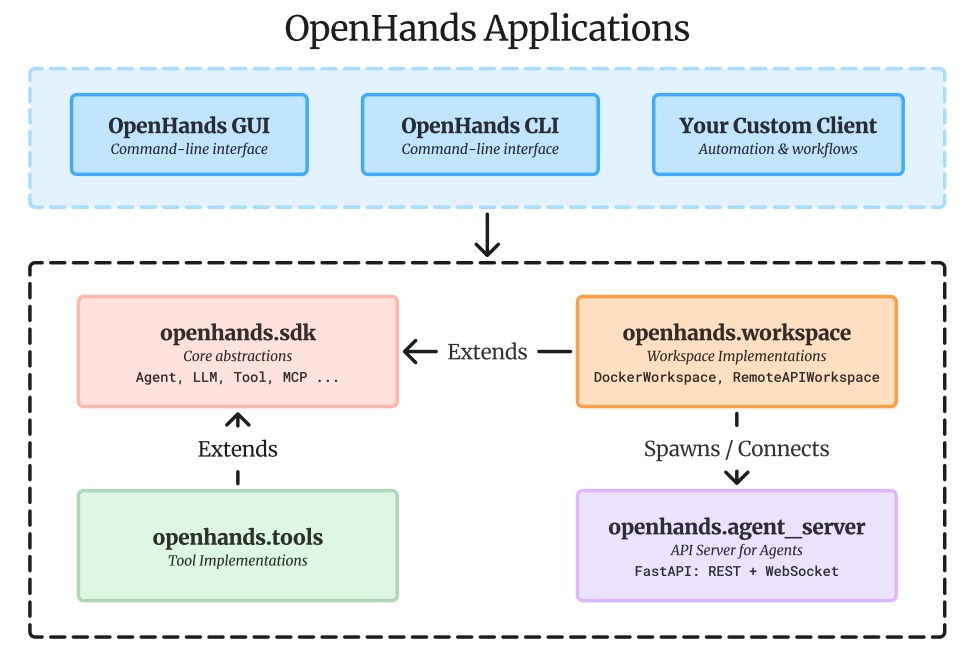
Because this series draws on a large number of articles, there may be some articles missing from the references. If so, please point them out.
0x01 Background
This section provides background information based on Google ADK.
1.1 The significance of the conversation
Just as you don’t start from scratch every time you send a text message, intelligent agents also need to understand the context of the current interaction. Common agent systems provide structured context management through methods such as Session, State, and Memory.
SessionThe current dialogue thread (different dialogue instances between you and the agent can be considered as independent dialogue threads, which may utilize long-term knowledge).- This refers to a single, continuous interaction between the user and your intelligent agent system.
- It contains the temporal sequence of messages and actions (called
Events) taken by the agent during that particular interaction. - It can also save temporary data that is only relevant during this conversation (
State).
StateData in the current conversation.- Data stored within a specific
Sessioncontext. - Used to manage information that is only relevant to the current (single) active conversation thread (e.g., items in the shopping cart in this conversation, user preferences mentioned in this session).
- Focus on how to efficiently read, write, and manage session-specific data.
- Data stored within a specific
MemoryRetrievable cross-session information.- This indicates information storage that may span multiple past sessions or include external data sources.
- As a knowledge base, it allows agents to retrieve information or context beyond the current conversation.
Therefore, an agent system typically has the following two sets of components or services:
SessionServiceManages different conversation threads (Sessionobjects) and is responsible for lifecycle management: creating, retrieving, updating (appendingEvents, modifyingState), and deleting individual objectsSession.MemoryServiceManage long-term knowledge storage (LTS Memory), responsible for importing information (usually from completed knowledgeSession) into long-term storage. Provide methods for retrieving stored knowledge based on queries.
This article introduces the dialog service; the memory service will be introduced later.
1.2 Common Functions of a Session System
Users typically do not create or manage Session objects directly, but rather through a SessionService third party. This service acts as a central manager for the session lifecycle. Its core responsibilities include:
- Start a new conversation: Create a new
Sessionobject when the user begins to interact. - Resume an existing conversation: Retrieve a specific one by ID
Session, allowing the agent to continue from where it left off. - Save progress: Appends new interactions (
Eventobjects) to the session history. This is alsostatethe mechanism for session updates (seeStatethe section for details). - List conversations: Find active session threads for specific users and applications.
- Clean up: Delete the chat and its related data when the conversation ends or is no longer needed
Session.
Choosing the right approach SessionService is key to determining how to store and persist the dialogue history and temporary data of an agent.
1.3 Common Session Content
Generally, when a user begins interacting with an agent, an object SessionService is created. This object serves as a container for all content related to a single conversation thread. Its main properties are as follows: Session.
- Identification information (
id,appName,userId): The core fields used to uniquely identify a conversation are explained in detail below:
idThis is a unique identifier for the current conversation thread and is crucial for subsequent retrieval of this conversation. OneSessionServiceobject can manage multipleSession(session) instances; this field specifies the concrete session object corresponding to the current operation. Example value:"test_id_modification".app_name: Identifies the agent application to which the current dialogue belongs. Example value:"id_modifier_workflow".userId: Association fields that link conversations to specific users, used for user-level conversation management and access control.
-
Dialogue History (
events): The interaction sequence is arranged in chronological order and contains all interactive behaviors that occur in the current dialogue thread (Eventstored in the form of objects), covering a full range of interaction records such as user messages, agent responses, and tool invocation actions. -
Session state (
state): It is used to store temporary data that is only relevant to the currently active dialogue, essentially acting as a “temporary draft” for the agent during the interaction process. The next section will detailstateits specific usage and management methods. -
Activity tracking (
lastUpdateTime): The timestamp field records the time of the last interaction event in the current conversation thread, and is used for session activity assessment and expiration management.
1.4 Session Lifecycle
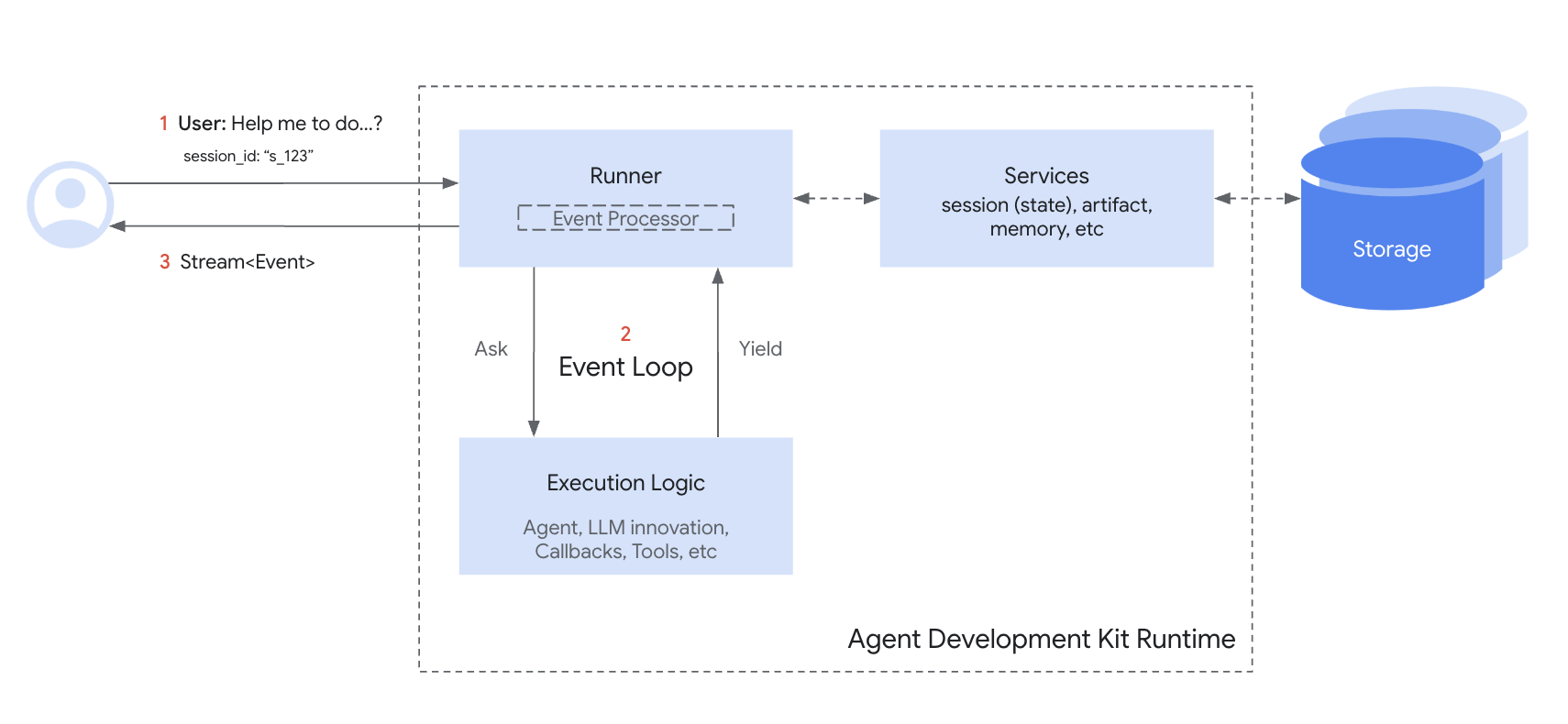
Here is a simplified workflow for collaborating Session with SessionService [the other person/entity] in a single conversation round:
- Start or Resume: Your application needs to use
SessionServiceeithercreate_session(for a new chat) or use an existing session ID. - Provide context:
RunnerObtain the appropriateSessionobject from the appropriate service method to provide the agent with access permissions to the corresponding Sessionstateand its propertiesevents. - Agent processing: The user provides query suggestions to the agent. The agent analyzes the query, along with possible session
stateandeventshistory data, to determine the response. - Response and State Update: The agent generates a response (and may mark
statedata to be updated in the system).RunnerThis is then packaged into anEvent. - Save Interaction:
RunnerCall this functionsessionService.append_event(session, event), taking the eventsessionand the new eventeventas parameters. The service willEventadd the event to the history and update the session in storage based on the information in the eventstate. The session’s statuslast_update_timewill also be updated. - Prepare for the next round: The agent’s response is sent to the user. The updated response is
SessionnowSessionServicestored, ready for the next round (this typically continues the conversation within the current session, restarting the loop from step 1). - End conversation: When the conversation ends, your application calls
clear()sessionService.delete_session(...)to clean up the stored session data (if it is no longer needed).
This loop highlights SessionService how to ensure the continuity of the conversation by managing Session the history and state of each object.
1.5 Previous Review
Let’s first review the OpenHands project’s server-side components related to dialogue, which were introduced earlier.
session.pyThe file definesSessiona class that represents a WebSocket session with the client.agent_session.pyThe file containsAgentSessiona class that manages the lifecycle of the Agent within a session.conversation_manager.pyThe file definesConversationManagera class that is responsible for managing multiple client sessions.listen.pyThis file is the main server file; it sets up the FastAPI application and defines various API endpoints. A crucial step here is establishing a connection with theConversationManager.
The steps above demonstrate how server components construct a session, so let’s move on from there.
0x02 OpenHands Session System
A session is an object specifically designed to track and manage individual conversation threads. Think of a session as a temporary workspace for the AI agent, much like a desk you prepare for a specific project. It contains all the necessary tools, notes, and references for the current conversation—everything is instantly accessible, but also temporary and task-specific.
Specifically, in OpenHands:
WebSessionIt is a session wrapper bound to a web server, responsible for managing individual web client connections and coordinating the AgentSession lifecycle. It is the core bridge connecting the front-end user interface and the back-end Agent execution in the OpenHands system, responsible for coordinating the entire interaction process.AgentSessionIt is the “context container” for Agent execution in the OpenHands framework. Its core function is to encapsulate all the components required for Agent execution (Agent, controller, runtime, memory, event stream), uniformly manage their lifecycle (initialization, startup, communication, shutdown), and provide session-level configuration isolation, data persistence, and state management. It is the foundation for Agent to execute tasks independently and stably.
2.1 ConversationManager Interface
The ConversationManager class defines the interface for conversation management, applicable to both standalone and cluster modes. It handles the entire lifecycle of a conversation,
including creation, attachment, detachment, and cleanup. This is an extension point of OpenHands; applications built upon it can modify their behavior through server configuration without altering their core code. Applications can provide custom implementations in the following ways:
- Create a class that inherits from
ConversationManager. - Implement all necessary abstract methods.
- Set
server_config.conversation_manager_classto the fully qualified name of the implementation class.
The ConversationManager is defined as follows.
class ConversationManager(ABC):
    """OpenHands中对话管理的抽象基类。
    应用程序可能需要在以下场景中自定义实现:
    - 具有分布式对话状态的集群部署
    - 自定义持久化或缓存策略
    - 与外部对话管理系统集成
    - 增强的监控或日志能力
    实现类通过openhands.server.shared.py中的get_impl()方法实例化。
    """

    sio: socketio.AsyncServer  # Socket.IO异步服务器实例,用于实时通信
    config: OpenHandsConfig    # OpenHands配置对象,存储系统参数
    file_store: FileStore      # 文件存储实例,用于管理对话相关文件
    conversation_store: ConversationStore  # 对话存储实例,用于持久化对话数据
2.1.1 StandaloneConversationManager
StandaloneConversationManager is a subclass of ConversationManager. It is the default implementation and is suitable for single-server deployment scenarios.
@dataclass
class StandaloneConversationManager(ConversationManager):
    """Default implementation of ConversationManager for single-server deployments.

    See ConversationManager for extensibility details.
    """

    sio: socketio.AsyncServer
    config: OpenHandsConfig
    file_store: FileStore
    server_config: ServerConfig
    # Defaulting monitoring_listener for temp backward compatibility.
    monitoring_listener: MonitoringListener = MonitoringListener()
    _local_agent_loops_by_sid: dict[str, Session] = field(default_factory=dict)
    _local_connection_id_to_session_id: dict[str, str] = field(default_factory=dict)
    _active_conversations: dict[str, tuple[ServerConversation, int]] = field(
        default_factory=dict
    )
    _detached_conversations: dict[str, tuple[ServerConversation, float]] = field(
        default_factory=dict
    )
    _conversations_lock: asyncio.Lock = field(default_factory=asyncio.Lock)
    _cleanup_task: asyncio.Task | None = None
    _conversation_store_class: type[ConversationStore] | None = None
    _loop: asyncio.AbstractEventLoop | None = None
2.1.2 Session Initialization
The flowchart for Session initialization is as follows.
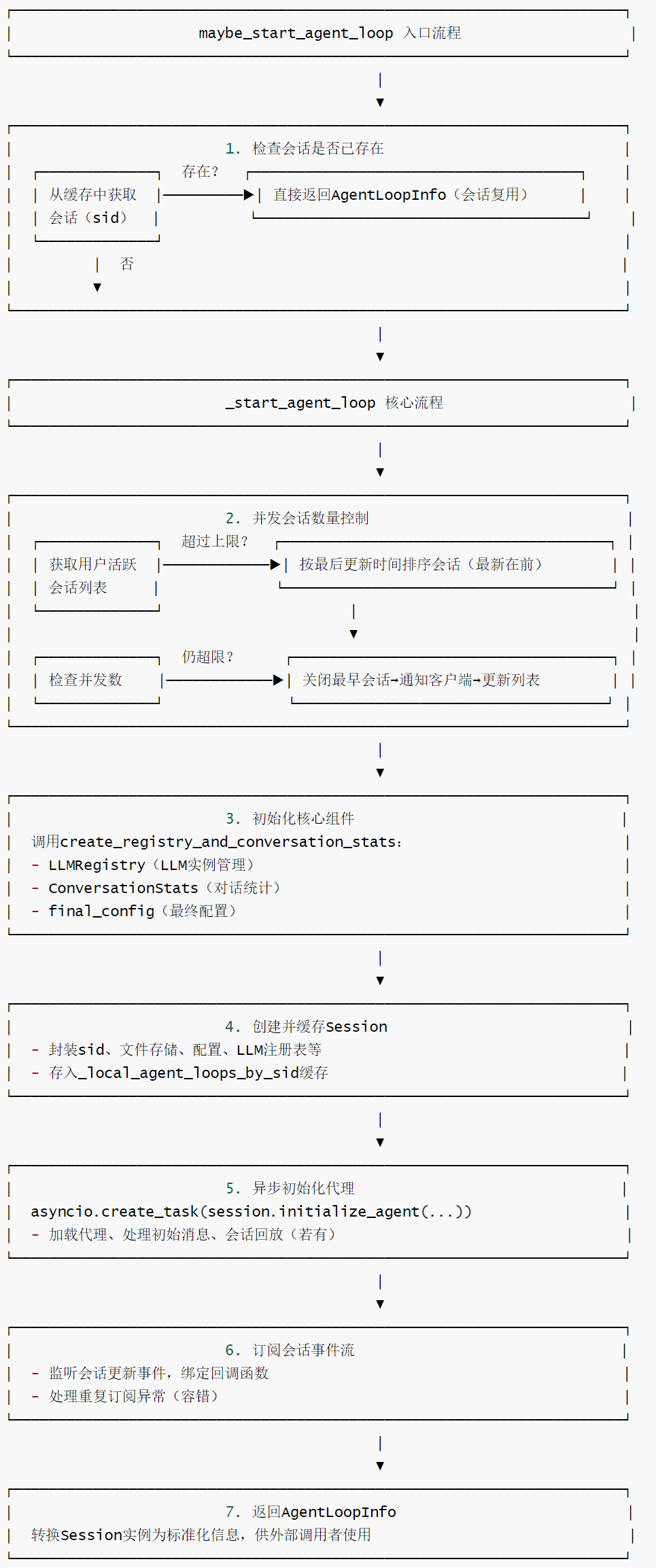
The join_conversation function of StandaloneConversationManager calls maybe_start_agent_loop to initialize the Agent. Note that the Session here is a WebSession.
    from openhands.server.session.session import WebSession as Session

    async def join_conversation(
        self,
        sid: str,
        connection_id: str,
        settings: Settings,
        user_id: str | None,
    ) -> AgentLoopInfo:
        await self.sio.enter_room(connection_id, ROOM_KEY.format(sid=sid))
        self._local_connection_id_to_session_id[connection_id] = sid
        # 此处调用 maybe_start_agent_loop
        agent_loop_info = await self.maybe_start_agent_loop(sid, settings, user_id)
        return agent_loop_info
maybe_start_agent_loop calls _start_agent_loop to initialize the Session.
class ConversationManager:
    def __init__(self, config: OpenHandsConfig, sio: Any, file_store: Any):
        self.config = config  # 框架全局配置
        self.sio = sio  # SocketIO实例(用于客户端通信)
        self.file_store = file_store  # 文件存储实例(用于会话数据持久化)
        self._local_agent_loops_by_sid: Dict[str, Session] = {}  # 会话ID到Session实例的映射(缓存活跃会话)
        self._loop = asyncio.get_event_loop()  # 事件循环实例

    async def maybe_start_agent_loop(
        self,
        sid: str,  # 会话ID(唯一标识一个对话)
        settings: Settings,  # 用户/会话设置(含Agent类型、LLM配置等)
        user_id: Optional[str] = None,  # 用户ID(可选,用于用户级并发控制)
        initial_user_msg: Optional[MessageAction] = None,  # 初始用户消息(可选,会话启动时的第一条消息)
        replay_json: Optional[str] = None,  # 回放JSON字符串(可选,用于会话回放场景)
    ) -> AgentLoopInfo:
        """
        尝试启动Agent循环:优先复用已存在的会话,不存在则新建。

        核心逻辑:
        - 检查会话ID对应的会话是否已存在(缓存于_local_agent_loops_by_sid)
        - 存在则直接返回会话信息,不存在则调用_start_agent_loop新建会话
        - 返回标准化的Agent循环信息(供外部调用者使用)
        """
        # 从缓存中获取会话(复用已有会话,避免重复初始化)
        session = self._local_agent_loops_by_sid.get(sid)
        if not session:
            # 会话不存在,新建Agent循环
            session = await self._start_agent_loop(
                sid, settings, user_id, initial_user_msg, replay_json
            )

        # 将Session实例转换为标准化的AgentLoopInfo返回
        return self._agent_loop_info_from_session(session)
The _start_agent_loop code is the core of the Agent Loop in the OpenHands framework , responsible for session creation, reuse, concurrency control, and initialization. It serves as the crucial hub connecting user requests and Agent execution. Its core mission is to provide complete component initialization (LLM registry, statistics, event subscription) for user sessions while adhering to concurrency limits, ensuring that Agents can start and run smoothly.
The core features of _start_agent_loop are as follows:
- Session reuse mechanism: By
_local_agent_loops_by_sidcaching active sessions, repeated initialization is avoided, improving response speed and resource utilization (e.g., when a user reconnects to the same session, it is directly reused). - Intelligent concurrency control: Limits the maximum number of concurrent sessions based on user ID. If the limit is exceeded, the oldest session is automatically closed, and a friendly notification is sent to the client, balancing resource consumption and user experience.
- Component-based initialization: Integrates
create_registry_and_conversation_statsfunctions to complete the initialization of the three core components of LLM registry, dialogue statistics, and configuration adaptation with one click, resulting in a clear and decoupled architecture. - Asynchronous non-blocking design: Agent initialization is executed
session.initialize_agentasynchronouslyasyncio.create_task, which does not block the session creation process and improves system throughput. - Event-driven extensions: Automatically subscribe to session event streams, respond to session updates via callback functions, support subsequent extensions such as monitoring and statistics, and have good scalability.
- Fault tolerance and compatibility: Handles duplicate subscription exceptions to avoid errors; supports session replay (
replay_json) and initial message (initial_user_msg), adapting to various scenarios such as normal conversation and replay.
The code for _start_agent_loop is as follows.
    async def _start_agent_loop(
        self,
        sid: str,
        settings: Settings,
        user_id: Optional[str] = None,
        initial_user_msg: Optional[MessageAction] = None,
        replay_json: Optional[str] = None,
    ) -> Session:
        """
        内部方法:实际创建并启动Agent循环,包含并发控制、会话初始化、事件订阅等核心流程。
        """
        # 1. 并发会话数量控制:检查用户当前活跃会话数是否超过上限
        # 获取用户当前运行中的所有会话ID
        running_session_ids = await self.get_running_agent_loops(user_id)
        # 若超过最大并发数,关闭最早的会话以释放资源
        if len(running_session_ids) >= self.config.max_concurrent_conversations:

            # 获取用户的会话存储实例,读取所有活跃会话的元数据
            conversation_store = await self._get_conversation_store(user_id)
            conversations = await conversation_store.get_all_metadata(running_session_ids)
            # 按最后更新时间排序(最新的在前, oldest的在后)
            conversations.sort(key=_last_updated_at_key, reverse=True)

            # 循环关闭最早的会话,直到并发数符合限制
            while len(conversations) >= self.config.max_concurrent_conversations:
                oldest_conversation = conversations.pop()  # 取出最早的会话
                oldest_sid = oldest_conversation.conversation_id

                # 向客户端发送错误通知(告知会话已关闭)
                status_update = {
                    'status_update': True,
                    'type': 'error',
                    'id': 'AGENT_ERROR$TOO_MANY_CONVERSATIONS',
                    'message': '同时开启的会话数已达上限。若仍需使用该会话,可发送消息重新激活Agent',
                }
                # 在事件循环中发送SocketIO事件(定向到该会话的房间)
                await run_in_loop(
                    self.sio.emit(
                        'oh_event',
                        status_update,
                        to=ROOM_KEY.format(sid=oldest_sid),  # 按会话ID定向发送
                    ),
                    self._loop,
                )

                # 关闭最早的会话(释放资源)
                await self.close_session(oldest_sid)

        # 2. 初始化核心组件:LLM注册表、对话统计、最终配置
        llm_registry, conversation_stats, final_config = (
            create_registry_and_conversation_stats(self.config, sid, user_id, settings)
        )

        # 3. 创建Session实例(封装会话的所有状态和组件)
        session = Session(
            sid=sid,
            file_store=self.file_store,  # 绑定文件存储
            config=final_config,  # 绑定最终配置
            llm_registry=llm_registry,  # 绑定LLM注册表
            conversation_stats=conversation_stats,  # 绑定对话统计
            sio=self.sio,  # 绑定SocketIO实例
            user_id=user_id,  # 绑定用户ID
        )

        # 4. 将新会话缓存到本地(供后续复用)
        self._local_agent_loops_by_sid[sid] = session

        # 5. 异步初始化Agent(不阻塞当前流程):加载Agent、处理初始消息、回放会话(若有)
        asyncio.create_task(
            session.initialize_agent(settings, initial_user_msg, replay_json)
        )

        # 6. 订阅会话事件流:监听会话更新事件(仅新建会话时订阅,复用会话跳过)
        try:
            session.agent_session.event_stream.subscribe(
                subscriber=EventStreamSubscriber.SERVER,  # 订阅者类型:服务器
                callback=self._create_conversation_update_callback(
                    user_id, sid, settings, llm_registry  # 会话更新回调函数
                ),
                callback_id=UPDATED_AT_CALLBACK_ID,  # 回调ID(用于后续取消订阅)
            )
        except ValueError:
            # 若已存在相同ID的订阅,忽略该操作(避免重复订阅)

        # 返回创建好的Session实例
        return session
2.2 session.py (WebSession)
The session.py file defines the WebSession class, which is the core component in the OpenHands system for managing web client sessions.
2.2.1 Overview of the WebSession Class
WebSession is a web server-bound session wrapper responsible for managing individual web client connections and coordinating the AgentSession lifecycle. The key design pattern of WebSession is:
- Asynchronous queue mode: Uses
asyncio.Queueto manage event publishing, ensuring non-blocking operations. - Event-driven architecture: Achieving component decoupling through event subscription/publishing mechanisms.
- State management mode: Track session state and connection state.
- Error handling mechanism: comprehensive exception handling and error reporting.
WebSession is the core bridge connecting the front-end user interface and the back-end agent execution in the OpenHands system, and is responsible for coordinating the entire interaction process.
2.2.2 WebSession Core Attributes
The core properties of WebSession are:
- SID: A stable session ID that remains consistent across transports.
- sio: Socket.IO server, used to send events to web clients.
- agent_session: The core agent session, coordinating runtime and LLM.
- config: Valid OpenHands configuration.
- llm_registry: The registry responsible for LLM access and retry hooks.
- file_store: The file storage interface for a session.
- user_id: Optional multi-tenant user identifier.
WebSession subscribes to EventStreamSubscriber.SERVER.
class WebSession:
    """Web server-bound session wrapper.

    This was previously named `Session`. We keep `Session` as a compatibility alias
    (see openhands.server.session.__init__) so downstream imports/tests continue to
    work. The class manages a single web client connection and orchestrates the
    AgentSession lifecycle for that conversation.
    """

    sid: str
    sio: socketio.AsyncServer | None
    last_active_ts: int = 0
    is_alive: bool = True
    agent_session: AgentSession
    loop: asyncio.AbstractEventLoop
    config: OpenHandsConfig
    llm_registry: LLMRegistry
    file_store: FileStore
    user_id: str | None
    logger: LoggerAdapter
2.2.3 Main Functional Modules
The main functional modules of WebSession are:
- Initialization and configuration management
- The init method sets up the basic configuration and components for the session.
- Subscribing to SERVER events of EventStream.
- Initialize the asynchronous event publishing queue.
- Agent initialization (
initialize_agent). - Configure Agent, LLM and runtime environment.
- Handling MCP (Model Context Protocol) configuration.
- Configure the condenser.
- Start AgentSession.
- Error handling and validation.
- Event handling (
on_eventand_on_event)- Handling events from the Agent.
- Filtering NullAction and NullObservation.
- The decision to handle and forward the event depends on its source.
- Send environmental feedback as an Agent event to the UI.
- Message dispatch
- Handling events from users.
- Verify image support.
- Add the event to the event stream.
- Asynchronous message sending (
send,_monitor_publish_queue,_send)- Use a queue mechanism to send messages asynchronously.
- Ensure the WebSocket connection is stable before sending.
- Handling connection status and errors.
- State Management
- The close method cleans up session resources.
queue_status_messageand_send_status_messagehandle status update messages.
2.2.4 Relationship with other system components
The relationship between WebSession and other system components is as follows:
- Integration with EventStream
- Receive events as a SERVER subscriber.
- Processing event streams from Agent and user.
- Collaborating with AgentSession:
- Managing the AgentSession lifecycle.
- Forwarding user events to the Agent.
- Send the Agent response to the client.
- Integration with Socket.IO:
- Sending real-time events to the client using Socket.IO.
- Managing WebSocket connection state.
2.2.5 Initialize AgentSession
The initialization of WebSession is completed in AgentSession the initialization of the event stream, and the initialization AgentSession of the event stream is also done in the initialization of the event stream EventStream. Therefore, the entire session EventStream is created here. The event stream is subscribed to here EventStreamSubscriber.SERVER, and the event callback function sends the events that need to be broadcast to the front end via socket.
class WebSession:
    def __init__(
        self,
        sid: str,
        config: OpenHandsConfig,
        llm_registry: LLMRegistry,
        conversation_stats: ConversationStats,
        file_store: FileStore,
        sio: socketio.AsyncServer | None,
        user_id: str | None = None,
    ):
        self.sid = sid
        self.sio = sio
        self.last_active_ts = int(time.time())
        self.file_store = file_store
        self.logger = OpenHandsLoggerAdapter(extra={'session_id': sid})
        self.llm_registry = llm_registry
        self.conversation_stats = conversation_stats
        self.agent_session = AgentSession(
            sid,
            file_store,
            llm_registry=self.llm_registry,
            conversation_stats=conversation_stats,
            status_callback=self.queue_status_message,
            user_id=user_id,
        )
        self.agent_session.event_stream.subscribe(
            EventStreamSubscriber.SERVER, self.on_event, self.sid
        )
        self.config = config

        # Lazy import to avoid ircular dependency
        from openhands.experiments.experiment_manager import ExperimentManagerImpl

        self.config = ExperimentManagerImpl.run_config_variant_test(
            user_id, sid, self.config
        )
        self.loop = asyncio.get_event_loop()
        self.user_id = user_id

        self._publish_queue: asyncio.Queue = asyncio.Queue()
        self._monitor_publish_queue_task: asyncio.Task = self.loop.create_task(
            self._monitor_publish_queue()
        )
        self._wait_websocket_initial_complete: bool = True
agent_session.start() The initialization of security_analyzer, runtime, memory, and controller was completed in the middle.
2.3 agent_session
2.3.1 AgentSession
AgentSession It is the “context container” for Agent execution in the OpenHands framework. Its core function is to encapsulate all the components required for Agent execution (Agent, controller, runtime, memory, event stream), uniformly manage their lifecycle (initialization, startup, communication, shutdown), and provide session-level configuration isolation, data persistence, and state management. It is the foundation for Agent to execute tasks independently and stably.
The core features of AgentSession are as follows:
- Full component lifecycle management: Centralized initialization and association of core components such as Agent, Controller, Runtime, Memory, and Event Stream, ensuring smooth communication between components and consistent lifecycles (synchronization during startup/shutdown).
- Flexible environment configuration: Supports Git repository integration, custom key injection, MCP tool extension, etc., adapting to complex scenarios such as code development and third-party service calls, and meeting diverse task requirements.
- Session state security management: Strictly verify session state (avoid duplicate startups and failure to start a closed session), and ensure process security and reduce anomalies through state flags (
_starting/_closed). - Supports session replay and state recovery: Provides
_run_replayan interface to support the recovery of historical sessions from JSON data, which is convenient for debugging, task resumption, and scenario reproduction. - Fine-grained logging and monitoring: Integrates a logger with session context to record metadata such as startup time, success status, and state recovery, facilitating troubleshooting and system monitoring.
- Security and Isolation Design: Securely manage third-party keys through a custom key processor (
UserSecrets), isolate code execution in the runtime environment, and avoid leakage of sensitive information and system risks. - State-driven event mechanism: At startup, the Agent state is automatically set (running/waiting for user input) based on whether there is an initial message, and the state is synchronized through event stream to ensure state consistency between components. AgentSession is defined as follows:
class AgentSession:
    """
        Agent会话类:封装Agent运行的完整上下文,管理Agent、控制器、运行时、内存等核心组件的生命周期。
        属性说明:
        controller: Agent控制器实例(负责调度Agent执行流程)
        sid: 会话唯一标识
        user_id: 用户ID(可选)
        event_stream: 事件流(组件间通信核心)
        llm_registry: LLM注册表(管理LLM实例)
        file_store: 文件存储(持久化会话数据)
        runtime: 运行时环境(如沙盒,执行代码/命令)
        memory: Agent内存(存储会话历史、上下文等)
        _starting: 会话启动中标记
        _started_at: 会话启动时间戳
        _closed: 会话关闭标记
        loop: 异步事件循环
        logger: 带会话上下文的日志器
    """

    sid: str
    user_id: Optional[str]
    event_stream: EventStream
    llm_registry: LLMRegistry
    file_store: FileStore
    controller: Optional[AgentController] = None
    runtime: Optional[Runtime] = None

    memory: Optional[Memory] = None
    _starting: bool = False
    _started_at: float = 0
    _closed: bool = False
    loop: Optional[asyncio.AbstractEventLoop] = None
    logger: LoggerAdapter

    def __init__(
        self,
        sid: str,
        file_store: FileStore,
        llm_registry: LLMRegistry,
        conversation_stats: ConversationStats,
        status_callback: Optional[Callable] = None,
        user_id: Optional[str] = None,
    ) -> None:
        """
        初始化AgentSession实例。

        参数:
            sid: 会话ID(唯一标识)
            file_store: 文件存储实例(用于事件流、内存数据持久化)
            llm_registry: LLM注册表实例(提供LLM资源)
            conversation_stats: 对话统计实例(记录会话相关统计数据)
            status_callback: 状态回调函数(可选,会话状态变更时触发)
            user_id: 用户ID(可选,用于用户级数据隔离)
        """
        self.sid = sid
        # 初始化事件流(会话内组件通信的核心枢纽)
        self.event_stream = EventStream(sid, file_store, user_id)
        self.file_store = file_store
        self._status_callback = status_callback  # 状态变更回调(如通知客户端)
        self.user_id = user_id
        # 初始化带会话上下文的日志器(便于追踪会话级日志)
        self.logger = OpenHandsLoggerAdapter(
            extra={'session_id': sid, 'user_id': user_id}
        )
        self.llm_registry = llm_registry  # 绑定LLM注册表
        self.conversation_stats = conversation_stats  # 绑定对话统计实例
After AgentSession is initialized, it adds events to the event stream ChangeAgentStateAction.
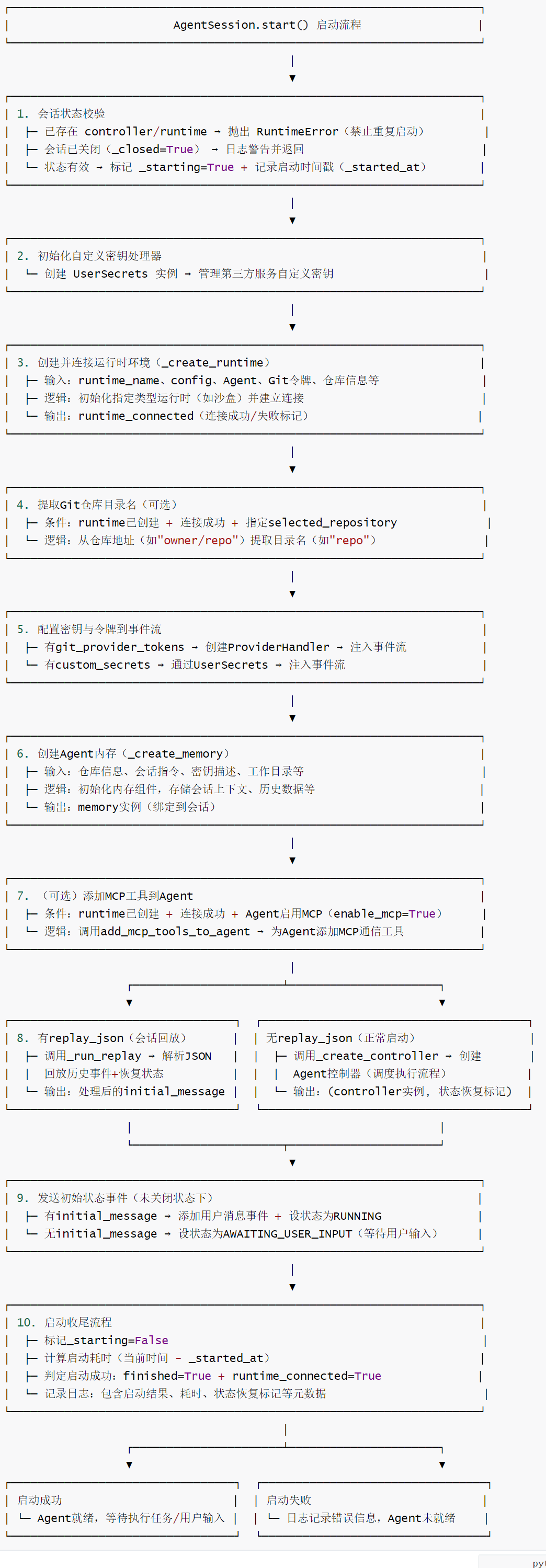
The specific code is as follows:
    async def start(
        self,
        runtime_name: str,  # 运行时名称(如"sandbox",指定运行环境类型)
        config: OpenHandsConfig,  # 框架全局配置
        agent: Agent,  # 已初始化的Agent实例
        max_iterations: int,  # Agent执行的最大迭代次数(防止无限循环)
        git_provider_tokens: Optional[PROVIDER_TOKEN_TYPE] = None,  # Git提供商令牌(如GitHub令牌)
        custom_secrets: Optional[CUSTOM_SECRETS_TYPE] = None,  # 自定义密钥(第三方服务访问用)
        max_budget_per_task: Optional[float] = None,  # 单任务最大预算(可选)
        agent_to_llm_config: Optional[Dict[str, LLMConfig]] = None,  # Agent-LLM配置映射
        agent_configs: Optional[Dict[str, AgentConfig]] = None,  # 所有Agent配置字典
        selected_repository: Optional[str] = None,  # 选中的Git仓库地址(可选)
        selected_branch: Optional[str] = None,  # 选中的仓库分支(可选)
        initial_message: Optional[MessageAction] = None,  # 初始用户消息(可选)
        conversation_instructions: Optional[str] = None,  # 会话指令(自定义Agent行为)
        replay_json: Optional[str] = None,  # 会话回放JSON数据(可选)
    ) -> None:
        """
        启动Agent会话:初始化运行时、内存、控制器,触发Agent开始执行。

        核心流程:
        1. 校验会话状态(避免重复启动)
        2. 创建运行时环境(如沙盒)
        3. 配置Git令牌、自定义密钥
        4. 创建Agent内存(存储上下文、会话指令等)
        5. (可选)添加MCP工具到Agent
        6. (可选)执行会话回放
        7. 创建Agent控制器(调度Agent执行)
        8. 发送初始事件(启动状态/等待用户输入)
        """
        # 校验会话状态:已存在控制器或运行时 → 抛出异常(避免重复启动)
        if self.controller or self.runtime:
            raise RuntimeError(
                'Session already started. You need to close this session and start a new one.'
            )

        # 会话已关闭 → 日志警告并返回
        if self._closed:
            self.logger.warning('Session closed before starting')
            return

        self._starting = True  # 标记会话启动中
        started_at = time.time()
        self._started_at = started_at
        finished = False  # 执行完成标记(用于监控)
        runtime_connected = False  # 运行时连接成功标记
        restored_state = False  # 状态恢复标记(会话回放/恢复场景)

        # 初始化自定义密钥处理器(管理第三方服务密钥)
        custom_secrets_handler = UserSecrets(
            custom_secrets=custom_secrets if custom_secrets else {}
        )

        try:
            # 1. 创建运行时环境(如Docker沙盒)并连接
            runtime_connected = await self._create_runtime(
                runtime_name=runtime_name,
                config=config,
                agent=agent,
                git_provider_tokens=git_provider_tokens,
                custom_secrets=custom_secrets,
                selected_repository=selected_repository,
                selected_branch=selected_branch,
            )

            # 提取仓库目录名(若指定了Git仓库)
            repo_directory = None
            if self.runtime and runtime_connected and selected_repository:
                repo_directory = selected_repository.split('/')[-1]  # 从仓库地址提取目录名(如"openhands")

            # 2. 配置Git提供商令牌(若有)
            if git_provider_tokens:
                provider_handler = ProviderHandler(provider_tokens=git_provider_tokens)
                await provider_handler.set_event_stream_secrets(self.event_stream)  # 注入令牌到事件流

            # 3. 配置自定义密钥(若有)
            if custom_secrets:
                custom_secrets_handler.set_event_stream_secrets(self.event_stream)  # 注入自定义密钥到事件流

            # 4. 创建Agent内存(存储会话上下文、仓库信息、会话指令等)
            self.memory = await self._create_memory(
                selected_repository=selected_repository,
                repo_directory=repo_directory,
                selected_branch=selected_branch,
                conversation_instructions=conversation_instructions,
                custom_secrets_descriptions=custom_secrets_handler.get_custom_secrets_descriptions(),  # 密钥描述(供Agent参考)
                working_dir=config.workspace_mount_path_in_sandbox,  # 沙盒中的工作目录路径
            )

            # 5. (可选)添加MCP工具到Agent(需运行时已连接且Agent启用MCP)
            if self.runtime and runtime_connected and agent.config.enable_mcp:
                await add_mcp_tools_to_agent(agent, self.runtime, self.memory)

            # 6. (可选)执行会话回放(从replay_json恢复历史会话)
            if replay_json:
                initial_message = self._run_replay(
                    initial_message,
                    replay_json,
                    agent,
                    config,
                    max_iterations,
                    max_budget_per_task,
                    agent_to_llm_config,
                    agent_configs,
                )
            # 7. (正常场景)创建Agent控制器(调度Agent执行流程)
            else:
                self.controller, restored_state = self._create_controller(
                    agent,
                    config.security.confirmation_mode,  # 安全确认模式(如自动确认/手动确认)
                    max_iterations,
                    max_budget_per_task=max_budget_per_task,
                    agent_to_llm_config=agent_to_llm_config,
                    agent_configs=agent_configs,
                )

            # 8. 发送初始事件(根据是否有初始消息设置Agent状态)
            if not self._closed:
                if initial_message:
                    # 有初始消息 → 向事件流添加用户消息,设置Agent状态为"运行中"
                    self.event_stream.add_event(initial_message, EventSource.USER)
                    self.event_stream.add_event(
                        ChangeAgentStateAction(AgentState.RUNNING),
                        EventSource.ENVIRONMENT,
                    )
                else:
                    # 无初始消息 → 设置Agent状态为"等待用户输入"
                    self.event_stream.add_event(
                        ChangeAgentStateAction(AgentState.AWAITING_USER_INPUT),
                        EventSource.ENVIRONMENT,
                    )
            finished = True  # 标记执行完成

        finally:
            self._starting = False  # 取消启动中标记
            # 计算启动结果(是否成功:执行完成且运行时连接成功)
            success = finished and runtime_connected
            duration = time.time() - started_at  # 计算启动耗时

            # 日志元数据(用于监控和分析)
            # 记录启动结果日志
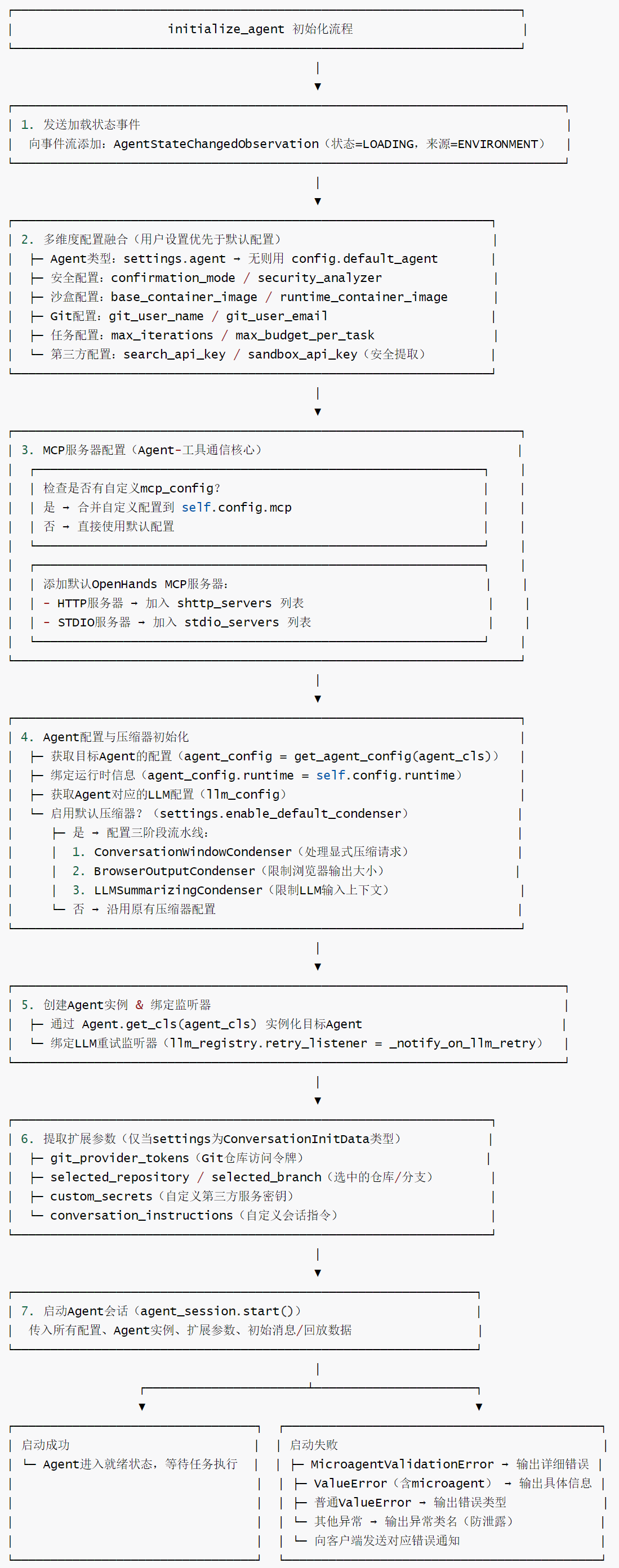
2.4.2 Initialize the Agent
_start_agent_loop calls initialize_agent to initialize the Agent. session After initialization, it calls initialize_agent further steps to complete the initialization of the remaining modules of the Agent, first creating the LLM and the Agent, and then calling initialize_agent agent_session.start().
core role
initialize_agent It is the core method for initializing Agent instances in the OpenHands framework. It is responsible for integrating user settings, default configurations, and third-party service configurations into the final runtime configuration, creating Agent instances and starting Agent sessions. It is the key bridge connecting configuration and Agent execution, ensuring that the Agent has all the capabilities required to complete tasks (tool access, LLM support, security control, etc.).
Core Features
- Configuration integration mechanism: User settings take precedence over default configurations, and support flexible coverage of multi-dimensional configurations such as security, sandbox, Git, and third-party services, taking into account both general and personalized needs.
- Modular compressor design: The three-stage context compressor pipeline is enabled by default, optimizing the context in the order of “dialogue window → browser output → LLM summary” to balance context relevance and model input length constraints.
- Complete service configuration: Automatically configures the MCP server (the communication hub between the agent and the tool), supports custom MCP configuration extensions, and adapts to the communication needs of tools in different deployment environments.
- Security and privacy protection: Sensitive information (such as sandbox API keys)
get_secret_value()is extracted securely, and unknown errors only return the error type to avoid leaking sensitive configurations. - Rich extension parameters: Supports Git repository access, custom keys, session commands and other extension parameters to adapt to complex scenarios such as code development and third-party service integration.
- Refined error handling: Differentiate between different types of errors (micro-Agent verification errors, value errors, unknown errors) and return targeted error information to facilitate problem troubleshooting.
- Status visualization:
AgentState.LOADINGStatus events are sent at the start of initialization, allowing clients to perceive the Agent startup progress in real time and improving user experience.
Initialization flowchart
The code for initialize_agent is as follows:
    async def initialize_agent(
        self,
        settings: Settings,  # 用户/会话设置(含Agent类型、安全配置等)
        initial_message: Optional[MessageAction] = None,  # 初始用户消息(可选)
        replay_json: Optional[str] = None,  # 会话回放JSON(可选)
    ) -> None:
        """
        初始化Agent核心流程:
        1. 更新会话配置(融合用户设置与默认配置)
        2. 配置MCP服务器(用于工具通信)
        3. 初始化Agent配置(含上下文压缩器)
        4. 创建Agent实例并启动Agent会话
        """
        # 1. 发送Agent状态变更事件:标记为"加载中"
        self.agent_session.event_stream.add_event(
            AgentStateChangedObservation('', AgentState.LOADING),
            EventSource.ENVIRONMENT,  # 事件来源:环境
        )

        # 2. 融合用户设置与默认配置(用户设置优先)
        # 确定Agent类型(用户设置优先,否则用默认)
        agent_cls = settings.agent or self.config.default_agent

        # 安全配置:确认模式(用户设置优先)
        self.config.security.confirmation_mode = (
            self.config.security.confirmation_mode
            if settings.confirmation_mode is None
            else settings.confirmation_mode
        )

        # 安全配置:安全分析器(用户设置优先)
        self.config.security.security_analyzer = (
            self.config.security.security_analyzer
            if settings.security_analyzer is None
            else settings.security_analyzer
        )

        # 沙盒配置:基础容器镜像(用户设置优先)
        self.config.sandbox.base_container_image = (
            settings.sandbox_base_container_image
            or self.config.sandbox.base_container_image
        )

        # 沙盒配置:运行时容器镜像(用户设置优先,逻辑:基础镜像或运行时镜像有一个设置则用用户值)
        self.config.sandbox.runtime_container_image = (
            settings.sandbox_runtime_container_image
            if settings.sandbox_base_container_image
            or settings.sandbox_runtime_container_image
            else self.config.sandbox.runtime_container_image
        )

        # 3. Git配置:若用户设置提供,覆盖默认值
        git_user_name = getattr(settings, 'git_user_name', None)
        if git_user_name is not None:
            self.config.git_user_name = git_user_name
        git_user_email = getattr(settings, 'git_user_email', None)
        if git_user_email is not None:
            self.config.git_user_email = git_user_email

        # 4. 任务配置:最大迭代次数(用户设置优先)
        max_iterations = settings.max_iterations or self.config.max_iterations

        # 5. 任务配置:单任务最大预算(用户设置优先,支持None值)
        max_budget_per_task = (
            settings.max_budget_per_task
            if settings.max_budget_per_task is not None
            else self.config.max_budget_per_task
        )

        # 6. 第三方服务配置:搜索API密钥、沙盒API密钥
        self.config.search_api_key = settings.search_api_key
        if settings.sandbox_api_key:
            # 提取沙盒API密钥的实际值(get_secret_value()用于安全存储的密钥)
            self.config.sandbox.api_key = settings.sandbox_api_key.get_secret_value()

        # 7. MCP服务器配置(用于Agent与工具的通信)

        # 若用户设置提供自定义MCP配置,合并到全局配置
        mcp_config = getattr(settings, 'mcp_config', None)
        if mcp_config is not None:
            self.config.mcp = self.config.mcp.merge(mcp_config)

        # 默认添加OpenHands的MCP服务器(HTTP + STDIO类型)
        openhands_mcp_server, openhands_mcp_stdio_servers = (
            OpenHandsMCPConfigImpl.create_default_mcp_server_config(
                self.config.mcp_host, self.config, self.user_id
            )
        )
        if openhands_mcp_server:
            self.config.mcp.shttp_servers.append(openhands_mcp_server)
            self.config.mcp.stdio_servers.extend(openhands_mcp_stdio_servers)

        # 8. Agent配置初始化
        # 获取指定Agent类型的配置
        agent_config = self.config.get_agent_config(agent_cls)
        # 传递运行时信息到Agent配置(用于工具的运行时特定行为)
        agent_config.runtime = self.config.runtime
        # 获取Agent对应的LLM配置
        agent_name = agent_cls if agent_cls is not None else 'agent'
        llm_config = self.config.get_llm_config_from_agent(agent_name)

        # 若启用默认上下文压缩器,配置压缩器流水线
        if settings.enable_default_condenser:
            """
            默认压缩器流水线包含三个阶段(顺序重要):
            1. 对话窗口压缩器:处理显式的压缩请求
            2. 浏览器输出压缩器:限制浏览器观察结果的大小(注意力窗口=2)
            3. LLM总结压缩器:限制传递给LLM的上下文大小
            顺序设计原因:先处理浏览器输出,可减少总结成本(仅保留最新浏览器输出)
            """
            max_events_for_condenser = settings.condenser_max_size or 120  # 压缩器最大事件数(默认120)
            default_condenser_config = CondenserPipelineConfig(
                condensers=[
                    ConversationWindowCondenserConfig(),
                    BrowserOutputCondenserConfig(attention_window=2),
                    LLMSummarizingCondenserConfig(
                        llm_config=llm_config,
                        keep_first=4,  # 保留前4个事件(不压缩)
                        max_size=max_events_for_condenser,  # 压缩后最大事件数
                    ),
                ]
            )

            agent_config.condenser = default_condenser_config

        # 9. 创建Agent实例(通过Agent工厂方法获取对应类型的Agent类)
        agent = Agent.get_cls(agent_cls)(agent_config, self.llm_registry)

        # 10. 绑定LLM重试监听器(Agent会话中LLM重试时触发通知)
        self.llm_registry.retry_listener = self._notify_on_llm_retry

        # 11. 提取ConversationInitData类型设置中的扩展参数(若适用)
        git_provider_tokens = None  # Git提供商令牌(用于代码仓库访问)
        selected_repository = None  # 选中的代码仓库
        selected_branch = None  # 选中的仓库分支
        custom_secrets = None  # 自定义密钥(用于第三方服务访问)
        conversation_instructions = None  # 会话指令(自定义Agent行为)
        if isinstance(settings, ConversationInitData):
            git_provider_tokens = settings.git_provider_tokens
            selected_repository = settings.selected_repository
            selected_branch = settings.selected_branch
            custom_secrets = settings.custom_secrets
            conversation_instructions = settings.conversation_instructions

        # 12. 启动Agent会话(核心步骤)
        try:
            await self.agent_session.start(
                runtime_name=self.config.runtime,  # 运行时名称(如沙盒类型)
                config=self.config,  # 完整配置
                agent=agent,  # Agent实例
                max_iterations=max_iterations,  # 最大迭代次数
                max_budget_per_task=max_budget_per_task,  # 单任务最大预算
                agent_to_llm_config=self.config.get_agent_to_llm_config_map(),  # Agent-LLM配置映射
                agent_configs=self.config.get_agent_configs(),  # 所有Agent配置
                git_provider_tokens=git_provider_tokens,  # Git令牌
                custom_secrets=custom_secrets,  # 自定义密钥
                selected_repository=selected_repository,  # 选中仓库
                selected_branch=selected_branch,  # 选中分支
                initial_message=initial_message,  # 初始用户消息
                conversation_instructions=conversation_instructions,  # 会话指令
                replay_json=replay_json,  # 会话回放数据
            )
        except MicroagentValidationError as e:
            # 微Agent验证错误:输出详细错误信息(帮助用户排查配置问题)
            return
        except ValueError as e:
            # 值错误:区分微Agent相关错误和普通值错误
            self.logger.exception(f"创建Agent会话失败: {e}")
            error_message = str(e)
            return
        except Exception as e:
            # 其他未知错误:仅输出错误类型(避免泄露敏感信息)

            return
2.4 User Interaction (oh_user_action) Logic
2.4.1 User Sending Messages
When a user sends a message, it’s done by adding an event to the event center socket in the oh_user_action function. The code is located in openhands\server\listen_socket.py conversation_manager.
@sio.event
async def oh_user_action(connection_id: str, data: dict[str, Any]) -> None:
    await conversation_manager.send_to_event_stream(connection_id, data)
The old API will call here.
@sio.event
async def oh_action(connection_id: str, data: dict[str, Any]) -> None:
    # TODO: Remove this handler once all clients are updated to use oh_user_action
    # Keeping for backward compatibility with in-progress sessions
    await conversation_manager.send_to_event_stream(connection_id, data)
2.4.2 Adding Events
The send_to_event_stream function is located in openhands\server\conversation_manager\standalone_conversation_manager.py. Ultimately, it calls session.dispatch to send events to the event stream.
    async def send_to_event_stream(self, connection_id: str, data: dict):
        # If there is a local session running, send to that
        sid = self._local_connection_id_to_session_id.get(connection_id)
        if not sid:
            raise RuntimeError(f'no_connected_session:{connection_id}')
        await self.send_event_to_conversation(sid, data)

    async def send_event_to_conversation(self, sid: str, data: dict):
        session = self._local_agent_loops_by_sid.get(sid)
        if not session:
            raise RuntimeError(f'no_conversation:{sid}')
        await session.dispatch(data)
The dispatch code is as follows.
async def dispatch(self, data: dict) -> None:
    # ...
    self.agent_session.event_stream.add_event(event, EventSource.USER)
2.4.3 Event Handling
Once an event is added to the system’s event stream, which modules will respond? To answer this question, we first need to identify the core modules in the system that have subscribed to the event stream—they are like receivers on standby, each guarding its own dedicated message channel: the Session module subscribes to the SERVER channel, the Runtime module corresponds to the RUNTIME channel, the Memory module listens to the MEMORY channel, and the AgentController module focuses on the AGENT_CONTROLLER channel.
Once a user sends a message and it enters the event stream, the message will be broadcast to all subscribed channels. Each module will then initiate its corresponding processing flow through a pre-registered callback function. The specific process is as follows:
The AgentController module will handle this in the _on_event function.
    async def _on_event(self, event: Event) -> None:
        if hasattr(event, 'hidden') and event.hidden:
            return

        self.state_tracker.add_history(event)

        if isinstance(event, Action):
            await self._handle_action(event)
        elif isinstance(event, Observation):
            await self._handle_observation(event)

        should_step = self.should_step(event)
        if should_step:
            self.log(
                'debug',
                f'Stepping agent after event: {type(event).__name__}',
                extra={'msg_type': 'STEPPING_AGENT'},
            )
            await self._step_with_exception_handling()
        elif isinstance(event, MessageAction) and event.source == EventSource.USER:
            # If we received a user message but aren't stepping, log why
            self.log(
                'warning',
                f'Not stepping agent after user message. Current state: {self.get_agent_state()}',
                extra={'msg_type': 'NOT_STEPPING_AFTER_USER_MESSAGE'},
            )
_handle_action will call _handle_message_action.
    async def _handle_action(self, action: Action) -> None:
        """Handles an Action from the agent or delegate."""
        if isinstance(action, ChangeAgentStateAction):
            await self.set_agent_state_to(action.agent_state)  # type: ignore
        elif isinstance(action, MessageAction):
            await self._handle_message_action(action)
        elif isinstance(action, AgentDelegateAction):
            await self.start_delegate(action)
            assert self.delegate is not None
            # Post a MessageAction with the task for the delegate
            if 'task' in action.inputs:
                self.event_stream.add_event(
                    MessageAction(content='TASK: ' + action.inputs['task']),
                    EventSource.USER,
                )
                await self.delegate.set_agent_state_to(AgentState.RUNNING)
            return

        elif isinstance(action, AgentFinishAction):
            self.state.outputs = action.outputs
            await self.set_agent_state_to(AgentState.FINISHED)
        elif isinstance(action, AgentRejectAction):
            self.state.outputs = action.outputs
            await self.set_agent_state_to(AgentState.REJECTED)
In _handle_message_action, the AgentController module generates a RecallAction event and pushes it into the event stream again. The type of this event is determined based on whether this is the user’s first input: if it is the first input, it is set to RecallType.WORKSPACE_CONTEXT, otherwise it is set to RecallType.KNOWLEDGE.
    async def _handle_message_action(self, action: MessageAction) -> None:
        """Handles message actions from the event stream.

        Args:
            action (MessageAction): The message action to handle.
        """
        if action.source == EventSource.USER:
            # Use info level if LOG_ALL_EVENTS is set
            log_level = (
                'info' if os.getenv('LOG_ALL_EVENTS') in ('true', '1') else 'debug'
            )
            self.log(
                log_level,
                str(action),
                extra={'msg_type': 'ACTION', 'event_source': EventSource.USER},
            )

            # if this is the first user message for this agent, matters for the microagent info type
            first_user_message = self._first_user_message()
            is_first_user_message = (
                action.id == first_user_message.id if first_user_message else False
            )
            recall_type = (
                RecallType.WORKSPACE_CONTEXT
                if is_first_user_message
                else RecallType.KNOWLEDGE
            )

            recall_action = RecallAction(query=action.content, recall_type=recall_type)
            self._pending_action = recall_action
            # this is source=USER because the user message is the trigger for the microagent retrieval
            self.event_stream.add_event(recall_action, EventSource.USER)

            if self.get_agent_state() != AgentState.RUNNING:
                await self.set_agent_state_to(AgentState.RUNNING)

        elif action.source == EventSource.AGENT:
            # If the agent is waiting for a response, set the appropriate state
            if action.wait_for_response:
                await self.set_agent_state_to(AgentState.AWAITING_USER_INPUT)
The AgentController module calls the agent.step method in the _on_event function to start the core processing flow of the agent.
The specific logic of agent.step here depends on the agent type specified in the configuration file. Taking the common CodeActAgent as an example, this method will point to the step function in OpenHands/openhands/agenthub/codeact_agent/codeact_agent.py. Ultimately, the processed information is transformed into messages conforming to the input format of the large language model.
    def step(self, state: State) -> 'Action':
        """Performs one step using the CodeAct Agent.

        This includes gathering info on previous steps and prompting the model to make a command to execute.

        Parameters:
        - state (State): used to get updated info

        Returns:
        - CmdRunAction(command) - bash command to run
        - IPythonRunCellAction(code) - IPython code to run
        - AgentDelegateAction(agent, inputs) - delegate action for (sub)task
        - MessageAction(content) - Message action to run (e.g. ask for clarification)
        - AgentFinishAction() - end the interaction
        - CondensationAction(...) - condense conversation history by forgetting specified events and optionally providing a summary
        - FileReadAction(path, ...) - read file content from specified path
        - FileEditAction(path, ...) - edit file using LLM-based (deprecated) or ACI-based editing
        - AgentThinkAction(thought) - log agent's thought/reasoning process
        - CondensationRequestAction() - request condensation of conversation history
        - BrowseInteractiveAction(browser_actions) - interact with browser using specified actions
        - MCPAction(name, arguments) - interact with MCP server tools
        """
        # Continue with pending actions if any
        if self.pending_actions:
            return self.pending_actions.popleft()

        # if we're done, go back
        latest_user_message = state.get_last_user_message()
        if latest_user_message and latest_user_message.content.strip() == '/exit':
            return AgentFinishAction()

        # Condense the events from the state. If we get a view we'll pass those
        # to the conversation manager for processing, but if we get a condensation
        # event we'll just return that instead of an action. The controller will
        # immediately ask the agent to step again with the new view.
        condensed_history: list[Event] = []
        match self.condenser.condensed_history(state):
            case View(events=events):
                condensed_history = events

            case Condensation(action=condensation_action):
                return condensation_action

        initial_user_message = self._get_initial_user_message(state.history)
        messages = self._get_messages(condensed_history, initial_user_message)
        params: dict = {
            'messages': messages,
        }
        params['tools'] = check_tools(self.tools, self.llm.config)
        params['extra_body'] = {
            'metadata': state.to_llm_metadata(
                model_name=self.llm.config.model, agent_name=self.name
            )
        }
        response = self.llm.completion(**params)
        logger.debug(f'Response from LLM: {response}')
        actions = self.response_to_actions(response)
        logger.debug(f'Actions after response_to_actions: {actions}')
        for action in actions:
            self.pending_actions.append(action)
        return self.pending_actions.popleft()
Once the large language model has finished processing and returned a result, that result is encapsulated into an Action object and re-sent into the event stream. Assuming the model directly returns a MessageAction type result, the Session module will capture this event and forward its content to the front-end interface to display feedback to the user.
0xFF Reference
https://docs.all-hands.dev/openhands/usage/architecture/backend
As AI agents evolve from “toys” to “tools,” what should we focus on? Openhands Architecture Analysis [Part 2: Core Concepts Related to Agents] by Kerry
As AI agents evolve from “toys” to “tools,” what should we focus on? Openhands Architecture Analysis [Part 1: Series Introduction] by Kerry
Coding Agent Openhands Analysis (with code) Arrow
OpenHands Source Code Analysis by Yi Lihui