AI Agents · AI Agent Frameworks
OpenHands Startup Lifecycle
Startup lifecycle and run_controller initialization flow in OpenHands.
0x00 Summary
When analyzing a system, the startup section and typical user scenarios are ideal entry points because these two sections can cover most of the system’s functional modules, allowing for in-depth analysis of the architecture.
Because this series draws on a large number of articles, there may be some articles missing from the references. If so, please point them out.
0x01 Background
1.1 Overall Architecture
The following is an architecture diagram of OpenHands, which is a complex system.
Openhands-arch
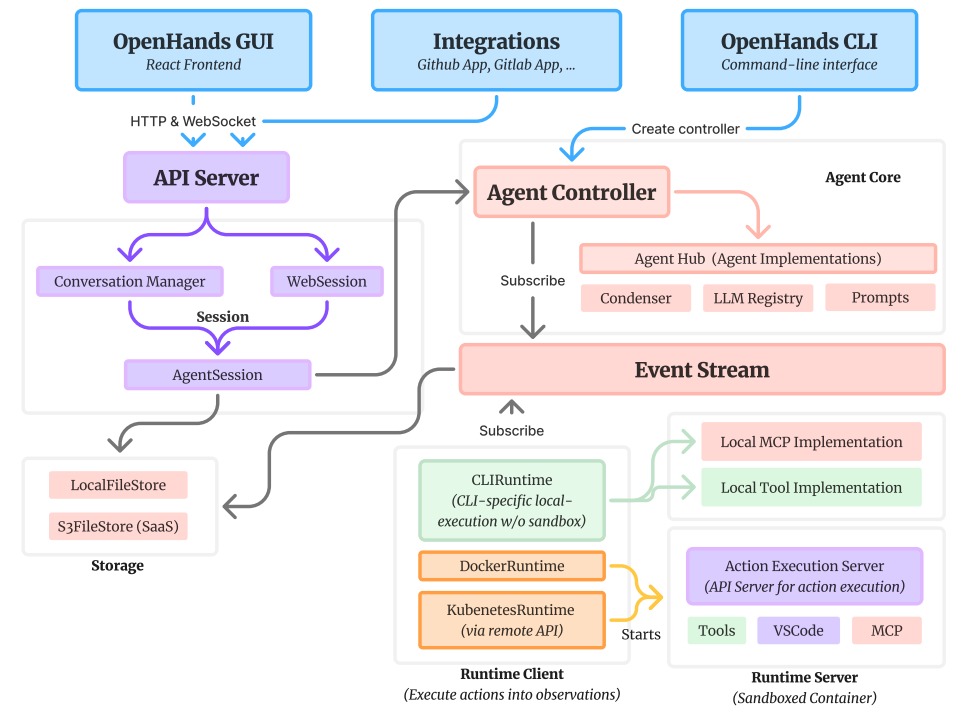
Leaving aside complex technical details, the interaction logic of OpenHands Agent can be summarized into a very simple process of “initialization - event injection - collaborative processing - waiting”, with the core revolving around EventStream to achieve module linkage:
- Initialization ready: When a user creates a session, the system automatically completes the initialization of the core modules such as Agent, AgentController, Runtime, and Memory, and each module automatically subscribes to EventStream to ensure that it can capture relevant events.
- Task initiation: When a user sends a message, it essentially injects an event into the EventStream. This event will trigger all modules that have subscribed to related callback functions, initiating collaborative processing.
- Multi-module collaborative response:
- The Session module continuously reports various state events in the event stream to ensure global observability.
- If the user enables Security Analyzer, this module will automatically identify low-risk tasks through security analysis, reducing the need for manual intervention by the user.
- AgentController injects
RecallActioninto the event stream. The Memory module determines whether it is the first time the user information has been received, and fills in the relevant memory accordingly and returns aRecallObservationevent.
- State synchronization: The AgentController updates the current state of the task and passes the relevant information to the Agent. Specifically, the AgentController calls
Agent.stepmethods to process the current event, generate an Action, and inject the event stream. - Action Decision: Based on the received status information, the Agent sends a request to the LLM to generate a specific action plan for the next step.
- Action output: The agent explicitly outputs action instructions, which may be specific operations such as running system commands, reading files, or calling tools.
- Action dispatch: The action instruction is passed to the Runtime component via EventStream, awaiting execution.
- Execution and Feedback: The Runtime executes action commands and generates observations containing execution results, error messages, and other information.
- Result feedback: The observation results are fed back to the AgentController via EventStream, completing one execution loop.
- Loop or terminate: The AgentController determines whether the task is completed based on the observation results. If it is not completed, the above process is repeated. If collaboration is required, it is delegated to other Agents until the task is completed.
1.2 Entry Point
Here is an example. We’ll start here to see how OpenHands starts up, and also to look at the basic logic of OpenHands.
config = load_openhands_config()
action = MessageAction(content="Write a hello world program")
state = await run_controller(config=config, initial_user_action=action)
The code above directly calls run_controller from the command line, so we’ll start with run_controller.
0x02 Initializing @run_controller
As the core entry coroutine for a single session in the OpenHands backend, run_controller’s core responsibility is to start the runtime environment, agent, and corresponding controller according to the preset configuration, establishing a complete processing chain from receiving user commands to executing tasks in multiple steps, and finally persistently storing the session state. Its core design highlights are reflected in three aspects:
- It enables integrated management of the entire session lifecycle, centrally completing key operations such as session identifier (SID) generation, runtime connection establishment, code repository cloning, MCP tool embedding, and task execution trajectory replay.
- A dual security control mechanism is constructed, which effectively avoids the risks of infinite loop execution and excessive resource costs by setting hard limits on the maximum number of iterations (
max_iterations) and the maximum budget per task (max_budget_per_task). - Enhance end-to-end observability by leveraging EventStream to achieve real-time event distribution. Support simultaneous subscription across multiple platforms, including command-line interface (CLI), front-end interface, and logging system. Simultaneously generate replayable and auditable JSON execution traces for easy subsequent tracing and verification.
2.1 Overall Process
The overall flow of run_controller in openhands/core/main.py is as follows.
- Initialize system components.
- Create an Agent.
- Creating runtime and memory system.
- Create a controller.
- Running the Agent will specifically:
- Manage the task execution process.
- Receive initial user operation.
- Handle various events in the event stream.
- Listen for changes in the agent’s state, especially when it’s waiting for user input.
- Handling user interactions:
- When the agent requires user input, it will either respond automatically based on the configuration or wait for real user input.
- It supports mocking the user response function
fake_user_response_fn, which enables automated testing.
- State management and persistence:
- Save the session state to a file.
- Record the execution path so that it can be analyzed and debugged.
- Supports trajectory replay.
- Resource management:
- Manage MCP integration.
- Control the execution budget (number of iterations and cost limits).
- Close resources correctly.
The specific flowchart is as follows.
OpenHands-3-1
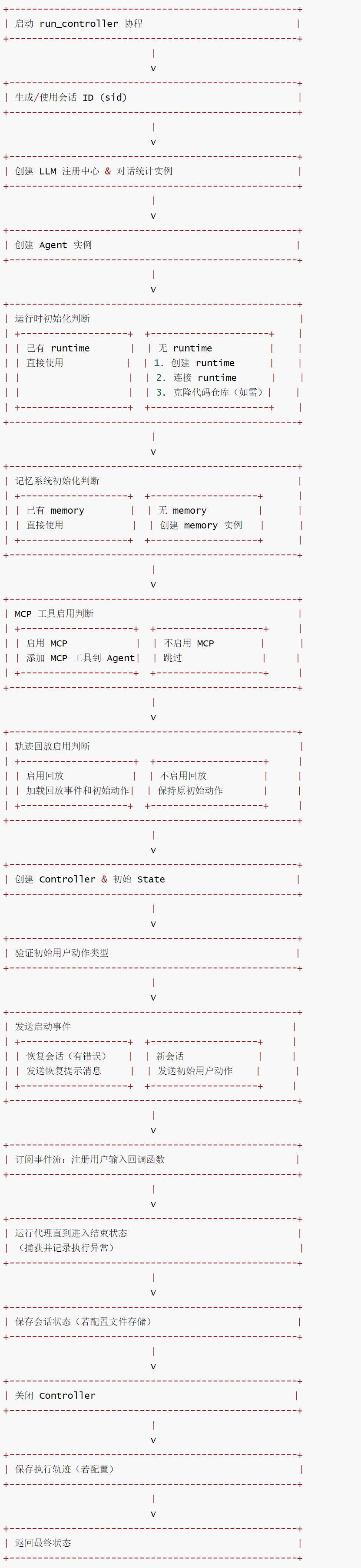
Let’s take a look at the specific process details.
2.2 Creating a Registration Center
The following statement will create an LLM registry and conversation statistics instance.
sid = sid or generate_sid(config)

llm_registry, conversation_stats, config = create_registry_and_conversation_stats(
    config,
    sid,
    None,
)
The specific code is as follows, and its function is:
- Adjust basic configuration according to user settings.
- Initialize the LLM registry (manages all LLM instances).
- Initialize file storage and conversation statistics (track conversation data).
- Establish a subscription relationship between the registry and the statistics server.
def create_registry_and_conversation_stats(
    config: OpenHandsConfig,
    sid: str,
    user_id: Optional[str],
    user_settings: Optional[Settings] = None,
) -> tuple[LLMRegistry, ConversationStats, OpenHandsConfig]:
    """
    创建LLM注册表、对话统计实例和用户配置的组合函数。

    参数:
        config: 基础配置对象
        sid: 会话ID(用于标识当前对话)
        user_id: 用户ID(可选,用于用户级数据跟踪)
        user_settings: 用户自定义设置(可选,用于覆盖默认配置)

    返回:
        三元组 (LLM注册表, 对话统计实例, 最终用户配置)
    """
    # 初始化用户配置(优先使用用户设置覆盖默认配置)
    user_config = config
    if user_settings:
        user_config = setup_llm_config(config, user_settings)

    # 确定代理类型(从用户设置或默认配置中获取)
    agent_cls = user_settings.agent if user_settings else None
    # 创建LLM注册表,关联配置和代理类型
    llm_registry = LLMRegistry(user_config, agent_cls)

    # 初始化文件存储(用于持久化对话数据)
    file_store = get_file_store(
        file_store_type=config.file_store,
        file_store_path=config.file_store_path,
        file_store_web_hook_url=config.file_store_web_hook_url,
        file_store_web_hook_headers=config.file_store_web_hook_headers,
        file_store_web_hook_batch=config.file_store_web_hook_batch,
    )

    # 创建对话统计实例(绑定文件存储、会话ID和用户ID)
    conversation_stats = ConversationStats(file_store, sid, user_id)
    # 订阅注册表事件:当新LLM注册时,自动记录到对话统计中
    llm_registry.subscribe(conversation_stats.register_llm)

    return llm_registry, conversation_stats, user_config
2.3 Creating an Agent
The agent will be created here based on the configuration information.
agent = create_agent(config, llm_registry)
The create_agent code is as follows. As can be seen from the default configuration, CodeActAgent is generated by default.
# default_agent = "CodeActAgent"

def create_agent(config: OpenHandsConfig, llm_registry: LLMRegistry) -> Agent:
    agent_cls: type[Agent] = Agent.get_cls(config.default_agent)
    agent_config = config.get_agent_config(config.default_agent)
    # Pass the runtime information from the main config to the agent config
    agent_config.runtime = config.runtime
    config.get_llm_config_from_agent(config.default_agent)
    agent = agent_cls(config=agent_config, llm_registry=llm_registry)
    return agent
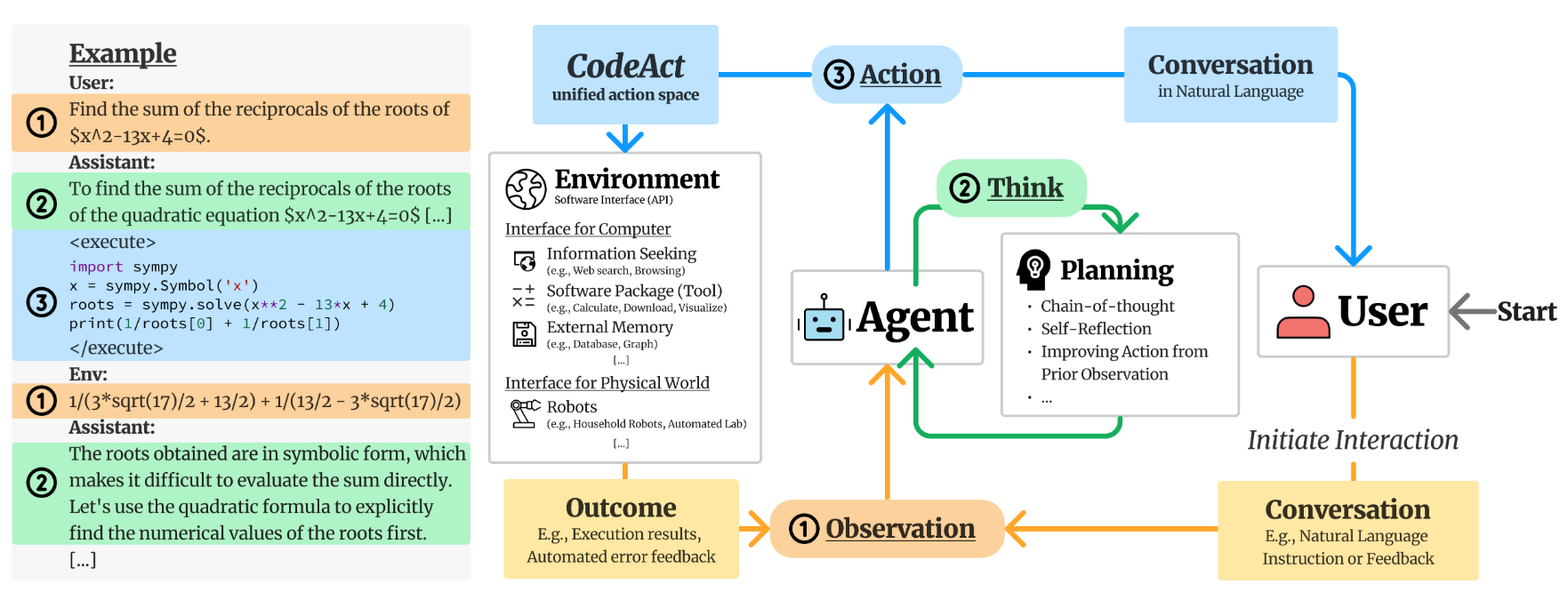
The CodeActAgent is defined as follows.
class CodeActAgent(Agent):
    """
    CodeActAgent:极简主义的智能代理,基于 CodeAct 理念实现。
    核心逻辑:将模型的行动统一到“代码执行”这一单一行动空间,通过传递“行动-观察”对列表,
    引导模型决策下一步操作,兼顾简洁性与执行性能。

    核心理念(源自论文:https://arxiv.org/abs/2402.01030):
    打破传统代理多行动类型的复杂设计,用代码执行统一所有行动,既简化架构又提升效率。

    每一轮交互中,代理可执行两种操作:
    1. **对话(Converse)**:用自然语言与人类沟通,例如请求澄清需求、确认操作等。
    2. **代码行动(CodeAct)**:通过执行代码完成任务,支持两种形式:
       - 执行任意有效的 Linux bash 命令
       - 执行任意有效的 Python 代码(通过交互式 IPython 解释器模拟,
         实际通过 bash 命令实现,详见插件系统说明)
    """
    VERSION = '2.2'  # 代理版本号

    # 沙盒环境所需插件依赖(按初始化顺序排列)
    sandbox_plugins: list[PluginRequirement] = [
        # 注意:AgentSkillsRequirement 需在 JupyterRequirement 之前初始化
        # 原因:AgentSkillsRequirement 提供大量 Python 工具函数,
        # Jupyter 环境需要依赖这些函数才能正常工作
        AgentSkillsRequirement(),  # 提供代理核心技能函数的插件
        JupyterRequirement(),      # 提供交互式 Python 执行环境的插件
    ]

    def __init__(self, config: AgentConfig, llm_registry: LLMRegistry) -> None:
        """
        初始化 CodeActAgent 实例。

        参数:
            config (AgentConfig):当前代理的配置对象(包含模型路由、记忆策略等)
            llm_registry (LLMRegistry):LLM 注册表实例,用于获取所需 LLM 或路由 LLM
        """
        # 调用父类 Agent 的初始化方法,完成基础配置(如 LLM 注册、提示词管理器初始化)
        super().__init__(config, llm_registry)

        self.pending_actions: deque['Action'] = deque()  # 待执行的行动队列(双端队列,支持高效进出)
        self.reset()  # 重置代理状态(初始化行动历史、观察记录等)
        self.tools = self._get_tools()  # 获取代理可使用的工具集(从插件或配置中提取)

        # 初始化对话记忆实例:存储“行动-观察”对,支持记忆压缩、上下文管理
        self.conversation_memory = ConversationMemory(self.config, self.prompt_manager)

        # 初始化上下文压缩器:根据配置创建 Condenser 实例,用于压缩长对话历史
        self.condenser = Condenser.from_config(self.config.condenser, llm_registry)

        # 覆盖父类的 LLM 实例:如需模型路由,优先使用路由 LLM(根据代理配置动态选择模型)
        self.llm = self.llm_registry.get_router(self.config)
See the image below for details.
image-20251019171311325
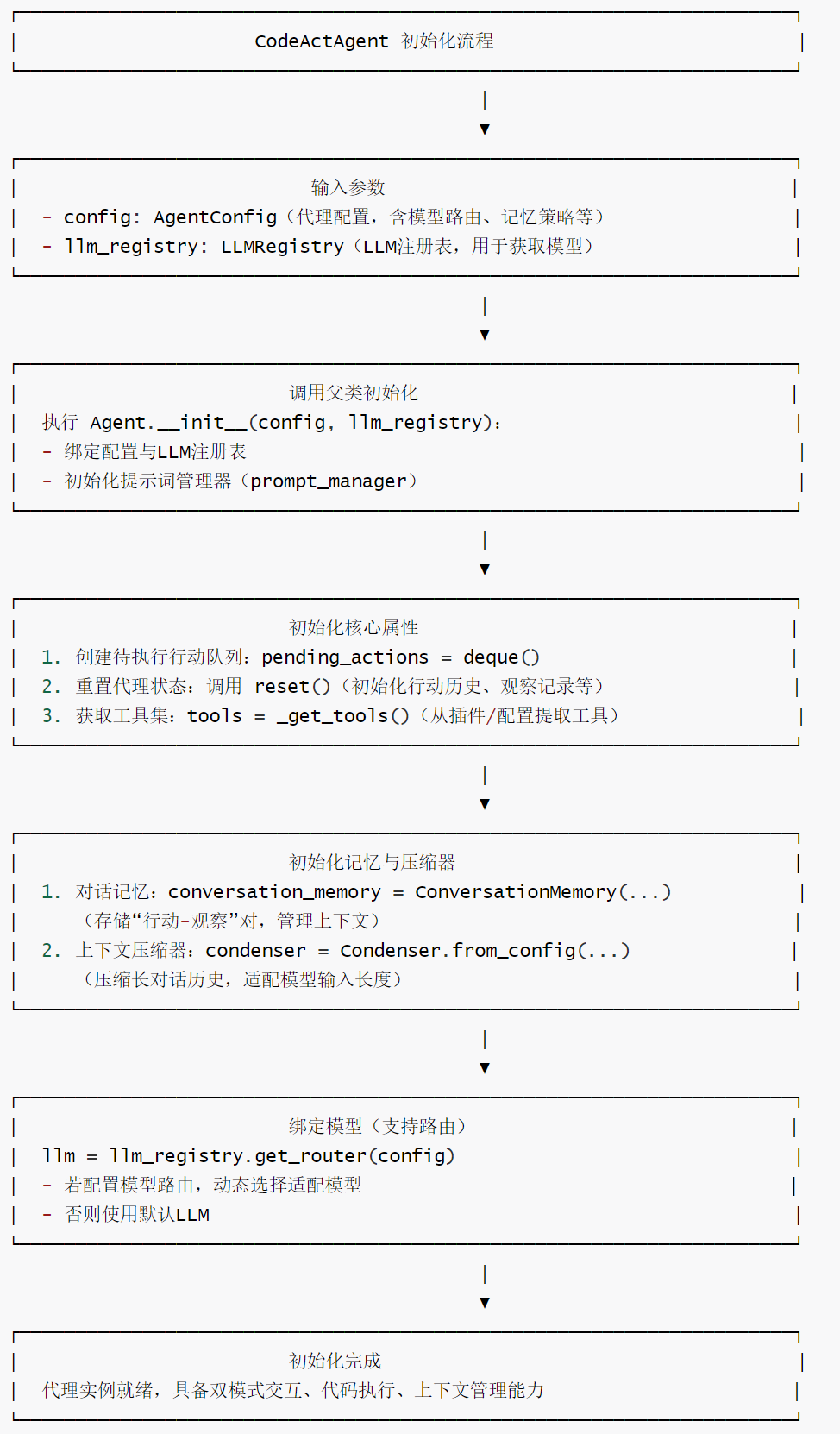
The initialization flowchart of CodeActAgent is as follows.
Openhands-3-2
2.4 Building the Runtime
The create_runtime() function constructs the “dedicated workspace” of the AI agent, the Runtime. In the OpenHands system, the Runtime plays a crucial role, providing a stable and controllable operating platform for the AI agent.
# 运行时创建后会自动连接并克隆选定的代码仓库
repo_directory = None
if runtime is None:
    # 初始化代码仓库(如需)
    repo_tokens = get_provider_tokens()
    # 创建运行时实例
    runtime = create_runtime(
        config,
        llm_registry,
        sid=sid,
        headless_mode=headless_mode,
        agent=agent,
        git_provider_tokens=repo_tokens,
    )
    # 同步调用异步的运行时连接方法
    call_async_from_sync(runtime.connect)

    # 初始化代码仓库(如需)
    if config.sandbox.selected_repo:
        repo_directory = initialize_repository_for_runtime(
            runtime,
            immutable_provider_tokens=repo_tokens,
            selected_repository=config.sandbox.selected_repo,
        )

# event_stream 是 event_stream = EventStream(session_id, file_store)
event_stream = runtime.event_stream
Runtime.__init__ will register EventStreamSubscriber.RUNTIME.
self.event_stream = event_stream
if event_stream:
    event_stream.subscribe(
        EventStreamSubscriber.RUNTIME, self.on_event, self.sid
    )
Runtime only processes runnable Action events, performs actions, retrieves output, Observation and sends it back to the event stream.
isinstance(event, MCPAction)executes MCP to obtain results.- Other runtime-supported actions will execute and retrieve the results.
2.5 Building Memory & Microagent
Next, initialize memory.
# when memory is created, it will load the microagents from the selected repository
if memory is None:
    memory = create_memory(
        runtime=runtime,
        event_stream=event_stream,
        sid=sid,
        selected_repository=config.sandbox.selected_repo,
        repo_directory=repo_directory,
        conversation_instructions=conversation_instructions,
        working_dir=str(runtime.workspace_root),
    )
2.5.1 Creating Memory
The create_memory function creates memory.
def create_memory(
    runtime: Runtime,
    event_stream: EventStream,
    sid: str,
    selected_repository: str | None = None,
    repo_directory: str | None = None,
    status_callback: Callable | None = None,
    conversation_instructions: str | None = None,
    working_dir: str = DEFAULT_WORKSPACE_MOUNT_PATH_IN_SANDBOX,
) -> Memory:
    """Create a memory for the agent to use.

    Args:
        runtime: The runtime to use.
        event_stream: The event stream it will subscribe to.
        sid: The session id.
        selected_repository: The repository to clone and start with, if any.
        repo_directory: The repository directory, if any.
        status_callback: Optional callback function to handle status updates.
        conversation_instructions: Optional instructions that are passed to the agent
    """
    memory = Memory(
        event_stream=event_stream,
        sid=sid,
        status_callback=status_callback,
    )

    memory.set_conversation_instructions(conversation_instructions)

    if runtime:
        # sets available hosts
        memory.set_runtime_info(runtime, {}, working_dir)

        # loads microagents from repo/.openhands/microagents
        microagents: list[BaseMicroagent] = runtime.get_microagents_from_selected_repo(
            selected_repository
        )
        memory.load_user_workspace_microagents(microagents)

        if selected_repository and repo_directory:
            memory.set_repository_info(selected_repository, repo_directory)

    return memory
When memory is initialized, there is an event stream subscription, which registers EventStreamSubscriber.MEMORY. When there is an event, on_event methods of memory will be called.
self.event_stream.subscribe(
    EventStreamSubscriber.MEMORY,
    self.on_event,
    self.sid,
)
Memory only processes RecallAction user input for the first time, adding some additional workspace context information to RecallObservation the send-back event stream, and adding other non-first-time user input microagent_knowledge (领域强化提示词) to RecallObservation the send-back event stream.
2.5.2 Creating a Microagent
The create_memory function loads Microagent.
# loads microagents from repo/.openhands/microagents
microagents: list[BaseMicroagent] = runtime.get_microagents_from_selected_repo(
    selected_repository
)
memory.load_user_workspace_microagents(microagents)
Microagent is the main agent’s “professional partner”.
To efficiently complete complex tasks, specialized division of labor and collaboration are usually required. Microagent is designed as a “professional executor” for this purpose. When the main agent encounters specific subdivisions of work in a particular domain while performing a task, it does not need to handle them personally. Instead, it can “delegate” these tasks to the corresponding Microagents, thereby leveraging their expertise to improve efficiency and accuracy.
Essentially, Microagent is also built on a large language model. For example, its unique feature is its built-in prompts. These prompts incorporate domain-specific knowledge guidelines and operational norms. For instance, for a Git-related Microagent, the prompts will contain core Git operation techniques and best practices, guiding the model to handle Git-related tasks more accurately and becoming a “powerful assistant” for the main agent in dealing with specific scenarios.
BaseMicroagent is defined as follows:
class BaseMicroagent(BaseModel):
    """Base class for all microagents."""

    name: str
    content: str
    metadata: MicroagentMetadata
    source: str  # path to the file
    type: MicroagentType

    PATH_TO_THIRD_PARTY_MICROAGENT_NAME: ClassVar[dict[str, str]] = {
        '.cursorrules': 'cursorrules',
        'agents.md': 'agents',
        'agent.md': 'agents',
    }
2.6 Creating an MCP
Next, we will create the MCP-related parts.
# Add MCP tools to the agent
if agent.config.enable_mcp:
    # Add OpenHands' MCP server by default
    _, openhands_mcp_stdio_servers = (
        OpenHandsMCPConfigImpl.create_default_mcp_server_config(
            config.mcp_host, config, None
        )
    )
    runtime.config.mcp.stdio_servers.extend(openhands_mcp_stdio_servers)

    await add_mcp_tools_to_agent(agent, runtime, memory)
2.7 Creating a Controller
Next, AgentController will be created.
AgentController is the core controller component in the OpenHands system, responsible for managing the entire lifecycle and behavior of the agent. It acts as a bridge between the agent and other system components, ensuring that the agent can perform tasks safely and efficiently, while also managing system resources.
AgentController as the main state management module:
Observationstate transition based on events.- Based on
Actionthe state transition and the following processing:- For
MessageActionsendingRecallActionto the event stream. - For
AgentDelegateActionagent routing (which will be explained in more detail in the subsequent mechanism analysis). eventcall based on the current judgmentagent.step.
- For
controller, initial_state = create_controller(
    agent, runtime, config, conversation_stats, replay_events=replay_events
)
The code for create_controller is as follows.
def create_controller(
    agent: Agent,
    runtime: Runtime,
    config: OpenHandsConfig,
    conversation_stats: ConversationStats,
    headless_mode: bool = True,
    replay_events: list[Event] | None = None,
) -> tuple[AgentController, State | None]:
    event_stream = runtime.event_stream
    initial_state = None
    initial_state = State.restore_from_session(
            event_stream.sid, event_stream.file_store)
    controller = AgentController(
        agent=agent,
        conversation_stats=conversation_stats,
        iteration_delta=config.max_iterations,
        budget_per_task_delta=config.max_budget_per_task,
        agent_to_llm_config=config.get_agent_to_llm_config_map(),
        event_stream=event_stream,
        initial_state=initial_state,
        headless_mode=headless_mode,
        confirmation_mode=config.security.confirmation_mode,
        replay_events=replay_events,
        security_analyzer=runtime.security_analyzer,
    )
    return (controller, initial_state)
In AgentController.__init__, EventStreamSubscriber.AGENT_CONTROLLER will be registered.
# subscribe to the event stream if this is not a delegate
if not self.is_delegate:
    self.event_stream.subscribe(
        EventStreamSubscriber.AGENT_CONTROLLER, self.on_event, self.id
    )
2.8 Send Start Event
Send a startup event MessageAction.
# start event is a MessageAction with the task, either resumed or new
if initial_state is not None and initial_state.last_error:
    # we're resuming the previous session
    event_stream.add_event(
        MessageAction(
            content=(
                "Let's get back on track. If you experienced errors before, do "
                'NOT resume your task. Ask me about it.'
            ),
        ),
        EventSource.USER,
    )
else:
    # init with the provided actions
    event_stream.add_event(initial_user_action, EventSource.USER)
2.9 Subscribing to Event Streams: User Input Callback Function
Register yourself as EventStreamSubscriber.MAIN.
def on_event(event: Event) -> None:
    if isinstance(event, AgentStateChangedObservation):
        if event.agent_state == AgentState.AWAITING_USER_INPUT:
            if exit_on_message:
                message = '/exit'
            elif fake_user_response_fn is None:
                message = read_input(config.cli_multiline_input)
            else:
                message = fake_user_response_fn(controller.get_state())
            action = MessageAction(content=message)
            event_stream.add_event(action, EventSource.USER)

event_stream.subscribe(EventStreamSubscriber.MAIN, on_event, sid)

end_states = [
    AgentState.FINISHED,
    AgentState.REJECTED,
    AgentState.ERROR,
    AgentState.PAUSED,
    AgentState.STOPPED,
]
The initialization paradigm of the modules is basically the same: __init__ the module’s initialization preparation work is completed in the function, and messages are subscribed to from the event stream and the respective module’s message handling function is registered. The event callback function will perform state transitions of the state machine according to the current event.
- Runtime subscribes to
EventStreamSubscriber.RUNTIMEin the event stream, and the event callback function will handle the actions that need to be processed by the runtime, such as mcp/tool, etc. - Memory subscribes to
EventStreamSubscriber.MEMORYin the event stream. The event callback functioneventgenerates a messagemicroagent_knowledgewith the current messageObservationandENVIRONMENTadds it back to the event stream as a source; thismicroagent_knowledgeis a method for enhancing specific cue words. - The AgentController subscribes to
EventStreamSubscriber.AGENT_CONTROLLERin the event stream. run_controllersubscribes toEventStreamSubscriber.MAINin the event stream.
2.10 Running the Agent
Run the agent until it enters the terminated state.
try:
    await run_agent_until_done(controller, runtime, memory, end_states)
except Exception as e:
    logger.error(f'Exception in main loop: {e}')

# save session when we're about to close
if config.file_store is not None and config.file_store != 'memory':
    end_state = controller.get_state()
    # NOTE: the saved state does not include delegates events
    end_state.save_to_session(
        event_stream.sid, event_stream.file_store, event_stream.user_id
    )

await controller.close(set_stop_state=False)
2.11 Complete code for run_controller
The complete code for run_controller is as follows:
async def run_controller(
    config: OpenHandsConfig,
    initial_user_action: Action,
    sid: str | None = None,
    runtime: Runtime | None = None,
    exit_on_message: bool = False,
    fake_user_response_fn: FakeUserResponseFunc | None = None,
    headless_mode: bool = True,
    memory: Memory | None = None,
    conversation_instructions: str | None = None,
) -> State | None:
    """主协程,用于运行代理控制器,支持灵活的任务输入。
    仅在通过命令行直接启动 OpenHands 后端时使用。

    参数:
        config: 应用配置实例
        initial_user_action: 包含初始用户输入的 Action 对象
        sid: (可选) 会话 ID。重要提示:非必要请勿手动设置,
             错误设置可能导致 RemoteRuntime 出现异常行为
        runtime: (可选) 代理运行的运行时环境实例
        exit_on_message: 当代理请求用户消息时退出(可选)
        fake_user_response_fn: (可选) 接收当前状态并返回模拟用户响应的函数
        headless_mode: 代理是否以无头模式运行

    返回:
        代理的最终状态;若发生错误则返回 None

    异常:
        AssertionError: 若 initial_user_action 不是 Action 实例
        Exception: 执行过程中可能抛出各类异常,均会被记录日志

    注意:
        - 状态持久化:若配置了 config.file_store,代理状态将在会话间保存
        - 执行轨迹:若配置了 config.trajectories_path,执行历史将以 JSON 格式保存用于分析
        - 预算控制:执行受 config.max_iterations 和 config.max_budget_per_task 限制

    示例:
        >>> config = load_openhands_config()
        >>> action = MessageAction(content="Write a hello world program")
        >>> state = await run_controller(config=config, initial_user_action=action)
    """
    # 若未提供会话ID,则生成一个
    sid = sid or generate_sid(config)

    # 创建 LLM 注册中心、对话统计实例,并处理配置
    llm_registry, conversation_stats, config = create_registry_and_conversation_stats(
        config,
        sid,
        None,
    )

    # 基于配置和 LLM 注册中心创建代理实例
    agent = create_agent(config, llm_registry)

    # 运行时创建后会自动连接并克隆选定的代码仓库
    repo_directory = None
    if runtime is None:
        # 初始化代码仓库(如需)
        repo_tokens = get_provider_tokens()
        # 创建运行时实例
        runtime = create_runtime(
            config,
            llm_registry,
            sid=sid,
            headless_mode=headless_mode,
            agent=agent,
            git_provider_tokens=repo_tokens,
        )
        # 同步调用异步的运行时连接方法
        call_async_from_sync(runtime.connect)

        # 初始化代码仓库(如需)
        if config.sandbox.selected_repo:
            repo_directory = initialize_repository_for_runtime(
                runtime,
                immutable_provider_tokens=repo_tokens,
                selected_repository=config.sandbox.selected_repo,
            )

    # 从运行时获取事件流实例(组件间通信核心)
    event_stream = runtime.event_stream

    # 记忆系统创建后会从选定仓库加载微代理
    if memory is None:
        # 创建记忆系统实例
        memory = create_memory(
            runtime=runtime,
            event_stream=event_stream,
            sid=sid,
            selected_repository=config.sandbox.selected_repo,
            repo_directory=repo_directory,
            conversation_instructions=conversation_instructions,
            working_dir=str(runtime.workspace_root),
        )

    # 为代理添加 MCP 工具(若启用)
    if agent.config.enable_mcp:
        # 默认添加 OpenHands 的 MCP 服务器配置
        _, openhands_mcp_stdio_servers = (
            OpenHandsMCPConfigImpl.create_default_mcp_server_config(
                config.mcp_host, config, None
            )
        )
        runtime.config.mcp.stdio_servers.extend(openhands_mcp_stdio_servers)

        # 异步将 MCP 工具添加到代理
        await add_mcp_tools_to_agent(agent, runtime, memory)

    # 加载回放事件(若启用轨迹回放)
    replay_events: list[Event] | None = None
    if config.replay_trajectory_path:
        logger.info('Trajectory replay is enabled')
        # 断言初始用户动作必须是空动作(回放场景)
        assert isinstance(initial_user_action, NullAction)
        # 从指定路径加载回放日志和初始用户动作
        replay_events, initial_user_action = load_replay_log(
            config.replay_trajectory_path
        )

    # 创建控制器和初始状态
    controller, initial_state = create_controller(
        agent, runtime, config, conversation_stats, replay_events=replay_events
    )

    # 断言初始用户动作必须是 Action 实例,否则抛出异常
    assert isinstance(initial_user_action, Action), (
        f'initial user actions must be an Action, got {type(initial_user_action)}'
    )
    # 记录调试日志:控制器初始化信息
    logger.debug(
        f'Agent Controller Initialized: Running agent {agent.name}, model '
        f'{agent.llm.config.model}, with actions: {initial_user_action}'
    )

    # 发送启动事件(恢复会话或新会话)
    if initial_state is not None and initial_state.last_error:
        # 恢复之前的会话(存在历史错误)
        event_stream.add_event(
            MessageAction(
                content=(
                    "Let's get back on track. If you experienced errors before, do "
                    'NOT resume your task. Ask me about it.'
                ),
            ),
            EventSource.USER,
        )
    else:
        # 新会话:添加初始用户动作到事件流
        event_stream.add_event(initial_user_action, EventSource.USER)

    # 定义事件回调函数:处理代理等待用户输入的场景
    def on_event(event: Event) -> None:
        # 监听代理状态变更事件
        if isinstance(event, AgentStateChangedObservation):
            # 当代理进入等待用户输入状态时
            if event.agent_state == AgentState.AWAITING_USER_INPUT:
                if exit_on_message:
                    # 需退出时发送 /exit 指令
                    message = '/exit'
                elif fake_user_response_fn is None:
                    # 读取真实用户输入
                    message = read_input(config.cli_multiline_input)
                else:
                    # 调用模拟用户响应函数
                    message = fake_user_response_fn(controller.get_state())
                # 创建消息动作并添加到事件流
                action = MessageAction(content=message)
                event_stream.add_event(action, EventSource.USER)

    # 订阅事件流:注册 MAIN 订阅者和回调函数
    event_stream.subscribe(EventStreamSubscriber.MAIN, on_event, sid)

    # 定义代理结束状态列表
    end_states = [
        AgentState.FINISHED,
        AgentState.REJECTED,
        AgentState.ERROR,
        AgentState.PAUSED,
        AgentState.STOPPED,
    ]

    try:
        # 运行代理直到进入结束状态
        await run_agent_until_done(controller, runtime, memory, end_states)
    except Exception as e:
        # 记录主循环异常日志
        logger.error(f'Exception in main loop: {e}')

    # 关闭前保存会话(若配置文件存储)
    if config.file_store is not None and config.file_store != 'memory':
        end_state = controller.get_state()
        # 注意:保存的状态不包含委托事件
        end_state.save_to_session(
            event_stream.sid, event_stream.file_store, event_stream.user_id
        )

    # 关闭控制器(不设置停止状态)
    await controller.close(set_stop_state=False)

    # 获取控制器最终状态
    state = controller.get_state()

    # 保存执行轨迹(若配置)
    if config.save_trajectory_path is not None:
        # 若路径是文件夹,则以会话ID为文件名
        if os.path.isdir(config.save_trajectory_path):
            file_path = os.path.join(config.save_trajectory_path, sid + '.json')
        else:
            file_path = config.save_trajectory_path
        # 创建目录(如需)
        os.makedirs(os.path.dirname(file_path), exist_ok=True)
        # 获取执行轨迹历史
        histories = controller.get_trajectory(config.save_screenshots_in_trajectory)
        # 写入 JSON 文件
        with open(file_path, 'w') as f:  # noqa: ASYNC101
            json.dump(histories, f, indent=4)

    # 返回最终状态
    return state
0xFF Reference
https://docs.all-hands.dev/openhands/usage/architecture/backend
As AI agents evolve from “toys” to “tools,” what should we focus on? Openhands Architecture Analysis [Part 2: Core Concepts Related to Agents] by Kerry
As AI agents evolve from “toys” to “tools,” what should we focus on? Openhands Architecture Analysis [Part 1: Series Introduction] by Kerry
Coding Agent Openhands Analysis (with code) Arrow
OpenHands Source Code Analysis by Yi Lihui
Categories: 001_Machine Learning, 020_Agent