Exploring the AI Agent Framework: Deconstructing OpenHands (7) --- Agent
Exploring the AI Agent Framework: Deconstructing OpenHands (7) --- Agent Table of contents Exploring the AI Agent Framework: Deconstructing OpenHands (7) --- Agent 0x00 Summary 0x01 State Management 1.1 Design Considerations 1.2 State Class 0x02 Agent System 2.1 Base Class 2.2 Agent Type 0x03 State 3.1 Features 3.2 State Definition 3.2.1 State of OpenHands 3.2.2 Other Implementations 3.3 Life Cycle 3.4 Contact 3.4.1 Relationship between State and AgentController 3.4.2 The Relationship Between State and Observation/Action 3.4.3 State Sharing 3.5 Persistence and Recovery 3.6 Summary 0x04 Large Model Adapter (LLM Adapter) 4.1 LLM 4.1.1 Function 4.1.2 Code 4.2 LLMRegistry 4.2.1 Function 4.2.2 Workflow 4.2.3 Code 0xFF Reference
0x00 Summary
An LLM agent runs tools in a loop to achieve a goal.
An intelligent agent is an application that can perceive and understand its environment and use tools to achieve its goals. An LLM (Leveled Model) can dynamically guide its own processes and tool usage, maintaining control over how tasks are accomplished. Agents are designed to handle certain tasks more flexibly, with decisions made by the model rather than predefined rules.
Leveraging CodeAct’s LLM agents, OpenHands demonstrates significant advantages through interactive, multi-round processes:
- Intelligent agents can receive new observation data and optimize previous action plans accordingly. This is similar to the process by which humans flexibly adjust their strategies based on new information during task execution.
- Relying on memory and feedback mechanisms, intelligent agents can improve their performance over time. They can remember past experiences and apply them in subsequent tasks, constantly improving, much like a student who is continuously learning and growing.
- Furthermore, the intelligent agent can handle complex process tasks, including model training, data visualization, and automated decision-making. This demonstrates that CodeAct can not only handle basic tasks but also manage advanced and complex operations, such as training machine learning models, generating graphs, and implementing automated decision-making.
Because this series draws on a large number of articles, there may be some articles missing from the references. If so, please point them out.
0x01 State Management
1.1 Design Considerations
When multiple tasks are executed concurrently, task states are prone to conflict; intermediate states of long-process tasks (such as completed subtasks and pending steps) are easily lost; and it is difficult to accurately restore the state to its pre-interruption state after an abnormal interruption. Therefore, a data structure is needed to maintain the Agent’s state, which is called State.
In each Session (our conversation thread), state attributes are like a draft board for the agent for that specific interaction, a place where the agent stores and updates the dynamic details needed during the conversation.
The value of state management lies in its traceability and recoverability : it can answer “where we are now, why we are doing this, what the result is, and what to do next” at any given time. When errors occur or human intervention is required, problems can be precisely located and recovery can begin from the point of failure. Best practices for state design are as follows:
- Minimalism: Store only the necessary, dynamic data.
- Serialization: Use basic, serializable types.
- Descriptive keys and prefixes: Use clear names and appropriate prefixes (
user:,app:, ortemp:; no prefix). - Shallow structure: Avoid deep nesting as much as possible.
- Standard update process: Dependencies
append_event.
1.2 State Class
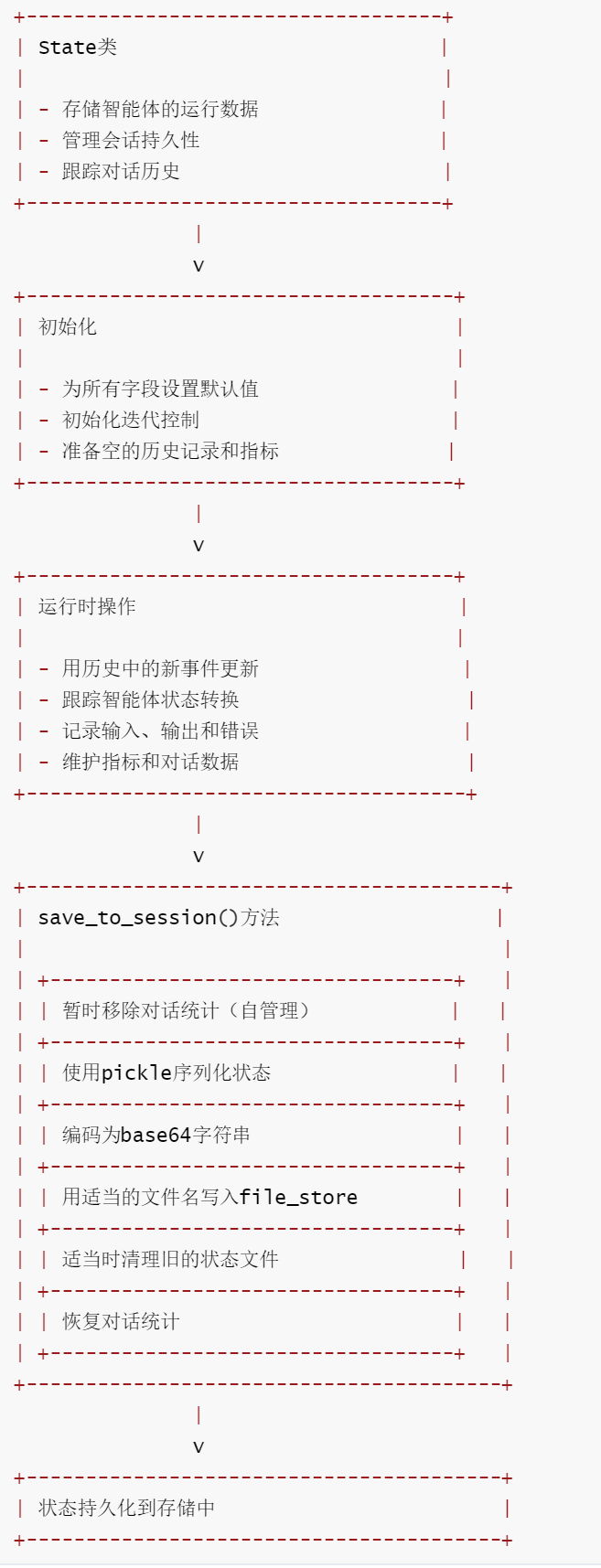
The State class serves as a comprehensive data container for tracking the operational state of agents in OpenHands systems. It maintains all the critical information needed for agent operation, evolution, and recovery from sessions, including dialogue history, operational metrics, iteration control, and error logging. The save_to_session method supports persistent storage of agent state, allowing sessions to be resumed and continuity maintained across different execution instances.
State plays a crucial role for agent tasks that need to run for a long time and whose states are constantly changing.
- First, it is the core basis for agent decision-making, especially the complete historical event record, which provides the agent with indispensable contextual information, making the decision-making no longer blind;
- Secondly, external systems (such as user interfaces or controllers) can manage the lifecycle of the Agent through
State, enabling operations such as pausing, resuming, and terminating; - More importantly,
Statecan be serialized and stored. When a task is interrupted unexpectedly, the system can load the storedStatedata and accurately resume the task from the breakpoint, perfectly solving the continuity problem of long-cycle tasks.
0x02 Agent System
2.1 Base Class
In fact, the simplest way to implement an AI Agent is to build a continuous loop of Reason, Act, and Observe based on ReAct.
Within the OpenHands technology framework, the Agent system, with its highly flexible modular architecture, enables the development and adaptation of diverse specialized Agents. The foundation of this design is an abstract base class called Agent – which acts as a “universal template” for all Agents. It not only specifies the core interfaces that must be implemented but also encapsulates the basic functionalities required by various Agents, ensuring compatibility between different Agents within the system.
All agents must adhere to Agent the base class’s specifications, with the methods being the core step(). These methods act as the agent’s “decision entry point,” receiving State input, processing it internally, and then outputting the result Action. This clear and concise interface design allows the system to easily integrate new agent implementations or switch between different agents, significantly improving scalability.
class Agent(ABC):
    DEPRECATED = False
    """
    This abstract base class is an general interface for an agent dedicated to
    executing a specific instruction and allowing human interaction with the
    agent during execution.
    It tracks the execution status and maintains a history of interactions.
    """

    _registry: dict[str, type['Agent']] = {}
    sandbox_plugins: list[PluginRequirement] = []

    config_model: type[AgentConfig] = AgentConfig
    """Class field that specifies the config model to use for the agent. Subclasses may override with a derived config model if needed."""

    def __init__(
        self,
        config: AgentConfig,
        llm_registry: LLMRegistry,
    ):
        self.llm = llm_registry.get_llm_from_agent_config('agent', config)
        self.llm_registry = llm_registry
        self.config = config
        self._complete = False
        self._prompt_manager: 'PromptManager' | None = None
        self.mcp_tools: dict[str, ChatCompletionToolParam] = {}
        self.tools: list = []

    @abstractmethod
    def step(self, state: 'State') -> 'Action':
        """Starts the execution of the assigned instruction. This method should
        be implemented by subclasses to define the specific execution logic.
        """
        pass
2.2 Agent Type
In OpenHands’ intelligent system, a variety of specialized agents are designed for different task scenarios. They are like “specialists” with clear division of labor, each carrying out a unique functional mission, and together supporting the system’s diverse capabilities.
CodeActAgent. As the core force of the system,CodeActAgentembodies the core philosophy ofCodeAct, unifying all actions at the code level and possessing extremely strong versatility. It is primarily responsible for handling various code-related tasks, capable of executing bash commands and running Python code. Its working principle is ingenious: it first provides detailed definitions of “tools” such as file reading and writing, and command execution to the large language model, and then, leveraging the model’s function call or tool call capabilities, allows the model to autonomously select the appropriate tool to complete the operation based on task requirements, making it a truly omnipotent “technical backbone” of the system.BrowsingAgent, focused on web page interaction tasks, acts like a professional web page operator. It passes the webpage’s accessibility tree as contextual information to the large language model, helping the model understand the webpage’s structure and layout. Simultaneously, it provides a series of webpage interaction actions such as clicking, filling out forms, and scrolling. The model analyzes the accessibility tree to formulate operation strategies, whichBrowsingAgentthen executes precisely and efficiently to complete webpage-related tasks.ReadOnlyAgentis a special agent that adheres to the “no modification principle.” Its core characteristic is that it is read-only, capable only of viewing operations, and will not perform any actions that could change the system state or modify the data. It plays an important role in scenarios that require ensuring system security and preventing accidental data modification.VisualBrowsingAgent, as a “visually enhanced version” ofBrowserAgent, possesses the ability to process visual information. It can not only understand the structure of a webpage but also recognize visual content such as images within it. For webpage tasks that require analyzing visual elements, such as recognizing information in images or performing operations based on visual layout, it demonstrates unique advantages.DummyAgentis a simple agent primarily used for testing. It acts as a “testing tool” for the system, allowing developers to verify its basic functionality and interaction logic. It also supports the development and debugging of other agents, playing a crucial supporting role in ensuring system stability.LocAgentimplementsLocAgent: Graph-Guided LLM Agents for Code Localization.LocAgentfirst parses the codebase into a heterogeneous graph representation, containing various types of code entities and their dependencies. Based on this, the system builds a hierarchical sparse index, which not only supports efficient content retrieval but also enables structured exploration. Using these indexes,LocAgentcombines the graph structure with tool interfaces to execute an agent-driven, step-by-step search process, thereby accurately locating code. This multi-hop reasoning approach allowsLocAgentto gradually approach the target code, achieving efficient code localization.
As the system’s “intelligent decision-maker,” each Agent’s core power comes from a Large Language Model (LLM). Its objective is clear: based on the complete context information of the current task (i.e., the State object), it determines and outputs the specific operation to be performed next Action. This design, which completely “packages” the decision-making logic within the Agent, is key to achieving system modularity—just as different specialized tools perform their respective functions, the Agent only needs to focus on its own decision-making task without interfering with other components. The existence of agenthub further enhances this system; it acts like an “Agent talent pool,” bringing together Agents with different professional skills. The system can flexibly select or delegate the appropriate Agent to handle specific task requirements.
Each Agent is designed as a loop. In each iteration, the agent.step() method is called, taking the state as input and outputting actions to perform operations or commands. After the actions are performed, observations may be received.
During implementation, each Agent class must implement the step and search_memory methods to execute commands and retrieve information from memory. This abstract class also provides helper methods such as reset, register, get_cls, and list_agents to help manage the Agent’s state and its registration information.
The simplest driving process for an Agent is as follows.
while True:
  prompt = agent.generate_prompt(state)
  response = llm.completion(prompt)
  action = agent.parse_response(response)
  observation = runtime.run(action)
  state = state.update(action, observation)
0x03 State
A State object is a collection of critical information that an Agent relies on when performing a task. It includes the following:
- The history of the actions taken by the agent, and the observations produced by these actions (such as file content, command output).
- The trajectory of a series of actions and observations since the most recent step.
- A plan object containing the main objective. Agents can add and modify subtasks using
AddTaskActionandModifyTaskAction.
3.1 Features
The main features of OpenHands State are as follows:
- Comprehensive state tracking : Captures all aspects of agent operations, from current state and dialogue history to performance metrics and error logs.
- Multi-agent support :
delegate_levelincludes delegation hierarchy tracking via parent metric snapshots for coordinating multi-agent operations. - Persistence mechanism : Provides reliable session saving through pickle serialization and base64 encoding, and handles backward compatibility with legacy state files.
- Operational control : Integrates iteration and budget control flags to manage resource usage and prevent infinite loops.
- Extensibility : Includes
extra_datafields for specific task information, making the class suitable for different use cases. - State transitions : Track the current state and the recovery state, and manage the lifecycle of the agent (LOADING, RUNNING, PAUSED, etc.).
- Historical management : Maintain event history and track relevant dialogue fragments through start/end indexes.
3.2 State Definition
3.2.1 State of OpenHands
State represents the running state of the agent in the OpenHands system, storing its operations and remembered data, and in fact aggregating all the information needed for the agent to make decisions:
- Multiple agent/delegation status:
- Storage task (dialogue between agent and user)
- Subtasks (dialogues between agents and users or other agents)
- Global and local iteration counts
- Number of delegation levels in multi-agent interactions
- Almost stuck
- Agent running status:
- Current agent status (e.g., loading, running, paused).
- Flow control state, used for rate limiting
- Confirmation mode
- Latest error encountered
- Save and restore agent data:
- Save and resume from session
- Use pickle and base64 serialization
- Save/restore data about message history:
- Start and end IDs of events in the proxy history
- Abstract and commissioned abstract
- index:
- Global metrics for the current task
- Local metrics of the current subtask
- Additional data:
- Additional task-specific data
The specific code is as follows.
@dataclass
class State:
    """表示OpenHands系统中智能体的运行状态,保存其操作和内存数据。"""

    session_id: str = ''  # 当前会话的唯一标识符
    user_id: Optional[str] = None  # 与会话相关联的用户标识符
    iteration_flag: IterationControlFlag = field(  # 控制迭代限制和进度
        default_factory=lambda: IterationControlFlag(
            limit_increase_amount=100, current_value=0, max_value=100
        )
    )
    conversation_stats: Optional[ConversationStats] = None  # 关于对话历史的统计信息
    budget_flag: Optional[BudgetControlFlag] = None  # 控制资源预算限制
    confirmation_mode: bool = False  # 智能体在执行操作前是否需要确认
    history: List[Event] = field(default_factory=list)  # 智能体操作中的事件记录
    inputs: Dict = field(default_factory=dict)  # 存储智能体的输入参数
    outputs: Dict = field(default_factory=dict)  # 存储智能体生成的输出结果
    agent_state: AgentState = AgentState.LOADING  # 智能体当前的运行状态
    resume_state: Optional[AgentState] = None  # 暂停后要返回的状态

    # 根智能体的层级为0,每个委托层级增加1
    delegate_level: int = 0  # 多智能体委托中的层级结构
    # start_id和end_id跟踪历史中事件的范围
    start_id: int = -1  # 历史中相关事件的起始索引
    end_id: int = -1  # 历史中相关事件的结束索引

    parent_metrics_snapshot: Optional[Metrics] = None  # 父智能体指标的快照
    parent_iteration: int = 100  # 来自父智能体的迭代计数

    # 注意:控制器使用此字段跟踪委托前父级的指标快照
    # 评估任务存储跟踪任务进度/状态所需的额外数据
    extra_data: Dict[str, Any] = field(default_factory=dict)  # 特定于任务的附加数据
    last_error: str = ''  # 最近遇到的错误记录

    # 注意:已弃用的参数,暂时保留以确保向后兼容性
    # 将在30天后移除
    iteration: Optional[int] = None  # 已弃用:使用iteration_flag替代
    local_iteration: Optional[int] = None  # 已弃用:本地迭代计数器
    max_iterations: Optional[int] = None  # 已弃用:最大迭代限制
    traffic_control_state: Optional[TrafficControlState] = None  # 已弃用:速率限制状态
    local_metrics: Optional[Metrics] = None  # 已弃用:使用metrics替代
    delegates: Optional[Dict[Tuple[int, int], Tuple[str, str]]] = None  # 已弃用:委托跟踪

    metrics: Metrics = field(default_factory=Metrics)  # 当前任务的性能指标

    def save_to_session(
        self, sid: str, file_store: FileStore, user_id: Optional[str]
    ) -> None:
        """将当前状态保存到持久存储中,以便以后检索。

        参数:
            sid: 与此状态相关联的会话ID
            file_store: 用于保存的存储系统
            user_id: 与此会话相关联的用户ID
        """
        # 暂时移除对话统计信息,因为它们自行处理持久性
        conversation_stats = self.conversation_stats
        self.conversation_stats = None

        # 序列化状态对象
        pickled = pickle.dumps(self)
        logger.debug(f'Saving state to session {sid}:{self.agent_state}')
        encoded = base64.b64encode(pickled).decode('utf-8')

        try:
            # 将编码后的状态写入文件存储
            file_store.write(
                get_conversation_agent_state_filename(sid, user_id), encoded
            )

            # 在SaaS/远程环境中清理旧的状态文件
            if user_id:
                old_filename = get_conversation_agent_state_filename(sid)
                try:
                    file_store.delete(old_filename)
                except Exception:
                    pass  # 删除旧文件时忽略错误
        except Exception as e:
            logger.error(f'Failed to save state to session: {e}')
            raise e
        finally:
            # 恢复对话统计信息引用
            self.conversation_stats = conversation_stats
3.2.2 Other Implementations
In other agent systems, state can also be implemented using a collection (dictionary or map) that stores key-value pairs. It stores the information the agent needs to remember or track to ensure the current conversation proceeds smoothly.
- Personalized interaction: Remember the user preferences mentioned earlier (e.g.,
user_preference_theme: 'dark'…). - Track task progress: Track steps in a multi-round process (e.g.,
booking_step: 'confirm_payment'…). - Accumulate information: Build lists or summaries (e.g.,
shopping_cart_items: ['book', 'pen']…). - Make informed decisions: Store flags or values that affect the next response (e.g.,
user_is_authenticated: True).
The prefixes on state keys define their scope and persistent behavior, especially for persistent services:
- No prefix (session state):
- Scope: Specific to the current session (
id). - Persistence: Persistence is only achieved if
SessionServiceis persistent (Database,VertexAI). - Use cases: Tracking progress in the current task (e.g., ‘current_booking_step’), and temporary markers for this interaction (e.g., ‘needs_clarification’).
- Example:
session.state['current_intent'] = 'book_flight'
- Scope: Specific to the current session (
user:Prefix (user status):- Scope: Bound to and shared across all
user_idsessions of that user (within the same scopeapp_name). - Persistence: Persistent in
DatabaseorVertexAI. (Stored byInMemorybut lost upon restart). - Use cases: User preferences (e.g., ‘user:theme’), profile details (e.g., ‘user:name’).
- Example:
session.state['user:preferred_language'] = 'fr'
- Scope: Bound to and shared across all
app:Prefix (application status):- Scope: Bound to and shared across all users and sessions
app_namewithin the application. - Persistence: Persistent in
DatabaseorVertexAI. (Stored byInMemorybut lost upon restart). - Use cases: Global settings (e.g., ‘app:api_endpoint’), shared templates.
- Example:
session.state['app:global_discount_code'] = 'SAVE10'
- Scope: Bound to and shared across all users and sessions
temp:Prefix (temporary session state):- Scope: Specific to the current session processing round.
- Persistence: Never persisted. Guaranteed to be discarded, even if a persistent service is used.
- Use cases: For intermediate results that are needed immediately, or for data that you explicitly do not want to store.
- Example:
session.state['temp:raw_api_response'] = {...}
The agent code interacts with the merged session.state state through a single set (dict/Map). It retrieves/merges the state from the correct underlying storage based on the prefix SessionService.
3.3 Life Cycle
The lifecycle of the State class is as follows:
openhands-5-1
3.4 Contact
The relationship between state and other components or data structures is as follows.
3.4.1 Relationship between State and AgentController
In AgentController._step(), the Agent obtains information through the State.
    async def _step(self) -> None:
        """Executes a single step of the parent or delegate agent. Detects stuck agents and limits on the number of iterations and the task budget."""
        if self.get_agent_state() != AgentState.RUNNING:
            self.log(
                'debug',
                f'Agent not stepping because state is {self.get_agent_state()} (not RUNNING)',
                extra={'msg_type': 'STEP_BLOCKED_STATE'},
            )
            return
3.4.2 The Relationship Between State and Observation/Action
An Observation updates the State. When an Environment returns an Observation, the Observation is added to the State history.
    def add_history(self, event: Event):
        # if the event is not filtered out, add it to the history
        if self.agent_history_filter.include(event):
            self.state.history.append(event)
The Agent generates an Action based on the current State.
action = self.agent.step(self.state)
Additionally, although the FooterContent component on the front end does not directly use State, the overall state management of the front end interface relies on the synchronization of Backend State -> WebSocket -> Frontend State -> UI Updates. The front end component updates the interface state and available operations based on the received State information.
3.4.3 State Sharing
State is divided into global state and local state. Global metrics are shared among delegates, for example…
    async def start_delegate(self, action: AgentDelegateAction) -> None:
        """启动一个委托智能体来处理子任务。

        OpenHands 是一个多智能体系统。`任务(task)` 指 OpenHands(整个系统)与用户之间的对话,
        可能包含用户的一个或多个输入。它始于用户的初始输入(通常是任务说明),结束于以下三种情况:
        智能体发起的 `AgentFinishAction`、用户发起的停止操作,或出现错误。

        `子任务(subtask)` 指智能体与用户之间,或智能体与其他智能体之间的对话。如果一个 `任务`
        由单个智能体执行,那么它同时也是一个 `子任务`。否则,一个 `任务` 由多个 `子任务` 组成,
        每个子任务由一个智能体执行。

        参数:
            action (AgentDelegateAction):包含要启动的委托智能体信息的动作对象
        """
        # 根据动作中指定的智能体类型获取对应的智能体类
        agent_cls: type[Agent] = Agent.get_cls(action.agent)
        # 获取该智能体的配置(优先使用动作指定的配置,否则使用当前智能体的配置)
        agent_config = self.agent_configs.get(action.agent, self.agent.config)
        # 确保父智能体与子智能体共享指标,以实现全局累积
        delegate_agent = agent_cls(
            config=agent_config, llm_registry=self.agent.llm_registry
        )

        # 在启动委托智能体前,对当前指标进行快照
        state = State(
            session_id=self.id.removesuffix('-delegate'),  # 会话ID(移除委托后缀)
            user_id=self.user_id,  # 关联的用户ID
            inputs=action.inputs or {},  # 子任务的输入参数(默认为空字典)
            iteration_flag=self.state.iteration_flag,  # 继承迭代控制标志
            budget_flag=self.state.budget_flag,  # 继承预算控制标志
            delegate_level=self.state.delegate_level + 1,  # 委托层级在父级基础上加1
            # 全局指标在父智能体与子智能体间共享
            metrics=self.state.metrics,
            # 从事件流的最新位置开始记录新事件
            start_id=self.event_stream.get_latest_event_id() + 1,
            # 记录委托前父智能体的指标快照
            parent_metrics_snapshot=self.state_tracker.get_metrics_snapshot(),
            # 记录父智能体当前的迭代次数
            parent_iteration=self.state.iteration_flag.current_value,
        )
Different levels of control use different flags, as shown in the code above:
self.state.iteration_flag # 全局迭代控制
self.state.budget_flag # 全局预算控制
3.5 Persistence and Recovery
OpenHands manages state persistence through StateTracker, supporting state recovery after session interruption and ensuring task continuity. For example, save_state saves the state to storage.
class StateTracker:
    """管理并同步智能体在其生命周期内的状态。

    它负责:
    1. 维持智能体状态在多个会话间的持久性
    2. 通过过滤和跟踪相关事件来管理智能体历史(以前由智能体控制器执行)
    3. 在控制器和LLM组件之间同步指标
    4. 更新预算和迭代限制的控制标志
    """

    def __init__(
        self, sid: str | None, file_store: FileStore | None, user_id: str | None
    ):
        self.sid = sid  # 会话ID,用于标识当前会话
        self.file_store = file_store  # 文件存储对象,用于持久化状态
        self.user_id = user_id  # 用户ID,关联到特定用户

        # 过滤掉与智能体无关的事件
        # 这些事件将不被包含在智能体历史中
        self.agent_history_filter = EventFilter(
            exclude_types=(
                NullAction,  # 排除空动作事件
                NullObservation,  # 排除空观察事件
                ChangeAgentStateAction,  # 排除更改智能体状态的动作事件
                AgentStateChangedObservation,  # 排除智能体状态已更改的观察事件
            ),
            exclude_hidden=True,  # 排除隐藏事件
        )
3.6 Summary
State plays the following key roles in the OpenHands system:
- Information Hub: Aggregates all information needed for decision-making
- Control Center: Manages iteration, budget, and other control processes.
- Memory carrier: Maintaining interaction history and context
- Coordination mechanism: Supports multi-agent delegation and state sharing
- Persistence foundation: supports session recovery and state preservation
- Interface bridge: Connecting backend logic and frontend presentation
State is the “brain” of the OpenHands system, ensuring the coherence and intelligent decision-making capabilities of the entire agent system.
0x04 Large Model Adapter (LLM Adapter)
Returning to the essence of AI Agent, it’s essentially Loop + Tokens . Let’s break it down:
- Loop : It’s essentially a cycle, analogous to how humans solve a problem by constantly trying until they find a solution. That’s a cycle, only the length of the cycle varies.
- Tokens : In the Loop, the large model continuously thinks, makes decisions, takes actions, and collects feedback information to continue planning and execution for the next time.
Therefore, the Large Language Model (LLM) is the “intelligent core” of OpenHands, and the design of using the LLM as a dynamic scheduler is the core implementation paradigm in the current AI Agent field. That is, the LLM is used as an active task planning and function call engine. This model brings two major advantages:
- Emerging capabilities : Because the execution plan is dynamically generated by the LLM, the agent can perform behaviors that the developer has never explicitly coded, and even autonomously decide to write and execute a script to complete the task.
- Reduced business logic complexity: Developers only need to continuously add atomic capability tools, while the complex business orchestration logic is left to the LLM to decide, thus reducing the overall code complexity.
This architectural paradigm frees the application’s capabilities from being limited by the developer’s pre-defined control flow. Instead, it depends on the AI’s dynamic combination and invocation of available tools at runtime, providing a referable implementation path for creating a general AI agent capable of handling complex, multi-step tasks and possessing a certain degree of autonomy.
The OpenHands framework achieves seamless integration with mainstream LLMs through its modular design, supporting both convenient access to cloud-based models and compatibility with privacy requirements for local deployments.
In terms of cloud integration, the OpenHands system provides a unified interface layer that encapsulates the API differences of platforms such as OpenAI, Azure, and Mistral AI. Developers only need to configure the corresponding API keys and model parameters, and the framework can automatically adapt to the input and output formats of different models, achieving “one-click switching.” The advantage of this design is that when a model becomes slow due to excessive load, the system can automatically switch to a backup model to ensure that the task is not interrupted; at the same time, it also allows developers to select the most suitable model according to the characteristics of the task (for example, using a model with strong code generation capabilities to handle programming tasks, and using a multimodal model to handle requirements involving text and images).
For scenarios with strict data privacy requirements (such as in the medical and financial fields), OpenHands supports deploying large local language models via Ollam. With just a server equipped with a GPU, developers can run the model in a private environment, completing all data processing locally and avoiding the risk of sensitive information being uploaded to the cloud. The framework automatically detects the computing power of the local GPU, recommends a suitable model version, and optimizes inference parameters to balance speed and accuracy.
4.1 LLM
4.1.1 Function
The LLM class is the core encapsulation class for language models in the OpenHands framework. It inherits from the retry mixin class RetryMixin and the debug mixin class DebugMixin, providing a unified interface for calling large language models. Its core responsibility is to integrate the multi-model adaptation capabilities of the LiteLLM tool, handling the entire process logic such as model configuration parsing, request parameter formatting, function call simulation, retry mechanism, logging, cost and latency statistics.
The LLM class provides a unified interface for various language models, supports more than 100 model providers through LiteLLM, and provides two major APIs: one is the standard dialogue completion API (Chat Completions API) to ensure broad compatibility, and the other is the OpenAI Responses API (Responses API) to adapt to the latest inference models.
- Native support for inference/extended thinking capabilities : The SDK can capture and process advanced native inference fields from cutting-edge models—such as the Extended Thinking field ThinkingBlock of the Anthropic model and the Inference field ReasoningItemModel of the OpenAI model. The SDK provides transparent support for the OpenAI Response API for agents, allowing client developers to directly use advanced inference models (such as GPT-5-Codex) that are only available through this API.
- Built-in support for non-function call models : For models that do not natively support function calls, the SDK implements the NonNativeToolCallingMixin hybrid class—which converts the tool schema into text-based prompts and parses the tool call instructions from the model output using structured prompts and regular expression extraction techniques. This design enables models without function call capabilities to perform agent tasks, significantly expanding the range of usable models.
- Multi-LLM routing support : The SDK includes RouterLLM (an LLM subclass), allowing agents to match different models for different LLM requests. Developers can extend RouterLLM and implement the select_llm() method to dynamically select the appropriate model based on the input, with the following adaptation criteria.
- Performance: Some models perform well in specific tasks (e.g., programming, reasoning, creative writing).
- Cost: Different models have different price points.
- Features: The model offers a variety of features, context window size, and fine-tuning options.
- Availability/Redundancy: Having alternatives ensures that the application can still function properly even if one provider has issues.
- Comprehensive engineering capabilities : Built-in retry mechanism (supports failure retry and latency strategy), request/response logging (can be persisted to a file), performance metric statistics (latency, cost), and also supports practical functions such as security settings and cache prompts.
- Flexible function call support : For models that do not natively support function calls, it provides simulation conversion capabilities based on prompt words; for models that support function calls, it automatically adapts their parameter formats, without requiring developers to worry about underlying differences.
- Configuration-driven : By
LLMConfiguniformly managing model parameters (temperature coefficient, maximum number of output tokens, API keys, etc.), it supports dynamic adjustment of model configuration to adapt to different scenario requirements.
4.1.2 Code
The code is as follows.
class LLM(RetryMixin, DebugMixin):
    """语言模型(LLM)实例的封装类,提供统一的模型调用接口。

    属性:
        config: LLMConfig 对象,存储模型的配置参数(如模型名称、API密钥、温度系数等)。
    """

    def __init__(
        self,
        config: LLMConfig,
        service_id: str,
        metrics: Metrics | None = None,
        retry_listener: Callable[[int, int], None] | None = None,
    ) -> None:
        """初始化 LLM 实例。若传入 LLMConfig,其参数将作为默认值;
        直接传入的简单参数会覆盖 config 中的对应配置。

        参数:
            config: 模型配置对象,包含模型调用所需的所有参数。
            service_id: 服务标识,用于关联当前 LLM 实例所属的服务。
            metrics: 指标统计对象,用于记录模型调用的延迟、成本等信息(可选)。
            retry_listener: 重试回调函数,每次重试时触发,接收(当前重试次数,总重试次数)作为参数(可选)。
        """
        # 标记是否已尝试获取模型信息
        self._tried_model_info = False
        # 标记是否支持成本统计指标
        self.cost_metric_supported: bool = True
        # 深拷贝配置对象,避免外部修改影响内部状态
        self.config: LLMConfig = copy.deepcopy(config)
        # 服务标识赋值
        self.service_id = service_id
        # 初始化指标统计对象(若未传入则创建默认实例)
        self.metrics: Metrics = (
            metrics if metrics is not None else Metrics(model_name=config.model)
        )

        # 模型信息(如支持的功能、参数限制等,后续通过 init_model_info 初始化)
        self.model_info: ModelInfo | None = None
        # 标记是否启用函数调用功能
        self._function_calling_active: bool = False
        # 重试回调函数赋值
        self.retry_listener = retry_listener

        # 处理日志记录配置:若启用日志记录,需确保日志文件夹存在
        if self.config.log_completions:
            if self.config.log_completions_folder is None:
                raise RuntimeError(
                    'log_completions_folder is required when log_completions is enabled'
                )
            # 创建日志文件夹(若已存在则不报错)
            os.makedirs(self.config.log_completions_folder, exist_ok=True)

        # 调用 init_model_info 初始化模型信息,核心是获取 config.max_output_tokens(后续函数调用需用到)
        # 忽略初始化过程中的警告信息
        with warnings.catch_warnings():
            warnings.simplefilter('ignore')
            self.init_model_info()

        # 打印调试日志:模型是否支持视觉能力
        if self.vision_is_active():
            logger.debug('LLM: model has vision enabled')
        # 打印调试日志:是否启用提示词缓存
        if self.is_caching_prompt_active():
            logger.debug('LLM: caching prompt enabled')
        # 打印调试日志:模型是否支持函数调用
        if self.is_function_calling_active():
            logger.debug('LLM: model supports function calling')

        # 处理自定义分词器:若配置了自定义分词器,按指定路径加载
        if self.config.custom_tokenizer is not None:
            self.tokenizer = create_pretrained_tokenizer(self.config.custom_tokenizer)
        else:
            self.tokenizer = None

        # 初始化模型调用的基础参数
        kwargs: dict[str, Any] = {
            'temperature': self.config.temperature,  # 温度系数,控制输出随机性
            'max_completion_tokens': self.config.max_output_tokens,  # 最大输出token数
        }

        # 若配置了 top_k,添加到参数中(OpenAI 不支持该参数,LiteLLM 会特殊处理)
        if self.config.top_k is not None:
            kwargs['top_k'] = self.config.top_k
        # 若配置了 top_p,添加到参数中(OpenAI 不支持该参数,但 LiteLLM 支持)
        if self.config.top_p is not None:
            kwargs['top_p'] = self.config.top_p

        # 处理 OpenHands 专属模型:重写为 LiteLLM 代理格式
        if self.config.model.startswith('openhands/'):
            model_name = self.config.model.removeprefix('openhands/')
            self.config.model = f'litellm_proxy/{model_name}'
            self.config.base_url = 'https://llm-proxy.app.all-hands.dev/'
            logger.debug(
                f'Rewrote openhands/{model_name} to {self.config.model} with base URL {self.config.base_url}'
            )

        # 获取当前模型支持的功能特性
        features = get_features(self.config.model)
        # 处理支持推理努力度(reasoning_effort)的模型
        if features.supports_reasoning_effort:
            # Gemini 模型特殊处理:仅将 'low'/'none' 映射为优化的思考预算
            if 'gemini-2.5-pro' in self.config.model:
                logger.debug(
                    f'Gemini model {self.config.model} with reasoning_effort {self.config.reasoning_effort}'
                )
                if self.config.reasoning_effort in {None, 'low', 'none'}:
                    kwargs['thinking'] = {'budget_tokens': 128}  # 思考预算设为 128 token
                    kwargs['allowed_openai_params'] = ['thinking']  # 允许传递 thinking 参数
                    kwargs.pop('reasoning_effort', None)  # 移除原 reasoning_effort 参数
                else:
                    kwargs['reasoning_effort'] = self.config.reasoning_effort
                logger.debug(
                    f'Gemini model {self.config.model} with reasoning_effort {self.config.reasoning_effort} mapped to thinking {kwargs.get("thinking")}'
                )
            # Claude Sonnet 4.5 不支持 reasoning_effort,直接移除该参数
            elif 'claude-sonnet-4-5' in self.config.model:
                kwargs.pop('reasoning_effort', None)
            # 其他支持的模型,直接传递 reasoning_effort 参数
            else:
                kwargs['reasoning_effort'] = self.config.reasoning_effort
            # 推理类模型不支持 temperature 和 top_p,移除这两个参数
            kwargs.pop('temperature')
            kwargs.pop('top_p')

        # 处理 Azure 模型的参数兼容问题(参考:https://github.com/All-Hands-AI/OpenHands/issues/6777)
        if self.config.model.startswith('azure'):
            kwargs['max_tokens'] = self.config.max_output_tokens  # Azure 用 max_tokens 而非 max_completion_tokens
            kwargs.pop('max_completion_tokens')

        # 为支持安全设置的模型添加安全配置
        if 'mistral' in self.config.model.lower() and self.config.safety_settings:
            kwargs['safety_settings'] = self.config.safety_settings
        elif 'gemini' in self.config.model.lower() and self.config.safety_settings:
            kwargs['safety_settings'] = self.config.safety_settings

        # 支持 AWS Bedrock 模型:添加 AWS 相关配置参数
        kwargs['aws_region_name'] = self.config.aws_region_name
        if self.config.aws_access_key_id:
            # 从密钥管理中获取 AWS 访问密钥
            kwargs['aws_access_key_id'] = (
                self.config.aws_access_key_id.get_secret_value()
            )
        if self.config.aws_secret_access_key:
            # 从密钥管理中获取 AWS 密钥
            kwargs['aws_secret_access_key'] = (
                self.config.aws_secret_access_key.get_secret_value()
            )

        # 禁用 Claude Opus 4.1 的 Anthropic 扩展思考功能(避免需要 'thinking' 内容块,参考:#10510)
        if 'claude-opus-4-1' in self.config.model.lower():
            kwargs['thinking'] = {'type': 'disabled'}

        # Anthropic 约束:Opus 4.1 不能同时接受 temperature 和 top_p,若两者都存在则优先保留 temperature
        _model_lower = self.config.model.lower()
        if ('claude-opus-4-1' in _model_lower) and (
            'temperature' in kwargs and 'top_p' in kwargs
        ):
            kwargs.pop('top_p', None)

        # 绑定 LiteLLM 完成函数,预设固定参数(通过 partial 固化模型配置)
        self._completion = partial(
            litellm.completion,  # LiteLLM 的核心完成函数
            model=self.config.model,  # 模型名称
            # API 密钥(若配置则从密钥管理中获取)
            api_key=self.config.api_key.get_secret_value()
            if self.config.api_key
            else None,
            base_url=self.config.base_url,  # 模型服务基础 URL
            api_version=self.config.api_version,  # API 版本(如 Azure 需指定)
            custom_llm_provider=self.config.custom_llm_provider,  # 自定义 LLM 提供商
            timeout=self.config.timeout,  # 超时时间
            drop_params=self.config.drop_params,  # 是否允许 LiteLLM 丢弃不支持的参数
            seed=self.config.seed,  # 随机种子(保证输出可复现)
            **kwargs,  # 上述拼接的动态参数
        )

        # 保存未包装的原始 completion 函数(用于内部调用)
        self._completion_unwrapped = self._completion

        # 为 completion 函数添加重试装饰器(继承自 RetryMixin)
        @self.retry_decorator(
            num_retries=self.config.num_retries,  # 最大重试次数
            retry_exceptions=LLM_RETRY_EXCEPTIONS,  # 触发重试的异常类型
            retry_min_wait=self.config.retry_min_wait,  # 最小重试等待时间
            retry_max_wait=self.config.retry_max_wait,  # 最大重试等待时间
            retry_multiplier=self.config.retry_multiplier,  # 重试等待时间倍增系数
            retry_listener=self.retry_listener,  # 重试回调函数
        )
        def wrapper(*args: Any, **kwargs: Any) -> Any:
            """LiteLLM 完成函数的包装器,负责:
            1. 解析输入消息(处理 Message 对象与字典格式的转换)
            2. 模拟函数调用(对不支持函数调用的模型)
            3. 日志记录(输入提示词、输出响应)
            4. 性能指标统计(延迟、成本)
            5. 响应格式转换与异常处理
            """
            # 延迟导入以避免循环依赖
            from openhands.io import json

            # 初始化消息参数(存储用户传入的消息)
            messages_kwarg: (
                dict[str, Any] | Message | list[dict[str, Any]] | list[Message]
            ) = []
            # 标记是否需要模拟函数调用(模型不支持原生函数调用时为 True)
            mock_function_calling = not self.is_function_calling_active()

            # 处理位置参数:部分调用者可能直接传入 (model, messages, **kwargs)
            if len(args) > 1:
                # 忽略第一个参数(模型名称,已通过 partial 固化)
                # 设计原则:不允许覆盖已配置的模型参数
                messages_kwarg = args[1] if len(args) > 1 else args[0]
                kwargs['messages'] = messages_kwarg

                # 移除前两个位置参数(已转换为关键字参数)
                args = args[2:]
            # 处理关键字参数:若已传入 messages 则直接赋值
            elif 'messages' in kwargs:
                messages_kwarg = kwargs['messages']

            # 确保消息为列表格式(统一处理单条/多条消息)
            messages_list = (
                messages_kwarg if isinstance(messages_kwarg, list) else [messages_kwarg]
            )
            # 格式化消息:将 Message 对象转换为模型可识别的字典格式
            messages: list[dict] = []
            if messages_list and isinstance(messages_list[0], Message):
                messages = self.format_messages_for_llm(
                    cast(list[Message], messages_list)
                )
            else:
                messages = cast(list[dict[str, Any]], messages_list)

            # 更新 kwargs 中的 messages 为格式化后的结果
            kwargs['messages'] = messages

            # 保存原始函数调用相关消息(用于后续日志记录)
            original_fncall_messages = copy.deepcopy(messages)
            mock_fncall_tools = None
            # 若需要模拟函数调用且传入了工具配置,转换消息格式
            if mock_function_calling and 'tools' in kwargs:
                # 标记是否添加上下文学习示例(部分模型不需要)
                add_in_context_learning_example = True
                if (
                    'openhands-lm' in self.config.model
                    or 'devstral' in self.config.model
                ):
                    add_in_context_learning_example = False

                # 将函数调用格式的消息转换为普通文本提示(模拟函数调用)
                messages = convert_fncall_messages_to_non_fncall_messages(
                    messages,
                    kwargs['tools'],
                    add_in_context_learning_example=add_in_context_learning_example,
                )
                kwargs['messages'] = messages

                # 若模型支持停止词且未禁用,添加默认停止词
                if (
                    get_features(self.config.model).supports_stop_words
                    and not self.config.disable_stop_word
                ):
                    kwargs['stop'] = STOP_WORDS

                # 移除 tools 参数(模拟调用时不需要传递)
                mock_fncall_tools = kwargs.pop('tools')
                # OpenHands 自研模型特殊处理:禁用工具调用
                if 'openhands-lm' in self.config.model:
                    kwargs['tool_choice'] = 'none'
                else:
                    # 其他模型:移除 tool_choice 参数(模拟调用时不支持)
                    kwargs.pop('tool_choice', None)

            # 校验消息非空:无消息则抛出异常
            if not messages:
                raise ValueError(
                    'The messages list is empty. At least one message is required.'
                )

            # 记录 LLM 输入提示词日志
            self.log_prompt(messages)

            # 设置 LiteLLM 是否允许修改参数(默认允许,如为空消息添加默认内容)
            # 注意:该设置为全局,无法通过 partial 覆盖
            litellm.modify_params = self.config.modify_params

            # 非 LiteLLM 代理模型:移除 extra_body 参数(仅代理模型支持)
            if 'litellm_proxy' not in self.config.model:
                kwargs.pop('extra_body', None)

            # 记录调用开始时间(用于计算延迟)
            start_time = time.time()

            # 抑制 LiteLLM 调用过程中 httpx 库的弃用警告
            # 避免出现 "Use 'content=<...>' to upload raw bytes/text content" 警告
            with warnings.catch_warnings():
                warnings.filterwarnings(
                    'ignore', category=DeprecationWarning, module='httpx.*'
                )
                warnings.filterwarnings(
                    'ignore',
                    message=r'.*content=.*upload.*',
                    category=DeprecationWarning,
                )
                # 调用原始 completion 函数(非流式,返回 ModelResponse 对象)
                resp: ModelResponse = self._completion_unwrapped(*args, **kwargs)

            # 计算调用延迟并记录到指标中
            latency = time.time() - start_time
            response_id = resp.get('id', 'unknown')  # 获取响应 ID(无则设为 'unknown')
            self.metrics.add_response_latency(latency, response_id)  # 记录延迟指标

            # 深拷贝原始响应(用于模拟函数调用场景的日志记录)
            non_fncall_response = copy.deepcopy(resp)

            # 若启用了函数调用模拟且存在工具配置,将响应转换回函数调用格式
            if mock_function_calling and mock_fncall_tools is not None:
                # 校验响应是否包含有效选项(Gemini 模型曾出现无选项的情况)
                if len(resp.choices) < 1:
                    raise LLMNoResponseError(
                        'Response choices is less than 1 - This is only seen in Gemini models so far. Response: '
                        + str(resp)
                    )

                # 获取非函数调用格式的响应消息
                non_fncall_response_message = resp.choices[0].message
                # 将 "原始消息 + 非函数调用响应" 转换为函数调用格式的响应
                fn_call_messages_with_response = (
                    convert_non_fncall_messages_to_fncall_messages(
                        messages + [non_fncall_response_message], mock_fncall_tools
                    )
                )
                # 提取转换后的函数调用响应消息
                fn_call_response_message = fn_call_messages_with_response[-1]
                # 确保响应消息为 LiteLLMMessage 类型(若为字典则转换)
                if not isinstance(fn_call_response_message, LiteLLMMessage):
                    fn_call_response_message = LiteLLMMessage(
                        **fn_call_response_message
                    )
                # 更新响应中的消息为函数调用格式
                resp.choices[0].message = fn_call_response_message

            # 二次校验响应有效性:确保 choices 非空且至少有一个选项
            if not resp.get('choices') or len(resp['choices']) < 1:
                raise LLMNoResponseError(
                    'Response choices is less than 1 - This is only seen in Gemini models so far. Response: '
                    + str(resp)
                )

            # 记录 LLM 响应日志
            self.log_response(resp)

            # 响应后处理:计算调用成本(如 token 消耗对应的费用)
            cost = self._post_completion(resp)

            # 若启用响应日志持久化,将请求/响应数据写入文件
            if self.config.log_completions:
                # 断言日志文件夹已配置(初始化时已校验,此处防止异常)
                assert self.config.log_completions_folder is not None
                # 构造日志文件名:模型名_时间戳.json(替换 '/' 为 '__' 避免路径错误)
                log_file = os.path.join(
                    self.config.log_completions_folder,
                    f'{self.config.model.replace("/", "__")}-{time.time()}.json',
                )

                # 构造日志数据字典
                _d = {
                    'messages': messages,  # 实际发送给模型的消息(可能是模拟函数调用格式)
                    'response': resp,      # 模型响应(可能是转换后的函数调用格式)
                    'args': args,          # 调用时的位置参数
                    'kwargs': {            # 调用时的关键字参数(过滤敏感/冗余字段)
                        k: v
                        for k, v in kwargs.items()
                        if k not in ('messages', 'client')
                    },
                    'timestamp': time.time(),  # 调用时间戳
                    'cost': cost,              # 调用成本(token 费用)
                }

                # 若启用了函数调用模拟,额外记录原始函数调用格式的消息和响应
                if mock_function_calling:
                    # 覆盖 response 为非函数调用格式(与 messages 保持一致)
                    _d['response'] = non_fncall_response
                    # 新增字段记录原始函数调用格式数据
                    _d['fncall_messages'] = original_fncall_messages
                    _d['fncall_response'] = resp

                # 将日志数据写入文件(JSON 格式)
                with open(log_file, 'w') as f:
                    f.write(json.dumps(_d))

            # 返回最终处理后的模型响应
            return resp

        # 将包装后的函数赋值给 _completion,后续通过该属性调用模型
        self._completion = wrapper
4.2 LLMRegistry
4.2.1 Function
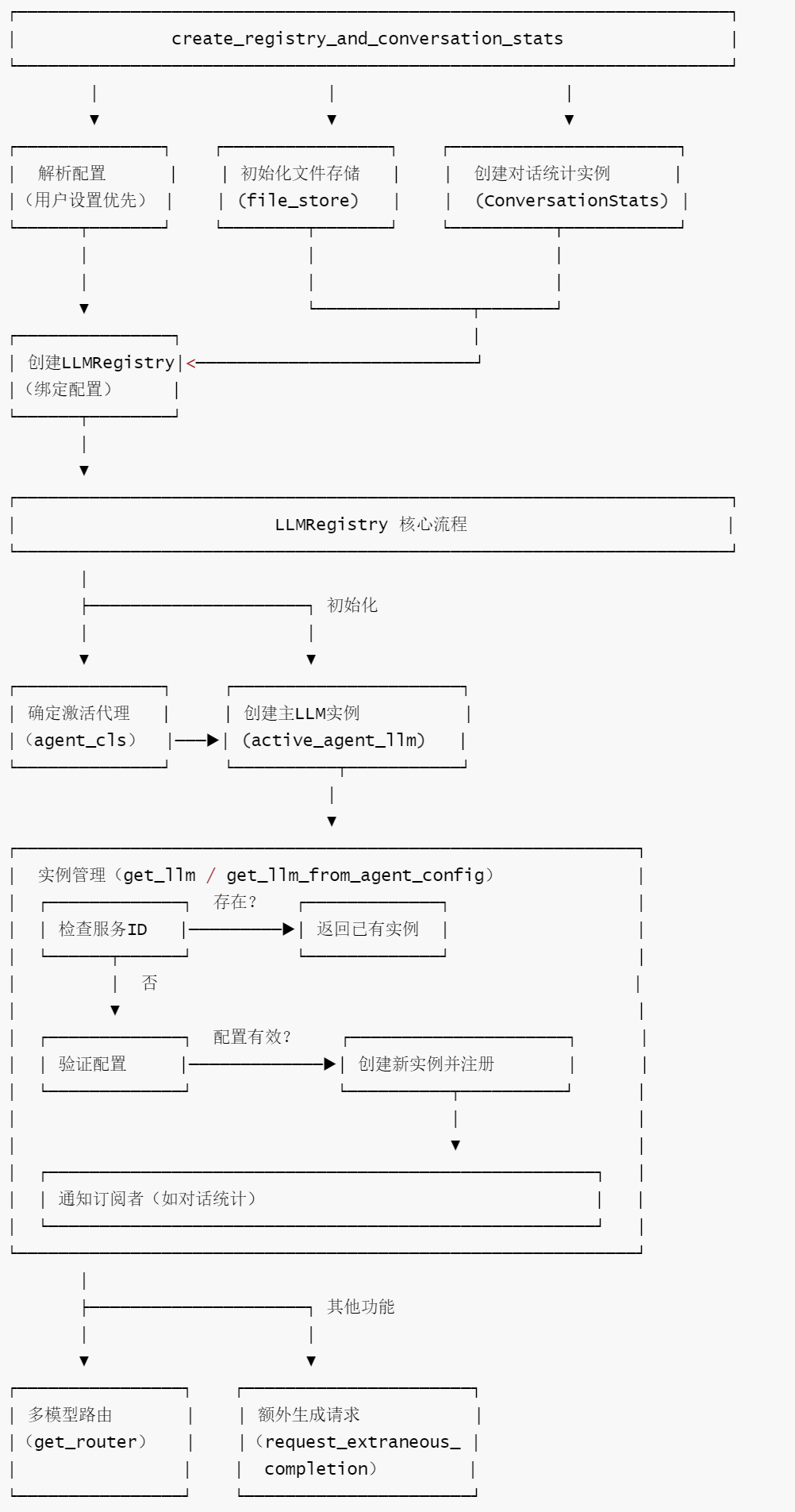
LLMRegistry is the core component in the OpenHands framework for managing LLM instances, responsible for the centralized creation, reuse, and monitoring of all LLM resources. Together with create_registry_and_conversation_stats, it builds a complete chain from configuration resolution to instance management, ensuring efficient utilization of LLM resources and consistent configuration. The functions of LLMRegistry are as follows.
- Centralized instance management : Track all LLM instances through
service_to_llmmapping table to avoid duplicate creation and reduce resource consumption; strictly check the configuration consistency of the same service ID to prevent conflicts. - Flexible instance retrieval mechanism :
-
- Supports directly obtaining or creating an LLM using a service ID
get_llm.
- Supports directly obtaining or creating an LLM using a service ID
-
- Supports automatic derivation of LLM configuration from agent configuration (
get_llm_from_agent_config)
- Supports automatic derivation of LLM configuration from agent configuration (
-
- Support for temporarily supplementing and generating requirements (
request_extraneous_completion)
- Support for temporarily supplementing and generating requirements (
- Multi-model routing support : Through
get_routermethod integration withRouterLLM, dynamic model selection based on agent configuration is achieved, flexibly responding to the needs of complex tasks for different models. - Event-driven scalability : Provides
subscribemechanisms andnotifyso external components (such asConversationStats) can subscribe to LLM registration events, easily extending functionality such as statistics and monitoring. - Configuration isolation and security : Through deep copy configuration and strict instance creation logic, we ensure that the LLM configurations of different services are isolated from each other, and prevent external modifications from interfering with the internal state.
- Adapt to user-specific settings : Combined with
create_registry_and_conversation_statsfunctions, it supports overriding default configurations through user settings, balancing generality and personalization needs.
4.2.2 Workflow
openhands-5-2
4.2.3 Code
The code for LLMRegistry is as follows:
class LLMRegistry:
    """
    LLM注册表:管理所有LLM实例的生命周期、配置和事件通知的核心组件。

    作用:
    - 集中管理多个LLM实例,避免重复创建
    - 确保同一服务ID的LLM配置一致性
    - 支持事件订阅(如统计、监控)
    - 提供路由LLM(RouterLLM)的创建能力
    """
    def __init__(
        self,
        config: OpenHandsConfig,
        agent_cls: Optional[str] = None,
        retry_listener: Optional[Callable[[int, int], None]] = None,
    ):
        self.registry_id = str(uuid4())  # 注册表唯一标识
        self.config = copy.deepcopy(config)  # 深拷贝配置,避免外部修改影响
        self.retry_listener = retry_listener  # 重试事件监听器(可选)
        # 构建代理到LLM配置的映射(从全局配置中提取)
        self.agent_to_llm_config = self.config.get_agent_to_llm_config_map()
        self.service_to_llm: dict[str, LLM] = {}  # 服务ID到LLM实例的映射
        self.subscriber: Optional[Callable[[Any], None]] = None  # 事件订阅者(如统计器)

        # 确定当前激活的代理类型(用户指定优先,否则使用默认)
        selected_agent_cls = self.config.default_agent
        if agent_cls:
            selected_agent_cls = agent_cls

        # 基于代理类型获取对应的LLM配置
        agent_name = selected_agent_cls if selected_agent_cls is not None else 'agent'
        llm_config = self.config.get_llm_config_from_agent(agent_name)
        # 初始化并激活代理的主LLM实例
        self.active_agent_llm: LLM = self.get_llm('agent', llm_config)

    def _create_new_llm(
        self, service_id: str, config: LLMConfig, with_listener: bool = True
    ) -> LLM:
        """
        内部方法:创建新的LLM实例并注册到注册表中。

        参数:
            service_id: 服务唯一标识(用于区分不同LLM实例)
            config: LLM配置
            with_listener: 是否绑定重试监听器

        返回:
            新创建的LLM实例
        """
        # 根据是否需要监听器,初始化LLM
        if with_listener:
            llm = LLM(
                service_id=service_id, config=config, retry_listener=self.retry_listener
            )
        else:
            llm = LLM(service_id=service_id, config=config)

        # 记录到映射表中
        self.service_to_llm[service_id] = llm
        # 通知订阅者(如统计器)有新LLM注册
        self.notify(RegistryEvent(llm=llm, service_id=service_id))
        return llm

    def request_extraneous_completion(
        self, service_id: str, llm_config: LLMConfig, messages: list[dict[str, str]]
    ) -> str:
        """
        请求额外的LLM生成(用于非主流程的补充生成需求)。

        参数:
            service_id: 服务ID
            llm_config: 对应的LLM配置
            messages: 输入消息列表(格式:[{role: ..., content: ...}, ...])

        返回:
            LLM生成的文本内容(去除首尾空白)
        """
        # 若服务ID未注册,则创建新LLM(不绑定监听器,适用于临时任务)
        if service_id not in self.service_to_llm:
            self._create_new_llm(
                config=llm_config, service_id=service_id, with_listener=False
            )

        # 获取LLM实例并执行生成
        llm = self.service_to_llm[service_id]
        response = llm.completion(messages=messages)
        return response.choices[0].message.content.strip()

    def get_llm_from_agent_config(self, service_id: str, agent_config: AgentConfig):
        """
        根据代理配置获取对应的LLM实例(支持复用已有实例)。

        参数:
            service_id: 服务ID
            agent_config: 代理配置对象

        返回:
            匹配的LLM实例
        """
        # 从代理配置中提取LLM配置
        llm_config = self.config.get_llm_config_from_agent_config(agent_config)
        # 若实例已存在,直接返回(配置不一致时暂不处理,预留更新逻辑)
        if service_id in self.service_to_llm:
            if self.service_to_llm[service_id].config != llm_config:
                # TODO: 未来支持动态更新LLM配置
                # 当代理委托的配置不同时,应复用现有LLM
                pass
            return self.service_to_llm[service_id]

        # 实例不存在则创建新的
        return self._create_new_llm(config=llm_config, service_id=service_id)

    def get_llm(
        self,
        service_id: str,
        config: Optional[LLMConfig] = None,
    ) -> LLM:
        """
        获取或创建指定服务ID的LLM实例(核心方法)。

        参数:
            service_id: 服务唯一标识
            config: LLM配置(新实例必需)

        返回:
            对应的LLM实例

        异常:
            ValueError: 同一服务ID配置不一致,或创建新实例时无配置
        """
        # 检查同一服务ID的配置是否一致(防止冲突)
        if (
            service_id in self.service_to_llm
            and self.service_to_llm[service_id].config != config
        ):
            raise ValueError(
                f"Service ID {service_id} requested with different config. Use a new service ID."
            )

        # 实例已存在则直接返回
        if service_id in self.service_to_llm:
            return self.service_to_llm[service_id]

        # 新实例必须提供配置
        if not config:
            raise ValueError("Cannot create new LLM without specifying config.")

        # 创建并返回新实例
        return self._create_new_llm(config=config, service_id=service_id)

    def get_active_llm(self) -> LLM:
        """返回当前激活的代理主LLM实例"""
        return self.active_agent_llm

    def get_router(self, agent_config: AgentConfig) -> LLM:
        """
        获取路由LLM实例(用于多模型路由选择)。

        参数:
            agent_config: 代理配置(包含路由规则)

        返回:
            路由LLM实例(RouterLLM)或主LLM(当路由为noop时)
        """
        # 从代理配置中获取路由名称
        router_name = agent_config.model_routing.router_name

        # 若为"noop_router"(无操作路由),直接返回主LLM
        if router_name == 'noop_router':
            return self.get_llm_from_agent_config('agent', agent_config)

        # 否则创建并返回路由LLM实例
        return RouterLLM.from_config(
            agent_config=agent_config,
            llm_registry=self,
            retry_listener=self.retry_listener,
        )

    def subscribe(self, callback: Callable[[RegistryEvent], None]) -> None:
        """
        订阅注册表事件(如新LLM创建)。

        参数:
            callback: 事件触发时的回调函数
        """
        self.subscriber = callback

        # 订阅后,立即通知已存在的主LLM实例(补报历史事件)
        self.notify(
            RegistryEvent(
                llm=self.active_agent_llm,
                service_id=self.active_agent_llm.service_id
            )
        )

    def notify(self, event: RegistryEvent) -> None:
        """
        通知订阅者事件发生(如LLM注册)。

        参数:
            event: 注册表事件对象
        """
        if self.subscriber:
            try:
                self.subscriber(event)
            except Exception as e:
                logger.warning(f"Failed to notify subscriber of event: {e}")
0xFF Reference
- https://docs.all-hands.dev/openhands/usage/architecture/backend
- As AI agents evolve from “toys” to “tools,” what should we focus on? Openhands Architecture Analysis [Part 2: Core Concepts Related to Agents] by Kerry
- As AI agents evolve from “toys” to “tools,” what should we focus on? Openhands Architecture Analysis [Part 1: Series Introduction] by Kerry
- Coding Agent Openhands Analysis (with code) Arrow
- OpenHands Source Code Analysis by Yi Lihui
- Google Agent White Paper Analysis
- Agent Development Practice: From Idea to Product – Overcoming Key Technologies in SSE, Context Engineering, and Streaming Parsing
- Agent Development Practices: From Idea to Product – System Architecture Design Practices