Exploring AI Agent Frameworks: Deconstructing OpenHands (6) --- Event System
0x00 Summary
If the ReAct paradigm is the “brain thinking mode” of the agent, then the event-driven architecture is the “neural network” of the agent system. It uses a publish-subscribe pattern to coordinate the efficient operation of various components in a decentralized manner, allowing loosely coupled communication between components. The core of the entire system is not rigid synchronous calls, but an “event stream” that carries all key activities. All kinds of core operations in the system are abstracted into standardized “events”.
In OpenHands, EventStream is responsible for managing events triggered in the session, as well as registering event callback functions in the event registration function’s callback list. For example:
Runtimeregistration: Only receivesActionevents and interacts with the runtime.AgentControllerregistration: Registers and updates Agent status based on events.main: Used when evaluating agent performance via command line, and to receive agent status change events.
Because this series draws on a large number of articles, there may be some articles missing from the references. If so, please point them out.
0x01 EventStream
To understand how the entire program works, you must first understand the event system, which acts like an information superhighway through the program, allowing different parts to exchange information. The core of the OpenHands event system is the EventStream class (event stream system), a system specifically designed for handling events. Its core function is to maintain event queues and support event publishing and subscription, as well as managing and distributing events. This event-driven architecture enables OpenHands to handle asynchronous operations and support collaboration between multiple agents.
The code implementation of OpenHands is relatively simple; the key is understanding its working principle. The main steps include:
- Start a looping thread that reads events from the event queue and sends them one by one to the processing queue of each subscribed module.
- When a module needs to subscribe to an event, it calls a subscription function
subscribe, and the event stream maintains a thread pool for that module. All events sent to that module will be processed by the corresponding callback function. - Whenever an event needs to be added to the event stream, a function to add the event is called
add_event.
Although the logic of event flow is simple, it ensures the independence between different parts of the program and the consistency of communication. The messages here are all events, and are divided into two types:
Action: Refers to the task that needs to be performed.Observation: Refers to the environment’s response to the results of task execution.
The diagram below illustrates the core mechanism of agent-environment interaction in OpenHands: the agent influences the environment by performing actions, the environment provides feedback to the agent through observations, and the agent makes its next decision based on this feedback.
- The Agent decides to perform an action, which is then passed to the Runtime via the AgentController and EventStream.
- The runtime performs this action in the environment.
- The environment produces an observation as the execution result.
- The runtime captures this observation and sends it to the EventStream.
- The EventStream stores the observation results, and then notifies the Agent through the AgentController.
- The agent retrieves the updated history (including new observations).
- The agent uses the observations to make the next decision.
- Repeat in a loop.

1.1 Functions
The functions of EventStream are as follows:
- Event subscription and notification mechanism.
- Multiple subscriber support: Multiple subscriber types are defined through the
EventStreamSubscriberenumeration. - Flexible subscription mechanism: Use the
subscribeandunscribemethods to manage subscription relationships. - Multiple callback support: Each subscriber can register multiple callback functions, which can be distinguished by
callback_id.
- Multiple subscriber support: Multiple subscriber types are defined through the
- Event handling and distribution.
- Asynchronous queue processing: Use
queue.Queueand a separate thread to process the event queue. - Thread pool execution: Create an independent thread pool for each subscriber’s callback function to avoid blocking.
- Sequential distribution: Events are distributed to subscribers in the order of their subscriber IDs.
- Asynchronous queue processing: Use
- Event storage and persistence.
- Event ID management: Assign a unique ID to each event and maintain an incrementing counter.
- Timestamp recording: Automatically adds timestamps to events.
- File storage: Persist events to the file system in JSON format.
- Page caching mechanism: Use page caching to improve the read and write performance of a large number of events.
- Workflow:
- The component registers as an event subscriber using the
subscribemethod. - When an event occurs, it is added to the event stream using the
add_eventmethod. - The
add_eventmethod handles event ID assignment, timestamp setting, and persistent storage. - Events are placed in a processing queue and dispatched asynchronously by a separate thread.
- The
_process_queuedispatches callback functions that sequentially distribute events to all subscribers.
- The component registers as an event subscriber using the
This design makes EventStream the core event hub of the system, enabling decoupling and asynchronous communication between components.
1.2 Implementation
The relevant code for EventStream is as follows:
class EventStream(EventStore):
    secrets: dict[str, str]
    # For each subscriber ID, there is a map of callback functions - useful
    # when there are multiple listeners
    _subscribers: dict[str, dict[str, Callable]]
    _lock: threading.Lock
    _queue: queue.Queue[Event]
    _queue_thread: threading.Thread
    _queue_loop: asyncio.AbstractEventLoop | None
    _thread_pools: dict[str, dict[str, ThreadPoolExecutor]]
    _thread_loops: dict[str, dict[str, asyncio.AbstractEventLoop]]
    _write_page_cache: list[dict]

    def __init__(self, sid: str, file_store: FileStore, user_id: str | None = None):
        super().__init__(sid, file_store, user_id)
        self._stop_flag = threading.Event()
        self._queue: queue.Queue[Event] = queue.Queue()
        self._thread_pools = {}
        self._thread_loops = {}
        self._queue_loop = None
        self._queue_thread = threading.Thread(target=self._run_queue_loop)
        self._queue_thread.daemon = True
        self._queue_thread.start()
        self._subscribers = {}
        self._lock = threading.Lock()
        self.secrets = {}
        self._write_page_cache = []

    def _init_thread_loop(self, subscriber_id: str, callback_id: str) -> None:
        loop = asyncio.new_event_loop()
        asyncio.set_event_loop(loop)
        if subscriber_id not in self._thread_loops:
            self._thread_loops[subscriber_id] = {}
        self._thread_loops[subscriber_id][callback_id] = loop
1.3 Subscription
The execution of any complex task relies on accurate perception and real-time response to state changes. OpenHands adopts the observer pattern as the core mechanism for task scheduling. Its design is inspired by the real-world “command-reconnaissance” system. Just as a commander on the battlefield needs scouts to relay frontline dynamics in real time, the scheduling center in the framework also relies on distributed “state observers” to keep track of the progress of each task.
Specifically, the system breaks down tasks into a series of monitorable “state nodes,” each equipped with a dedicated observer instance. When the state of a node changes (for example, from “pending execution” to “execution,” or from “success” to “failure”), the observer immediately triggers pre-defined callback logic, notifying the scheduling center to proceed with the next step. This design brings two core advantages:
- This achieves “loose coupling” in task scheduling. The scheduling center does not need to actively query the status of each task, but passively receives status change notifications. This significantly reduces the dependencies between modules in the system, so that adding new task types or modifying scheduling logic does not require rebuilding the entire framework.
- Dynamic priority adjustment is supported. When a high-urgency task is inserted, the observer can capture this event in real time, triggering the priority reordering mechanism of the scheduling center to suspend resource allocation for low-priority tasks and ensure that critical tasks are executed first. This flexibility is especially important in scenarios with multiple projects running in parallel.
In this architecture, all components act as either “producers” or “consumers.” Producers are responsible for generating events: “action events” are generated after the agent makes a decision, and “feedback events” are generated after the runtime environment executes tasks. Consumers obtain information and respond by subscribing to specific events: the runtime subscribes to “action events” to execute specific tasks, and the controller subscribes to all events to maintain the system state. This event-based interaction model completely breaks down direct dependencies between components.
The event flow resembles a circular elevated highway. Once any vehicle (event) enters, it is diverted by parallel ramps to several tollbooths: Session, Runtime, Memory, AgentController, and so on. Each tollbooth receives its own “pass” (Subscriber identifier) and simultaneously checks, charges, or records the same vehicle without waiting for the previous tollbooth to allow passage.
1.3.1 Subscribers
The functions of _subscribers and subscriber_id are as follows.
The subscriber_id uniquely identifies a subscriber, and each subscriber represents a different component or service within the system. Different subscribers handle events, such as:
EventStreamSubscriber.SERVER: Server processing.EventStreamSubscriber.RUNTIME: Runtime processing.EventStreamSubscriber.AGENT_CONTROLLER: Agent controller handling.
class EventStreamSubscriber(str, Enum):
    AGENT_CONTROLLER = 'agent_controller'
    RESOLVER = 'openhands_resolver'
    SERVER = 'server'
    RUNTIME = 'runtime'
    MEMORY = 'memory'
    MAIN = 'main'
    TEST = 'test'
Several major modules complete their initialization and preparation work within __init__ functions, subscribe to messages in the event stream, and register their respective message handling functions. The event callback function will perform state transitions in the state machine based on the current event.
- The runtime subscribes to
EventStreamSubscriber.RUNTIMEin the event stream. Event callback functions handle actions that the runtime needs to process, such as mcp/tool, etc.Runtimeonly processes runnableActionevents, executes the action, gets the output, wraps anObservation, and sends it back to the event stream.isinstance(event, MCPAction)executes MCP to get the result, and other runtime-supported actions are also executed to get results. - Memory subscribes to
EventStreamSubscriber.MEMORYin the event stream. The event callback function generatesmicroagent_knowledgebased on the current input and addsRecallObservationback to the event stream withENVIRONMENTas source. Thismicroagent_knowledgeis a method for enhancing specific prompt words.Memoryonly processesRecallActionuser input. For first input, extra workspace context is added toRecallObservation; for subsequent inputs,microagent_knowledgeis added toRecallObservation. - The AgentController subscribes to
EventStreamSubscriber.AGENT_CONTROLLERin the event stream.AgentControllerserves as the primary state management module.Observation: state transition based on events.Action: state transition and further processing.- For
MessageAction, sendRecallActionto the event stream. - For
AgentDelegateAction, do Agent routing (explained later). - Decide whether to call
agent.stepbased on the current event.
- For
run_controllersubscribes toEventStreamSubscriber.MAINin the event stream.WebSessionandConversationManagersubscribe toEventStreamSubscriber.SERVER.
1.3.2 Distribution
A user sends a message, adding it to the message stream. The system uses the subscriber_id to determine which subscribers should receive this type of event. This message is then broadcast to every message channel, and registered callback functions can be used to analyze which modules processed the message.
    async def _process_queue(self) -> None:
        while should_continue() and not self._stop_flag.is_set():
            event = None
            try:
                event = self._queue.get(timeout=0.1)
            except queue.Empty:
                continue

            # pass each event to each callback in order
            for key in sorted(self._subscribers.keys()):  # 此处会决定分发到哪里
                callbacks = self._subscribers[key]
                # Create a copy of the keys to avoid "dictionary changed size during iteration" error
                callback_ids = list(callbacks.keys())
                for callback_id in callback_ids:
                    # Check if callback_id still exists (might have been removed during iteration)
                    if callback_id in callbacks:
                        callback = callbacks[callback_id]
                        pool = self._thread_pools[key][callback_id]
                        future = pool.submit(callback, event)
                        future.add_done_callback(
                            self._make_error_handler(callback_id, key)
                        )
1.3.3 Resource Management
subscriber_id helps the system manage resources for each subscriber.
    def _clean_up_subscriber(self, subscriber_id: str, callback_id: str) -> None:
        if subscriber_id not in self._subscribers:
            logger.warning(f'Subscriber not found during cleanup: {subscriber_id}')
            return
        if callback_id not in self._subscribers[subscriber_id]:
            logger.warning(f'Callback not found during cleanup: {callback_id}')
            return
        if (
            subscriber_id in self._thread_loops
            and callback_id in self._thread_loops[subscriber_id]
        ):
            loop = self._thread_loops[subscriber_id][callback_id]
            current_task = asyncio.current_task(loop)
            pending = [
                task for task in asyncio.all_tasks(loop) if task is not current_task
            ]
            for task in pending:
                task.cancel()
            try:
                loop.stop()
                loop.close()
            except Exception as e:
                logger.warning(
                    f'Error closing loop for {subscriber_id}/{callback_id}: {e}'
                )
            del self._thread_loops[subscriber_id][callback_id]

        if (
            subscriber_id in self._thread_pools
            and callback_id in self._thread_pools[subscriber_id]
        ):
            pool = self._thread_pools[subscriber_id][callback_id]
            pool.shutdown()
            del self._thread_pools[subscriber_id][callback_id]

        del self._subscribers[subscriber_id][callback_id]
0x02 Event
In the OpenHands system, an Event is the most basic data unit, representing various actions and observations that occur within the system (user input, agent text, tool calls/results, state change requests, control signals). All events inherit from the Event base class. An atomic event is represented.
Imagine we compare EventStream to a “postal system” for information transmission; then Event is like the “letters” delivered within that system. In OpenHands, Event is the most basic unit of information; it’s a standardized data structure used to record any significant events that occur within the system.
By separating the agent’s thinking (the natural language output generated by the LLM) from the system’s actual execution (structured Actions/Observations), we solve the problem of separating intent from execution. The LLM is responsible for deciding “what to do,” while the Actions/Observations detail “how to do it” and “what the outcome will be,” which ensures the stability and predictability of the system.
2.1 Event
2.1.1 Definition
Each Event object carries some metadata, like information on an envelope:
id: The unique identifier for the event.source: The source of the event can beAGENT,USER, orENVIRONMENT.timestamp: The timestamp of the event.cause: Another eventidthat triggered this event.
By abstracting all interactions within the system as Event, we arrive at a universal language. Whether it’s agent decisions, user messages, or environmental feedback, everything can be processed, stored, and distributed uniformly. In particular, cause fields act like an invisible thread, tightly linking actions and the observations they trigger, forming a causal chain of ReAct loops. This is crucial for understanding and debugging agent behavior.
Part of the code is as follows:
@dataclass
class Event:
    INVALID_ID = -1

    @property
    def message(self) -> str | None:
        if hasattr(self, '_message'):
            msg = getattr(self, '_message')
            return str(msg) if msg is not None else None
        return ''

    @property
    def id(self) -> int:
        if hasattr(self, '_id'):
            id_val = getattr(self, '_id')
            return int(id_val) if id_val is not None else Event.INVALID_ID
        return Event.INVALID_ID
The EventStream process for handling Events is as follows:
- Events are added to the stream using the
add_eventmethod. - The system automatically assigns IDs and timestamps.
- The event is stored in the file system.
- The event is placed in the processing queue.
The system uses the event_to_dict and event_from_dict functions to handle event serialization and deserialization, ensuring that events can be transmitted and stored between different components.
2.1.2 Classification
Based on their function, events are mainly divided into two categories:
- The first type is
Action, which represents the specific operation that the intelligent agent wants to perform on the environment. This is not a vague natural language description, but a clear instruction. For example, if the agent wants to list all files in a directory, it will send a clear instruction such as “execute commandls -l”. Such instructions allow the system to accurately understand the agent’s intent and perform the corresponding operation. - The second type is
Observation, which represents information that the intelligent agent gathers from the environment. This is typically feedback from the system after an action is performed. For example, if the agent executes a command to list files, the observation will include detailed information about the result, such as “output is..., exit code is 0”. This information helps the agent understand the outcome of its actions and provides a basis for its next action.
The events are categorized by source as follows:
EventSource.AGENTrepresents the operations and observations from the agent.EventSource.USERis the user’s action.EventSource.ENVIRONMENTrefers to the operational and observational results from the environment, which may include:- System state changes.
- Environment initialization complete notification.
- Runtime state update.
- System-level observations.
class EventSource(str, Enum):
    AGENT = 'agent'
    USER = 'user'
    ENVIRONMENT = 'environment'
2.2 Action
2.2.1 Type
There are a total of 13 different Action types. These Actions cover a wide range of operations performed by the agent, including core functionalities such as file operations, command execution, message passing, state management, and agent delegation.
Basic Action type:
Action– Abstract base class.
Specific Action implementations:
AgentDelegateAction– Delegate tasks to an agent.AgentThinkAction– Allows the Agent to add plain text to the history without any action.AgentFinishAction– The agent completes the task, stops the control loop, and allows the user to enter a new task.AgentRejectAction– Agent rejection task.AgentRecallAction– Search memory (e.g., vector database).BrowseInteractiveAction– Interactive browsing.ChangeAgentStateAction– Change agent state.CmdRunAction– Run commands in the sandbox terminal.CmdKillAction– Kill background commands.FileEditAction– Edit file.FileReadAction– Read files.IPythonRunCellAction– Interactively executes and receives blocks of Python code (in a Jupyter notebook) withCmdOutputObservation.MessageAction– Message operations that represent messages from agents or users.AddTaskAction– Adds a subtask to the schedule.ModifyTaskAction– Changes the state of a subtask.NullAction– No operation.SystemMessageAction– System message operations.
Special agent-related Actions:
CondensationAction– Historical compression operation.CondensationRequestAction– Requests historical compression operations.RecallAction– Recalling actions.
2.2.2 Process
In the OpenHands architecture, the overall event flow is as follows: Agent -> Action -> Runtime -> Observation -> Agent.
- The agent generates Action events and sends them to the environment.
- Events are passed to the Runtime for execution via EventStream.
- Runtime performs the corresponding operations.
- The environment executes the Action and generates an Observation as a response.
- The observation is sent back to the Agent as input for the next decision.
Please refer to the anthropic illustration for details.
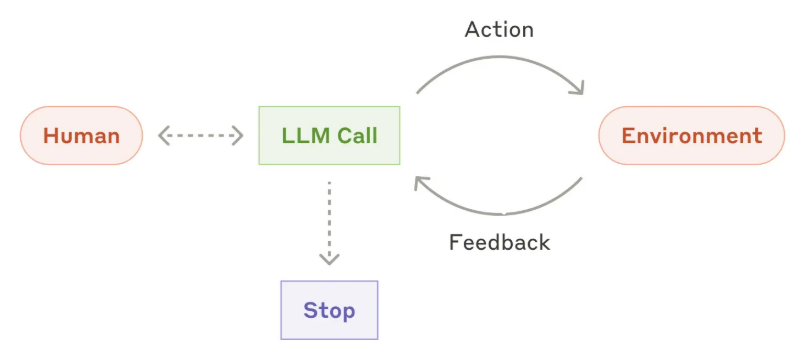
In other words, a closed-loop feedback mechanism was introduced to address the fragility of linear workflows. Now, each step of a task is no longer a one-time invocation, but a self-correcting agent loop. This loop greatly improves the robustness of the system and the quality of the final result because the model has the opportunity to learn and recover from its own errors.
Therefore, we introduced Observation.
2.3 Observation
An Action is an instruction or operation issued by the Agent to the Runtime, while an Observation is the environment’s response or feedback to these operations. It represents the environment’s response to the Action executed by the Agent, including information such as the operation result and changes in the environment’s state, which the Agent uses to make further decisions. This design aligns with the typical pattern of reinforcement learning and intelligent agent systems, where the Agent completes tasks by interacting with the environment (executing Actions and receiving Observations).
2.3.1 Type
Externally sourced Observations: Most Observation objects are constructed and passed in from the external environment or runtime system. These Observation types represent different states of the environment, for example:
- Command execution result (
CmdRunObservation) - File read results (
FileReadObservation) - IPython execution results (
IPythonRunCellObservation) - Browser interaction results (
BrowserOutputObservation) RecallObservation: Remembers retrieval results.CmdOutputObservation: The output of command execution.BrowserOutputObservation: The output after browsing a URL.FileReadObservation: Output of file read operations.AgentRecallObservation: The output of the Agent recall operation.AgentErrorObservation: Output of errors that occur when the Agent performs an operation.
These are typically created by the runtime system and passed to the controller via an event stream.
The Observations built internally by AgentController. Within the AgentController class, there are several places where Observation objects are directly constructed:
NullObservation: Represents observations that require no action or are ignored, used to filter events that do not need to be processed.ErrorObservation: Represents errors that occur during execution, containing error information for the agent to handle.AgentStateChangedObservation: Represents changes in agent state, such as loading, running, or error states. For example, in theset_agent_state_tofunction of AgentController, when the agent state changes, anAgentStateChangedObservationevent is created, and its source is set toEventSource.ENVIRONMENT.
2.3.2 Process
The processing flow of Observation in the Agent is as follows:
Runtime 执行 Action --> 产生 Observation --> EventStream 发布事件 --> AgentController.on_event 接收 --> 判断是否需要 step --> AgentController._step 处理 --> 调用 Agent.step --> Agent 基于历史事件(包括 Observation)决策
The specific process is as follows:
- After the runtime finishes executing the action, it generates an observation event.
- Events are passed back to the Agent via
EventStream.add_event(). These Observations are passed through the event stream and used to update the agent’s state and history. - The AgentController subscribes to the EventStream and handles these events in the
on_event()method. - The agent determines its next action based on observations.
The role of observation in agent decision-making is as follows:
- Agent state updates:
AgentStateChangedObservationupdates the Agent’s internal state;ErrorObservationtriggers the error handling process. - History: All Observations are stored in
State.history; the Agent reviews the entire history, including all Actions and Observations, when making decisions. - Decision-making basis: Agent (LLM) understands the state of the environment by analyzing historical observations. For example,
CmdOutputObservationprovides command execution results, and the Agent decides on the next action based on this.
2.3.3 Details
The main locations where Observations are built include:
- Runtime environment (command execution, file operations, etc.)
- The
AgentController._reset()method (builds anErrorObservation) - The
AgentController.set_agent_state_to()method (creates anAgentStateChangedObservation) AgentController.end_delegate()method (buildsAgentDelegateObservation)
2.4 Environment
This section provides special instructions regarding EventSource.ENVIRONMENT.
EventSource.ENVIRONMENT typically represents events generated by the system environment or infrastructure, and may include:
- System state changes.
- Environment initialization complete notification.
- Runtime state update.
- System-level observations.
Use the following in the code.
# openhands\cli\commands.py
def handle_exit_command(
    config: OpenHandsConfig,
    event_stream: EventStream,
    usage_metrics: UsageMetrics,
    sid: str,
) -> bool:
    if confirm_exit:
        event_stream.add_event(
            ChangeAgentStateAction(AgentState.STOPPED),
            EventSource.ENVIRONMENT,
        )

# 在 Runtime 中
    def maybe_run_setup_script(self):
        # setup scripts time out after 10 minutes
        action = CmdRunAction(
            f'chmod +x {setup_script} && source {setup_script}',
            blocking=True,
            hidden=True,
        )
        # Add the action to the event stream as an ENVIRONMENT event
        source = EventSource.ENVIRONMENT
        self.event_stream.add_event(action, source)

# 在Memory类 _on_event 方法中,我们可以看到环境返回的 Observation 被重新标记为 Agent 事件发送到 UI
async def _on_event(self, event: Event):
    self.event_stream.add_event(workspace_obs, EventSource.ENVIRONMENT)

# 在 AgentSession 中
                    self.event_stream.add_event(
                        ChangeAgentStateAction(AgentState.RUNNING),
                        EventSource.ENVIRONMENT,
                    )

# 在 WebSession 中
        self.agent_session.event_stream.add_event(
            AgentStateChangedObservation('', AgentState.LOADING),
            EventSource.ENVIRONMENT,
        )

# AgentController 中
    async def set_agent_state_to(self, new_state: AgentState) -> None:
        self.event_stream.add_event(
            AgentStateChangedObservation('', self.state.agent_state, reason),
            EventSource.ENVIRONMENT,
        )
While the runtime may also produce some observations, whether it is EventSource.ENVIRONMENT or EventSource.AGENT depends on the context.
2.5 AgentThinkAction
Let’s take a look at AgentThinkAction, which allows the Agent to add plain text to the history of no-action entries.
            # ================================================
            # AgentThinkAction
            # ================================================
            elif tool_call.function.name == ThinkTool['function']['name']:
                action = AgentThinkAction(thought=arguments.get('thought', ''))
ThinkTool is an imitation or reimplementation of the design concept of Anthropic ThinkTool.
Anthropic Think Tool
Anthropic Think Tool creates a dedicated space for structured thinking when performing complex tasks. The Think Tool occurs after the AI begins to respond, much like proactively pausing to organize thoughts during work. Through the “think” tool, Anthropic empowers Claude to insert an extra thinking step into the process of arriving at a final answer. This mechanism is particularly useful when executing long chains of tool calls or engaging in multi-turn, complex dialogues with the user.
Although it sounds similar to extended thinking, the two concepts are different: extended thinking occurs before Claude begins generating responses, allowing the model to think deeply and iterate on solutions; while the “thinking” tool is used after Claude has started generating responses, proactively pausing and considering whether sufficient information has been gathered when encountering long chains of tool calls or lengthy dialogues.
Compared to extended thinking, the reasoning tools used by “thinking” tools have a narrower scope and are more focused on newly discovered information.
Anthropic recommendation:
- For non-sequential tool calls or simple command follows, prioritize using extended thinking.
- Use the “Think” tool for complex toolchains, where careful analysis of tool outputs is required, for strategy-intensive environments, or for costly sequential decisions.
When to use “thinking” tools
Applicable scenarios:
- A thorough analysis of the preceding tool outputs is needed, potentially revealing backtracking solutions.
- In strategy-intensive environments, compliance verification is required.
- Sequential decision-making relies on the results of previous steps at each step and incurs high error costs.
Not applicable scenarios:
- The task can be completed with a single or parallel tool call.
- The constraints are simple, and the default behavior is sufficient.
Best Practices
- Domain-example driven hints: Provide when and how to invoke thinking tools, along with business-relevant reasoning examples.
- Place complex commands in system prompts: Long and complex thought processes are more effective when placed in system prompts rather than tool descriptions.
- Continuous monitoring and iteration: Observe Claude’s actual call patterns and adjust prompts accordingly to enhance effective thinking paths.
code
The corresponding code for ThinkTool is as follows. It allows the model to write its thought process to a log during the “internal monologue” phase, without triggering external calls.
_THINK_DESCRIPTION = """Use the tool to think about something. It will not obtain new information or make any changes to the repository, but just log the thought. Use it when complex reasoning or brainstorming is needed.

Common use cases:
1. When exploring a repository and discovering the source of a bug, call this tool to brainstorm several unique ways of fixing the bug, and assess which change(s) are likely to be simplest and most effective.
2. After receiving test results, use this tool to brainstorm ways to fix failing tests.
3. When planning a complex refactoring, use this tool to outline different approaches and their tradeoffs.
4. When designing a new feature, use this tool to think through architecture decisions and implementation details.
5. When debugging a complex issue, use this tool to organize your thoughts and hypotheses.

The tool simply logs your thought process for better transparency and does not execute any code or make changes."""

ThinkTool = ChatCompletionToolParam(
    type='function',
    function=ChatCompletionToolParamFunctionChunk(
        name='think',
        description=_THINK_DESCRIPTION,
        parameters={
            'type': 'object',
            'properties': {
                'thought': {'type': 'string', 'description': 'The thought to log.'},
            },
            'required': ['thought'],
        },
    ),
)

class ThinkExecutor(ToolExecutor):
    def __call__(
        self,
        _: ThinkAction,
        conversation: "BaseConversation | None" = None,  # noqa: ARG002
    ) -> ThinkObservation:
        return ThinkObservation.from_text(text="Your thought has been logged.")


class ThinkTool(ToolDefinition[ThinkAction, ThinkObservation]):
    """Tool for logging thoughts without making changes."""

    @classmethod
    def create(
        cls,
        conv_state: "ConversationState | None" = None,  # noqa: ARG003
        **params,
    ) -> Sequence[Self]:
        """Create ThinkTool instance.

        Args:
            conv_state: Optional conversation state (not used by ThinkTool).
            **params: Additional parameters (none supported).

        Returns:
            A sequence containing a single ThinkTool instance.

        Raises:
            ValueError: If any parameters are provided.
        """
        if params:
            raise ValueError("ThinkTool doesn't accept parameters")
        return [
            cls(
                description=THINK_DESCRIPTION,
                action_type=ThinkAction,
                observation_type=ThinkObservation,
                executor=ThinkExecutor(),
                annotations=ToolAnnotations(
                    readOnlyHint=True,
                    destructiveHint=False,
                    idempotentHint=True,
                    openWorldHint=False,
                ),
            )
        ]
0xFF Reference
- https://docs.all-hands.dev/openhands/usage/architecture/backend
- As AI agents evolve from “toys” to “tools,” what should we focus on? Openhands Architecture Analysis [Part 2: Core Concepts Related to Agents] by Kerry
- As AI agents evolve from “toys” to “tools,” what should we focus on? Openhands Architecture Analysis [Part 1: Series Introduction] by Kerry
- Coding Agent Openhands Analysis (with code) Arrow
- OpenHands Source Code Analysis by Yi Lihui
- Anthropic Official Tutorial: Best Practices for Designing Efficient Tools for Agents
- The “think” tool: Enabling Claude to stop and think in complex tool use situations