Exploring AI Agent Frameworks: Deconstructing OpenHands (12) --- Function call
0x00 Summary
“A ChatBot is just something that can talk; an Agent is something that can use tools to get things done.”
Large Language Models (LLMs) are essentially text generators; they cannot directly operate systems, call APIs, or access databases. All of these capabilities require additional engineering implementation. The Agent tool usage model is the core architectural paradigm that breaks through the inherent limitations of Large Language Models (LLMs) and enables agents to interact with the real world. Its essence is to transform the LLM from a simple text generator into an intelligent agent with perception, reasoning, and action capabilities. The core relies on the model’s autonomous decision-making ability regarding the timing of tool invocation in the ReAct loop.
quickstart-flow-tool
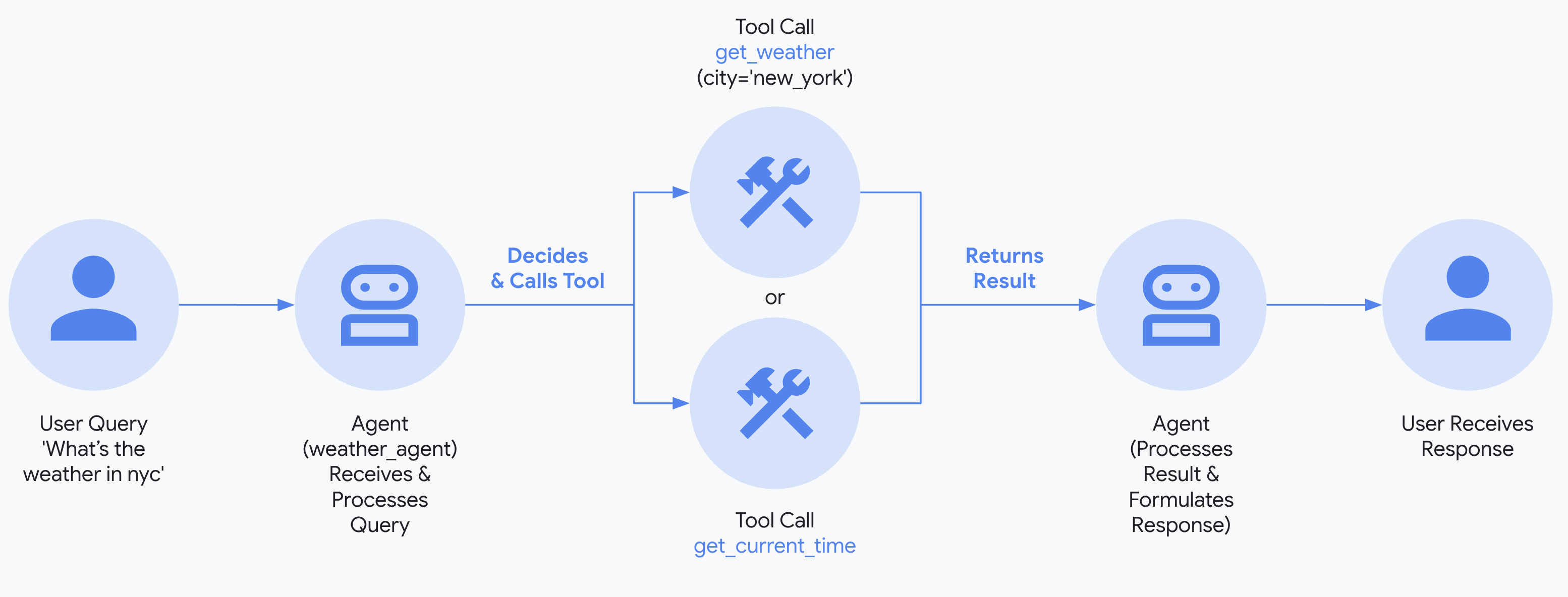
The function_calling.py file is the core component of CodeActAgent in OpenHands. It is responsible for converting LLM function call responses into specific Agent Actions, bridging the “translation gap” between intent and execution.
Because this series draws on a large number of articles, there may be some articles missing from the references. If so, please point them out.
0x01 Tool System Design
Let’s first look at the tool system’s pattern, robustness, and engine architecture.
img
1.1 Requirements
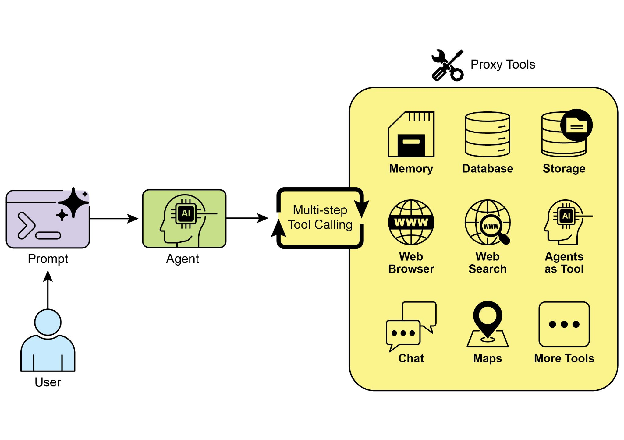
LLMs are inherently limited by static training data, making it impossible to acquire real-time information, perform external operations, or access proprietary data. The tool usage model solves this key problem by building a bridge between LLMs and external systems. The core logic of this model is to encapsulate external capabilities as “tools,” allowing LLMs to autonomously decide on tool invocation strategies based on user needs. The framework layer then handles tool execution and result feedback, and finally, LLMs integrate the results to form a response or advance the next step of the process.
Compared to the narrow definition of “function call,” the concept of “tool call” has greater practical value. It encompasses not only basic functions but also complex APIs, database interactions, and cross-agent command transmission. This enables agents to act as orchestrators of digital resources and intelligent entities, achieving more complex task collaboration. In development practice, developers only need to declaratively register atomic tools through a tool registry, without writing business process code. The tool composition logic is dynamically generated by the LLM at runtime and then executed by the framework’s scheduling module. This design fully unleashes the LLM’s reasoning and decision-making capabilities, giving agents the flexibility to dynamically adapt to complex tasks.
There are also clear rules of thumb for the applicable scenarios of tool usage patterns: when an agent needs to break through the internal knowledge boundaries of an LLM to carry out tasks such as real-time data acquisition, private information query, precise calculation, and external system operation, this pattern becomes the basic choice for building a strong agent with environmental awareness and interaction capabilities.
1.2 The essence of tool invocation
The core of tool calls lies in the fact that LLM needs to convert the user’s unstructured requirements (a piece of natural language text) into structured function calls (function names and parameters), then interact with other applications, and finally return the structured results to the model so that the model can make the next decision based on these results.
The crux of the problem is that historically, other systems (databases, APIs, file systems, etc.) could only handle structured information, while LLM excels at handling unstructured information (text). Therefore, LLM must find a way to bridge the gap between these two information formats: converting unstructured user requirements into structured function calls so that it can interact with external systems.
Tool calls solve the core problem: enabling LLM to reliably output structured tool call requests, achieving the transformation from “unstructured” to “structured”. This is the foundation of AI Agent tool capabilities.
1.3 Design Principles
The goal of Function Calls is not to make the model “call tools,” but to make it “correctly call tools according to business logic.” The difficulty lies not in the tools themselves, but in the “decision-making”: when should the model call them, which tool should it call, what should the order of calling them be, whether to ask follow-up questions when information is missing, and how to advance multi-turn dialogues. This requires targeted training and targeted adjustments during actual use.
Therefore, the core design principles of the Agent tool usage model revolve around four core elements: “decoupling, intelligent decision-making, scalability, and practicality.” These principles are key to ensuring the efficient implementation of this model and its adaptability to complex scenarios. Specifically, they can be summarized into the following principles:
A qualified agent tool should be an “understandable, secure and fault-tolerant” interactive interface.
1.3.1 Principles of Tool Abstraction and Standardization
Tools need to be abstracted into a unified interface paradigm. Regardless of whether their underlying implementation is a function, API, database query, or other agent, standardized descriptive dimensions (such as name, purpose, parameter types and constraints, and return value format) must be defined. This standardization allows the LLM to understand and invoke different types of tools with consistent logic, and also allows the framework’s orchestration layer to uniformly handle tool execution requests, avoiding confusion in invocation logic caused by differences in tool types. For example, encapsulating both the “weather query API” and the “data analysis agent” into tool objects containing “input parameters - output parameters - function description” allows the LLM to make invocation decisions without distinguishing their underlying implementation.
1.3.2 Decoupling Principles of Tools and LLM
The framework decouples tools from the LLM through a ToolRegistry, ensuring that tool registration, updates, and removal are independent of the LLM’s inference logic. The framework instantiates and registers tools at startup; the LLM only obtains the tool’s declaration information from the registry, and the scheduling layer also searches for and executes the tool through the registry during invocation. This design allows tool iterations to proceed without modifying the LLM’s inference logic, while also supporting dynamic expansion of the toolset. For example, when adding an “email sending tool,” registration in the registry is sufficient for the LLM to recognize and use the tool.
1.3.3 Core Principles of LLM’s Autonomous Decision-Making
The decision-making power for tool combination and invocation is completely delegated to the LLM, with developers only responsible for providing atomic tools and not writing fixed business process code. Based on the complexity of user requests and the capabilities of the tools, the LLM dynamically generates the order, parameters, and number of tool invocations at runtime, achieving “on-demand tool combination.” This principle fully leverages the reasoning capabilities of the LLM, allowing the Agent to adapt to complex task scenarios without pre-defined parameters. For example, if a user requests to “analyze stock data from the past week and generate a visualization report,” the LLM can autonomously decide to first invoke the “stock data query tool,” then the “data analysis tool,” and finally the “visualization generation tool.”
1.3.4 Structured Interaction Principle
Tool calls between LLM and the framework must adhere to a structured data format (such as JSON), rather than natural language. Tool call requests generated by LLM must explicitly include structured information such as “tool name, parameter key-value pairs, and call priority.” The framework’s orchestration layer executes the tool by parsing this structured data, avoiding call errors caused by ambiguity in natural language. This principle is fundamental to ensuring the accuracy of tool calls; for example, {"tool_name": "weather_query", "params": {"city": "北京", "date": "2025-12-01"}}, the framework can directly parse and execute the corresponding weather query logic from a structured request generated by LLM.
1.3.5 Principles of Result Closure and Iterative Reasoning
The results of the tool’s execution must be fully fed back to the LLM, forming a closed-loop reasoning process of “request-decision-invocation-feedback-re-decision”. Based on the tool’s feedback, the LLM can further determine whether to invoke other tools, adjust parameters to re-invoke the same tool, or integrate the results to generate the final response. This principle enables the Agent to possess “reflective” reasoning capabilities. For example, if the results obtained from a “translation tool” do not meet the requirements, the LLM can autonomously decide to adjust the target language parameters for translation and re-invoke the tool to obtain more accurate results.
1.3.6 Principle of Generalized Tool Expansion
Moving beyond the narrow definition of “tool = function,” this approach expands the scope of tools to include all external capability carriers such as APIs, databases, other specialized agents, and physical device interfaces. This principle allows agents to act as “intelligent orchestrators,” integrating cross-domain and cross-type external resources to construct more complex multi-agent collaboration or cross-system interaction scenarios. For example, the main agent can delegate “image recognition tasks” to a dedicated “visual agent” (treating it as a tool), or control smart hardware through API tools to perform operations in the physical world.
1.3.7 Layered or Gradual Approach
Feeding an LLM with more than 100 tools at once can lead to context confusion, easily causing illusions or parameter errors. Advanced architectures such as Manus mitigate this problem through a three-layered design.
In fact, Skills also embodies this principle.
1.4 Best Practices for Designing Efficient Tools in Anthropic
Anthropic provides best practices for designing efficient tools in its blog.
- Choose appropriate tools for implementation (and which tools not to implement).
- Define namespaces for tools to clarify functional boundaries.
- Returning meaningful context from tools to AI agents.
- Optimize the efficiency of token response from the optimization tool.
- Provide prompts for tool descriptions and specifications in the project.
1.5 Agent Tool Invocation Lifecycle
In practical implementation, the tool usage pattern follows a standardized implementation process:
- First, the tool definition and registration need to be completed. External functions, APIs, database queries, and even other Agent capabilities are encapsulated into tools, and the purpose, parameters, and other information of the tools are registered in the tool registry so that the LLM can be aware of the available capabilities.
- Next, after receiving the user request, the LLM determines whether a tool needs to be invoked and which tool to invoke based on the tool information; if it decides to invoke the tool, the LLM generates a structured request containing the tool name and parameters.
- Subsequently, the framework’s orchestration layer executes the corresponding tool based on the request, obtains the execution result, and sends it back to the LLM.
- Finally, the LLM combines the tool results to either generate a final response or make further decisions on whether to continue calling other tools.
ByteDance’s technology team also outlined several stages in the lifecycle of Agent tool calls, as well as key elements and methods to consider when designing tools:
- Type safety and automation: Fully leverage Python’s type system and Pydantic to automatically handle schema generation and data validation, preventing models from “guessing”.
- Using Pydantic BaseModel: Leverage Pydantic for complex parameter validation, automatically handling schema generation and data validation.
- Limiting enumerated values: Restricting optional parameters through methods such as Literal reduces the probability of model errors.
- Setting default values: Clear default values are crucial, as they can reduce the burden on the model and prevent excessive response.
- LLM’s user-friendly interface design: Unlike traditional programs that rely on technical documentation to understand interfaces, LLM depends on natural language descriptions to determine how to use tools.
- Natural language priority: Use natural language to describe signatures, parameters, and error messages, and avoid using obscure technical jargon.
- Spend 50% of your time refining the Docstring, and be adept at using Examples and Sample Cases to guide the model to accurately pass parameters.
- Adhere to the “single responsibility” principle, avoid giving the model an overly complex interface; instead, break it down into smaller tools with clear parameters and well-defined responsibilities to make the agent’s decision-making process more stable.
- Integrating external APIs using the OpenAPI specification and converting them into Tools: It is recommended to use the OpenAPIToolset, which can automatically generate function declarations, parameter schemas, and request construction logic from the OpenAPI spec using OperationParser, enabling standardized and rapid creation.
- Build self-healing capabilities instead of terminating the process: Tools should not throw exceptions and terminate the process directly when they encounter errors, but should guide the agent to adjust its strategy.
- Structured error returns include error information and recovery suggestions.
- In conjunction with plugins such as ReflectAndRetryToolPlugin, it intercepts errors, provides structured reflection guidance, and enables the Agent to learn from failures and automatically retry.
- Incorporate Human-in-the-loop (security protection mechanism) and key behavior verification.
- By having users confirm their decisions, the decision-making power and responsibility for key actions are returned to the users.
- The
require_confirmationparameter defines whether the tool needs to enable confirmation mode.tool_context.tool_confirmationverifies whether the user has authorized the action before performing sensitive operations. - When unable to make a decision or lacking key information,
ask_humanproactively requests help from the user.
- Performance Optimization and Context Management: To ensure agent response speed and prevent context overflow, fine-grained control over results is necessary. When providing multiple tools for model invocation, asynchronous invocation can be implemented to convert serial calls into parallel ones, thus accelerating execution. Limiting the number of returned rows using
max_query_result_rows, or returning only a summary instead of the full text, can prevent LLM context overflow.
0x02 Design of OpenHands
2.1 Tool Call Engine
Giving an intelligent agent a tool is simple, but ensuring its reliable, secure, and effective use is the real challenge. The tool invocation engine, acting as the agent’s hands and feet connecting to the real world, bears the core responsibilities of tool management, interaction execution, and process control. Its core functions and key implementation points are as follows:
- Extended Interaction Capabilities: By connecting with external tools and resources (APIs, local tools, third-party services, etc.), the limitations of the agent’s plain text output are overcome, enabling it to manipulate entities and acquire real-time data.
- Full lifecycle management: Supports tool registration, querying, updating and uninstallation, allows dynamic expansion of the tool library, and adapts to diverse task requirements.
- Full-process automation: covering parameter validation, format conversion, result parsing and error handling for tool calls, and can complete end-to-end execution without manual intervention.
2.2 Core Design Patterns
The OpenHands V1 tool system is built around a three-layer abstraction framework of Action → Execution → Observation, creating a type-safe and extensible foundation. Its core logic is as follows:
- Action: JSON formatted tool call instructions generated by the large language model are converted into standardized Action objects after being validated by the Pydantic model.
- Execution: The ToolExecutor component receives the validated Action and executes the underlying operations.
- Observation: The final execution result (including normal output and error messages) is returned in a structured format through the Observation component and automatically adapts to the understanding paradigm of the large language model.
This design unifies the access standards for custom tools and MCP (Model Communication Protocol) tools, providing a single interface for the definition, invocation, and management of tools, and significantly reducing the integration cost of multiple types of tools.
2.3 Robustness and Compatibility Solutions
To address core pain points such as heterogeneous tool interfaces, unstable external environments, and the risk of link collapse due to interface changes, OpenHands has designed a three-layer solution:
- Adaptor layer isolation: The Tool Wrapper layer unifies the input and output formats of various tools, shields the differences in parameter structure and response methods of native interfaces, and allows the upper-layer system to be free from concern about the underlying implementation of the tools.
- Intelligent fault tolerance mechanism: Based on error type classification (network timeout, insufficient permissions, illegal parameters, etc.), preset retry, degradation, rollback and other strategies are implemented. For example, automatic retry when the network fluctuates, and switching to backup tools when the core tools are unavailable.
- Version management: Supports tool version labeling and dynamic adjustment of the adaptation layer. When the tool interface changes, only the corresponding Wrapper logic needs to be modified, without changing the core execution flow, ensuring the stability of the task chain.
0x03 Function Analysis
The ReAct framework is a framework that deeply binds thought with action (invoking tools). Driven by this framework, if AI realizes during the thought process that “my internal knowledge is insufficient to support the next decision,” it will proactively use the search_api to connect to the internet, transmit dynamic objective facts back to its brain, and continue thinking. Therefore, the primary responsibility of the Agent Framework is to design the model’s thinking structure, memory mechanism, and paradigm for interacting with the world.
3.1 Process
The function calling process is as follows in the overall flow:
- Tool usage (function calls) allows the Agent to interact with external systems and access dynamic information.
- It involves defining tools with clear descriptions and parameters that LLMs can understand.
- LLM determines when to use tools and generates structured function calls.
- The Agent framework executes the actual tool calls and returns the results to the LLM.
Please see the image below for details:
LLM Response
    ↓
function_calling.response_to_action() (从tool生成Action)
    ↓
具体的Action对象(CmdRunAction,IPythonRunCellAction等)
    ↓
AgentController(调度Action)
    ↓
Runtime(执行Action)
    ↓
Observation (执行结果)
    ↓
Agent(依据结果做下一步决策)
3.2 Tool Registration and Management
3.2.1 How to determine tool_calls with LLM
Prompt words:
Tools are not giving the model a black-box API, but rather capability components with strict contracts:
- Clearly define the input/output structure.
- Apply hard constraints to parameter range, permissions, and errors.
For intelligent agents interacting with the external world, the most important thing is writing cue words for tool use. Whether an LLM can correctly use the tool you provide depends almost entirely on how you describe it. An effective tool description must:
image
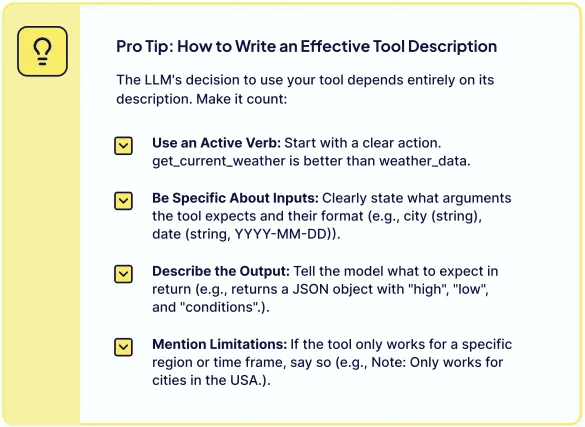
- Use active verbs: start with a clear action (e.g., use
get_current_weatherinstead ofweather_data). - Explicit input: Clearly specify the required parameters and their format (e.g.,
city (string),date (string, YYYY-MM-DD)). - Describe the output: Tell the model what to return (e.g., “Return a JSON object containing ‘high’, ‘low’, and ‘conditions’”).
- Mention limitations: If the tool is only valid in a specific area, be sure to state this (e.g., “Note: Only applicable to U.S. cities.”).
Which tools:
Specifically for OpenHands, the first step is to determine which external functions or services can be invoked. These tools can be a native function or method (e.g., in the form of a litellm.ChatCompletionToolParam parameter), an instance of a utility class, or an instance of an agent.
The tool first needs to introduce itself to the larger model. This is done through a configuration object conforming to the JSON Schema specification. It defines in detail the tool’s name (e.g., read_file), its function description (for reading file content), and most importantly—its parameters (e.g., absolute_path, offset, etc.). This introduction is the basis for the model to understand and decide how to use the tool.
Tool usage patterns are typically implemented through function call mechanisms, enabling agents to connect to external APIs, databases, services, and even execute code. This mechanism allows the Large Language Model (LLM) at the agent’s core to decide when and how to call specific external functions based on user requests or task states.
If it exists as a function, such as querying a database, calling a weather API, or performing mathematical calculations, each tool should contain the following information:
- Tool name (
name) - Description
- Parameter definitions, including parameter type and whether they are required
LLM determines which tool to invoke based on the function/tool name, description (from the docstring or description field), and parameter pattern, combined with the dialog and instructions.
3.2.2 List of Configuration Tools
Next, the defined tools need to be compiled into a list and passed in through the LLM interface. The LLM will then decide whether to invoke them when generating the response based on the information about these tools.
The tools property of CodeActAgent will maintain the tools.
class CodeActAgent(Agent):
    def __init__(self, config: AgentConfig, llm_registry: LLMRegistry) -> None:
        self.tools = self._get_tools()
The details of _get_tools are as follows:
    def _get_tools(self) -> list['ChatCompletionToolParam']:
        # For these models, we use short tool descriptions ( < 1024 tokens)
        # to avoid hitting the OpenAI token limit for tool descriptions.
        SHORT_TOOL_DESCRIPTION_LLM_SUBSTRS = ['gpt-4', 'o3', 'o1', 'o4']

        use_short_tool_desc = False
        if self.llm is not None:
            use_short_tool_desc = any(
                model_substr in self.llm.config.model
                for model_substr in SHORT_TOOL_DESCRIPTION_LLM_SUBSTRS
            )

        tools = []
        if self.config.enable_cmd:
            tools.append(create_cmd_run_tool(use_short_description=use_short_tool_desc))
        if self.config.enable_think:
            tools.append(ThinkTool)
        if self.config.enable_finish:
            tools.append(FinishTool)
        if self.config.enable_condensation_request:
            tools.append(CondensationRequestTool)
        if self.config.enable_browsing:
            tools.append(BrowserTool)
        if self.config.enable_jupyter:
            tools.append(IPythonTool)
        if self.config.enable_plan_mode:
            # In plan mode, we use the task_tracker tool for task management
            tools.append(create_task_tracker_tool(use_short_tool_desc))
        if self.config.enable_llm_editor:
            tools.append(LLMBasedFileEditTool)
        elif self.config.enable_editor:
            tools.append(
                create_str_replace_editor_tool(
                    use_short_description=use_short_tool_desc,
                    runtime_type=self.config.runtime,
                )
            )
        return tools
Let’s take IPythonTool as an example to see how to define these tools.
_IPYTHON_DESCRIPTION = """Run a cell of Python code in an IPython environment.
* The assistant should define variables and import packages before using them.
* The variable defined in the IPython environment will not be available outside the IPython environment (e.g., in terminal).
"""

IPythonTool = ChatCompletionToolParam(
    type='function',
    function=ChatCompletionToolParamFunctionChunk(
        name='execute_ipython_cell',
        description=_IPYTHON_DESCRIPTION,
        parameters={
            'type': 'object',
            'properties': {
                'code': {
                    'type': 'string',
                    'description': 'The Python code to execute. Supports magic commands like %pip.',
                },
                'security_risk': {
                    'type': 'string',
                    'description': SECURITY_RISK_DESC,
                    'enum': RISK_LEVELS,
                },
            },
            'required': ['code', 'security_risk'],
        },
    ),
)
3.2.3 Supported Tool Types
When planning tools, it is necessary to control both the granularity and the quantity, as follows:
- Follow the minimum necessary interface principle: expose only the parameters and functions necessary to complete the task, and remove parameters that are meaningless or always have fixed values.
- Avoid breaking things down too much: Start with the task the user needs to complete and package strongly related steps into a task-oriented tool, rather than dozens of atomic interfaces.
- The toolset should be designed with a task-oriented rather than interface listing approach, so that the model understands what needs to be accomplished now.
OpenHands supports the following types of tools:
- Command-line tool (CmdRunTool): Executes Bash commands.
- IPython Tools: The IPython code to run.
- AgentDelegateAction: Delegates tasks to the browsing agent.
- AgentFinishAction: Marks the task as finished and returns to Final Thoughts.
- LLMBasedFileEditTool: An LLM-based file editing tool (deprecated).
- String replacement editing tool: Supports file reading and replacement operations.
- AgentThinkAction: Records the thought process of an intelligent agent.
- CondensationRequestAction: Triggers historical context simplification.
- BrowserTool: Performs interactive browsing operations.
- TaskTrackingAction: Manages task lists (scheduled, updated, etc.).
- MCPAction: A tool that invokes the MCP registration.
The features of several of these tools are as follows:
execute_bash
- Execute any valid Linux bash command.
- This is handled by running long-running commands in the background and redirecting their output.
- Supports interactive processes via STDIN input and process interruption.
- Handling command timeouts and automatically retrying in background mode.
execute_ipython_cell
- Running Python code in an IPython environment.
- Supports
%pipmagic commands. - Variables are restricted to the IPython environment.
- Before using it, you need to define variables and import packages.
web_read and browser
web_read: Read and convert web page content to Markdown.browser: Interacting with web pages using Python code.- Supports common browser operations such as navigation, clicking, form filling, and scrolling.
- Handle file upload and drag-and-drop operations.
str_replace_editor
- View, create, and edit files using string replacement.
- Persistent state across command invocations.
- Viewing files with line numbers.
- Exact match string replacement.
- Undo function for editing.
edit_file (Based on LLM)
- Use LLM-based content generation to edit files.
- Supports partial file editing, with line range functionality.
- Process large files by editing specific parts.
- Append mode for adding content to a file.
The specific code is as follows:
from openhands.events.action import (
    Action,
    ActionSecurityRisk,
    AgentDelegateAction,
    AgentFinishAction,
    AgentThinkAction,
    BrowseInteractiveAction,
    CmdRunAction,
    FileEditAction,
    FileReadAction,
    IPythonRunCellAction,
    MessageAction,
    TaskTrackingAction,
)
Tools can be enabled/disabled by configuring parameters:
enable_browsingenables browser interaction tools.enable_jupyterenables IPython code execution.enable_llm_editorenables LLM-based file editing (if disabled, it reverts to a string replacement editor).
3.3 BrowserTool
The BrowserTool is defined as follows:
for _, action in _browser_action_space.action_set.items():
    assert action.signature in _BROWSER_TOOL_DESCRIPTION, (
        f'Browser description mismatch. Please double check if the BrowserGym updated their action space.\n\nAction: {action.signature}'
    )
    assert action.description in _BROWSER_TOOL_DESCRIPTION, (
        f'Browser description mismatch. Please double check if the BrowserGym updated their action space.\n\nAction: {action.description}'
    )

BrowserTool = ChatCompletionToolParam(
    type='function',
    function=ChatCompletionToolParamFunctionChunk(
        name=BROWSER_TOOL_NAME,
        description=_BROWSER_DESCRIPTION,
        parameters={
            'type': 'object',
            'properties': {
                'code': {
                    'type': 'string',
                    'description': (
                        'The Python code that interacts with the browser.\n'
                        + _BROWSER_TOOL_DESCRIPTION
                    ),
                },
                'security_risk': {
                    'type': 'string',
                    'description': SECURITY_RISK_DESC,
                    'enum': RISK_LEVELS,
                },
            },
            'required': ['code', 'security_risk'],
        },
    ),
)
The specific metadata is as follows:
_BROWSER_DESCRIPTION = """Interact with the browser using Python code. Use it ONLY when you need to interact with a webpage.

See the description of "code" parameter for more details.

Multiple actions can be provided at once, but will be executed sequentially without any feedback from the page.
More than 2-3 actions usually leads to failure or unexpected behavior. Example:
fill('a12', 'example with "quotes"')
click('a51')
click('48', button='middle', modifiers=['Shift'])

You can also use the browser to view pdf, png, jpg files.
You should first check the content of /tmp/oh-server-url to get the server url, and then use it to view the file by `goto("{server_url}/view?path={absolute_file_path}")`.
For example: `goto("http://localhost:8000/view?path=/workspace/test_document.pdf")`
Note: The file should be downloaded to the local machine first before using the browser to view it.
"""

_BROWSER_TOOL_DESCRIPTION = """
The following 15 functions are available. Nothing else is supported.

goto(url: str)
    Description: Navigate to a url.
    Examples:
        goto('http://www.example.com')

go_back()
    Description: Navigate to the previous page in history.
    Examples:
        go_back()

go_forward()
    Description: Navigate to the next page in history.
    Examples:
        go_forward()

noop(wait_ms: float = 1000)
    Description: Do nothing, and optionally wait for the given time (in milliseconds).
    You can use this to get the current page content and/or wait for the page to load.
    Examples:
        noop()

        noop(500)

scroll(delta_x: float, delta_y: float)
    Description: Scroll horizontally and vertically. Amounts in pixels, positive for right or down scrolling, negative for left or up scrolling. Dispatches a wheel event.
    Examples:
        scroll(0, 200)

        scroll(-50.2, -100.5)

    省略其他
"""
3.4 Python Interpreter Integration
CodeAct integrates a Python interpreter, enabling it to:
- The script runs dynamically and adjusts based on the execution results. This is like an intelligent agent having a brain, allowing it to adapt flexibly to the actual situation.
- Instead of reinventing tools for specific tasks, CodeAct leverages existing Python libraries. The Python community has accumulated a wealth of tool libraries, and CodeAct can directly use these ready-made parts, greatly improving efficiency.
- It processes complex logic using control flow structures (loops, conditional statements) within a single execution cycle. This means that the agent can handle more complex tasks, just like we write programs, using loops and conditional statements to control the flow of the program.
For example, if the task given to an LLM is to analyze a dataset, CodeAct allows it to generate and execute Python code for data cleaning, visualization, and statistical analysis—all within a seamless workflow.
3.5 Parsing Tool Call
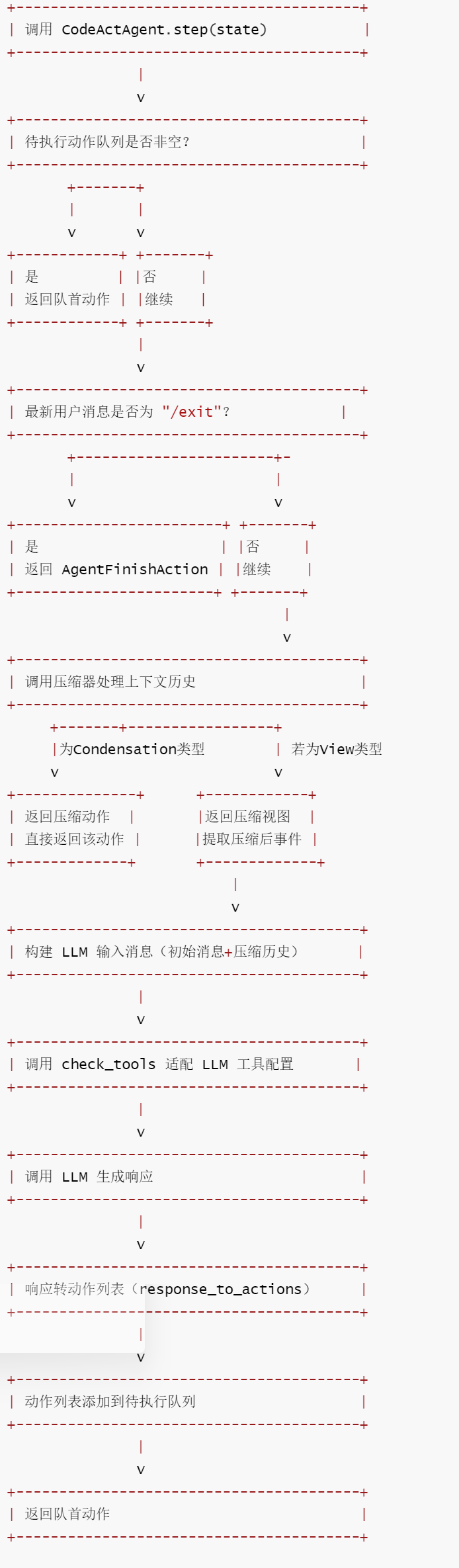
The CodeActAgent.step() function calls response_to_actions to convert the LLM response (tool) into a list of specific actions.
3.5.1 Using CodeActAgent
step() serves as the core execution entry point for the CodeAct agent, responsible for generating single-step actions. Its main functions include:
- Prioritize pending tasks: Maintain the task queue to ensure tasks are executed in the correct order.
- Exit condition detection:
/exitterminates the task in response to user commands. - Context compression: Optimizes LLM input efficiency by filtering redundant history through a compressor.
- LLM call adaptation: Assemble dialogue messages, tool configurations, and metadata to generate compliant LLM requests.
- Response to Action: Converts LLM output into a system-executable action, stores it in a queue, and returns the action at the head of the queue.
In the CodeActAgent.step() method, the self.llm.completion() method calls the underlying LLM API (such as OpenAI, Anthropic, etc.).
response = self.llm.completion(**params)
The responses to these APIs are encapsulated into ModelResponse objects by the LiteLLM library, which contain a choices property. The choices property is a list containing all candidate responses generated by the model (usually only one). Choices are automatically set by the LiteLLM library during the LLM response generation process, not manually set in the OpenHands code.
When an LLM is triggered, if tool calls are enabled, it will include a tool_calls field in the output. This field is a list, with each element describing a specific tool call request, including:
- The name of the tool to be called
- Parameters passed to the tool
- Other metadata
OpenHands executes the corresponding utility functions based on the information in tool_calls and returns the results to the LLM. The LLM can then use these results to generate more accurate responses.
The flowchart is as follows:
12-1
The code is as follows:
    def step(self, state: State) -> 'Action':
        """使用CodeAct Agent执行一步操作。

        包括收集先前步骤的信息,并提示模型生成要执行的命令。

        参数:
        - state (State): 用于获取更新的信息

        返回:
        - CmdRunAction(command) - 要运行的bash命令
        - IPythonRunCellAction(code) - 要运行的IPython代码
        - AgentDelegateAction(agent, inputs) - 用于(子)任务的委托操作
        - MessageAction(content) - 要运行的消息操作(例如,请求澄清)
        - AgentFinishAction() - 结束交互
        - CondensationAction(...) - 通过遗忘指定事件并可选地提供摘要来压缩对话历史
        - FileReadAction(path, ...) - 从指定路径读取文件内容
        - FileEditAction(path, ...) - 使用基于LLM(已弃用)或基于ACI的编辑方式编辑文件
        - AgentThinkAction(thought) - 记录代理的思考/推理过程
        - CondensationRequestAction() - 请求压缩对话历史
        - BrowseInteractiveAction(browser_actions) - 使用指定操作与浏览器交互
        - MCPAction(name, arguments) - 与MCP服务器工具交互
        """
        # 处理待处理操作(如果有)
        if self.pending_actions:
            # 返回并移除队列中的第一个待处理操作
            return self.pending_actions.popleft()

        # 如果任务已完成,退出
        # 获取最新的用户消息
        latest_user_message = state.get_last_user_message()
        # 若用户输入"/exit",则返回结束操作
        if latest_user_message and latest_user_message.content.strip() == '/exit':
            return AgentFinishAction()

        # 压缩状态中的事件。如果获得视图,将其传递给对话管理器处理;
        # 如果获得压缩事件,则返回该事件而非操作。控制器将立即要求代理使用新视图再次执行步骤
        condensed_history: list[Event] = []
        # 匹配压缩器返回的结果类型
        match self.condenser.condensed_history(state):
            # 若为View类型,提取事件列表作为压缩历史
            case View(events=events):
                condensed_history = events
            # 若为Condensation类型,返回其包含的压缩操作
            case Condensation(action=condensation_action):
                return condensation_action

        # 获取初始用户消息(从状态历史中)
        initial_user_message = self._get_initial_user_message(state.history)
        # 构建用于LLM的消息列表(基于压缩历史和初始用户消息)
        messages = self._get_messages(condensed_history, initial_user_message)
        # 构建LLM调用参数
        params: dict = {
            'messages': messages,  # 消息列表
        }
        # 检查并添加可用工具(根据LLM配置过滤)
        params['tools'] = check_tools(self.tools, self.llm.config)
        # 添加额外元数据(从状态中提取,适配LLM格式)
        params['extra_body'] = {
            'metadata': state.to_llm_metadata(
                model_name=self.llm.config.model, agent_name=self.name
            )
        }
        # 调用LLM获取响应
        response = self.llm.completion(** params)
        # 将LLM响应转换为具体操作列表
        actions = self.response_to_actions(response)
        # 将所有操作添加到待处理队列
        for action in actions:
            self.pending_actions.append(action)
        # 返回并移除队列中的第一个操作
        return self.pending_actions.popleft()
3.5.2 Constructing tools-related information
check_tools serves as a compatibility adaptation layer for tool configuration, and its main functions include:
- Model identification: Detect whether the LLM is a Gemini series.
- Field cleanup: Remove fields not supported by Gemini default and incompatible formats (only keep
enumanddate-time). - Configuration protection: Deep copy the original tool list to avoid modifying the original configuration and ensure reusability.
def check_tools(
    tools: List[ChatCompletionToolParam], llm_config: LLMConfig
) -> List[ChatCompletionToolParam]:
    """检查并修改工具配置,确保与当前 LLM 兼容。

    核心适配逻辑:针对 Gemini 模型移除不支持的字段(默认值、非兼容格式),避免调用报错。

    参数:
        tools: 原始工具配置列表
        llm_config: LLM 配置实例(含模型名称等信息)

    返回:
        适配后的工具配置列表
    """
    # 仅对 Gemini 模型进行特殊处理(不支持默认字段和部分格式)
    if 'gemini' in llm_config.model.lower():
        logger.info(
            f'Removing default fields and unsupported formats from tools for Gemini model {llm_config.model} '
            "since Gemini models have limited format support (only 'enum' and 'date-time' for STRING types)."
        )
        # 深拷贝工具列表,避免修改原始配置
        checked_tools = copy.deepcopy(tools)

        # 遍历每个工具,清理不支持的字段
        for tool in checked_tools:
            if 'function' in tool and 'parameters' in tool['function']:
                parameters = tool['function']['parameters']
                if 'properties' in parameters:
                    # 遍历每个参数属性
                    for prop_name, prop in parameters['properties'].items():
                        # 移除默认值字段(Gemini 不支持)
                        if 'default' in prop:
                            del prop['default']

                        # 移除字符串类型参数的不支持格式
                        # Gemini 仅支持 'enum' 和 'date-time' 格式
                        if prop.get('type') == 'string' and 'format' in prop:
                            supported_formats = ['enum', 'date-time']
                            if prop['format'] not in supported_formats:
                                logger.info(
                                    f'Removing unsupported format "{prop["format"]}" for STRING parameter "{prop_name}"'
                                )
                                del prop['format']
        return checked_tools

    # 非 Gemini 模型:直接返回原始工具配置
    return tools
3.5.3 Parsing and Transformation of LLM Responses Using Parsing Tools
Tool calls are parsed in the response_to_actions function.
response_to_actions serves as the core bridge between LLM responses and system actions in the OpenHands system, responsible for converting the natural language responses (including tool invocation commands) output by the LLM into a standardized list of actions that the system can directly execute. Its main functions include:
- Response parsing: Extracts textual thoughts and tool call information from the LLM response, compatible with various content formats such as strings and lists of text fragments.
- Tool mapping: Based on the tool name, the tools called by LLM are mapped to corresponding system actions (such as command line execution, file operation, agent delegation, etc., 11 types of actions).
- Parameter validation and standardization: Strictly validate the required parameters for each action, handle the format conversion of optional parameters (such as Boolean values and timeouts), filter invalid parameters, and ensure the legality of actions.
- Metadata supplementation: Add tool call metadata (call ID, function name, etc.) and response ID to actions to facilitate tracking and associating token usage data.
- Exception handling: For scenarios such as parameter parsing failure, missing required parameters, and unregistered tools, explicit validation exceptions are thrown to ensure the robustness of the process.
- No tool call adaptation: When the response contains only text content, a message action is automatically created to support user-interactive responses.
The response.choices here are obtained from the ModelResponse object, which is a class in the LiteLLM library.
The flowchart is as follows:
12-2
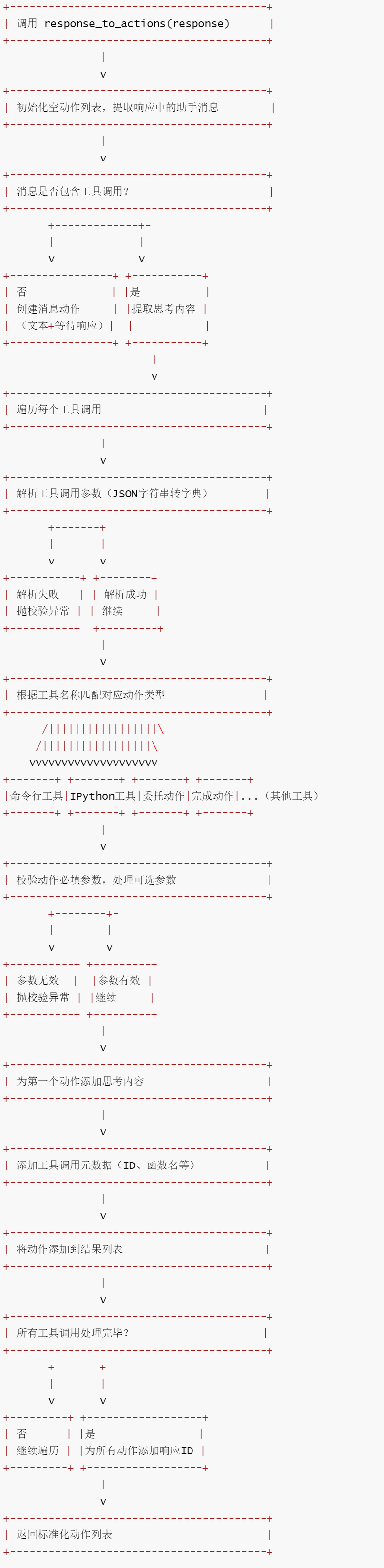
The complete code for response_to_actions is as follows:
def response_to_actions(
    response: ModelResponse, mcp_tool_names: Optional[List[str]] = None
) -> List[Action]:
    """将 LLM 模型响应转换为 OpenHands 系统可执行的动作列表。

    核心逻辑:解析模型响应中的工具调用或文本消息,根据工具名称映射为对应的系统动作,
    校验参数合法性,补充元数据,最终返回标准化的动作列表。

    参数:
        response: LLM 输出的原始响应对象(包含工具调用或文本内容)
        mcp_tool_names: MCP 注册的工具名称列表(可选),用于识别 MCP 工具调用

    返回:
        标准化的系统动作列表,可直接被智能体控制器执行
    """
    actions: List[Action] = []
    # 断言响应仅包含一个选项(当前系统仅支持单选项响应)
    assert len(response.choices) == 1, 'Only one choice is supported for now'
    choice = response.choices[0]
    assistant_msg = choice.message

    # 处理包含工具调用的响应
    if hasattr(assistant_msg, 'tool_calls') and assistant_msg.tool_calls:
        # 提取思考内容:支持字符串或文本片段列表两种格式
        thought = ''
        if isinstance(assistant_msg.content, str):
            thought = assistant_msg.content
        elif isinstance(assistant_msg.content, list):
            for msg in assistant_msg.content:
                if msg['type'] == 'text':
                    thought += msg['text']

        # 遍历每个工具调用,转换为对应系统动作
        for i, tool_call in enumerate(assistant_msg.tool_calls):
            action: Action
            logger.debug(f'Tool call in function_calling.py: {tool_call}')

            # 解析工具调用参数(JSON 字符串转字典)
            try:
                arguments = json.loads(tool_call.function.arguments)
            except json.decoder.JSONDecodeError as e:
                # 参数解析失败,抛出校验异常
                raise FunctionCallValidationError(
                    f'Failed to parse tool call arguments: {tool_call.function.arguments}'
                ) from e

            # ================================================
            # 1. 命令行工具(CmdRunTool):执行 Bash 命令
            # ================================================
            if tool_call.function.name == create_cmd_run_tool()['function']['name']:
                # 校验必填参数 "command"
                if 'command' not in arguments:
                    raise FunctionCallValidationError(
                        f'Missing required argument "command" in tool call {tool_call.function.name}'
                    )
                # 转换 "is_input" 参数为布尔值(默认 false)
                is_input = arguments.get('is_input', 'false') == 'true'
                # 创建命令行执行动作
                action = CmdRunAction(command=arguments['command'], is_input=is_input)

                # 处理可选参数 "timeout"(设置硬超时时间)
                if 'timeout' in arguments:
                    try:
                        action.set_hard_timeout(float(arguments['timeout']))
                    except ValueError as e:
                        raise FunctionCallValidationError(
                            f"Invalid float passed to 'timeout' argument: {arguments['timeout']}"
                        ) from e
                # 为动作设置安全风险等级
                set_security_risk(action, arguments)

            # ================================================
            # 2. IPython 工具:执行 Jupyter 代码
            # ================================================
            elif tool_call.function.name == IPythonTool['function']['name']:
                # 校验必填参数 "code"
                if 'code' not in arguments:
                    raise FunctionCallValidationError(
                        f'Missing required argument "code" in tool call {tool_call.function.name}'
                    )
                # 创建 IPython 代码执行动作
                action = IPythonRunCellAction(code=arguments['code'])
                # 设置安全风险等级
                set_security_risk(action, arguments)

            # ================================================
            # 3. AgentDelegateAction:将任务委托给浏览智能体(BrowsingAgent)
            # ================================================
            elif tool_call.function.name == 'delegate_to_browsing_agent':
                action = AgentDelegateAction(
                    agent='BrowsingAgent',
                    inputs=arguments,
                )

            # ================================================
            # 4. AgentFinishAction:标记任务结束并返回最终思考
            # ================================================
            elif tool_call.function.name == FinishTool['function']['name']:
                action = AgentFinishAction(
                    final_thought=arguments.get('message', ''),
                )

            # ==================================================
            # 5. LLMBasedFileEditTool: LLM 基于文件编辑工具(已废弃)
            # ================================================
            elif tool_call.function.name == LLMBasedFileEditTool['function']['name']:
                # 校验必填参数 "path" 和 "content"
                if 'path' not in arguments:
                    raise FunctionCallValidationError(
                        f'Missing required argument "path" in tool call {tool_call.function.name}'
                    )
                if 'content' not in arguments:
                    raise FunctionCallValidationError(
                        f'Missing required argument "content" in tool call {tool_call.function.name}'
                    )
                # 创建文件编辑动作(直接写入内容模式)
                action = FileEditAction(
                    path=arguments['path'],
                    content=arguments['content'],
                    start=arguments.get('start', 1),  # 默认起始行 1
                    end=arguments.get('end', -1),    # 默认结束行 -1(全文)
                    impl_source=arguments.get(
                        'impl_source', FileEditSource.LLM_BASED_EDIT
                    ),
                )

            # ================================================
            # 6. 字符串替换编辑工具:支持文件读取和替换操作
            # ================================================
            elif (
                tool_call.function.name
                == create_str_replace_editor_tool()['function']['name']
            ):
                # 校验必填参数 "command" 和 "path"
                if 'command' not in arguments:
                    raise FunctionCallValidationError(
                        f'Missing required argument "command" in tool call {tool_call.function.name}'
                    )
                if 'path' not in arguments:
                    raise FunctionCallValidationError(
                        f'Missing required argument "path" in tool call {tool_call.function.name}'
                    )
                path = arguments['path']
                command = arguments['command']
                # 提取除 "command" 和 "path" 外的其他参数
                other_kwargs = {
                    k: v for k, v in arguments.items() if k not in ['command', 'path']
                }

                # 命令为 "view":创建文件读取动作
                if command == 'view':
                    action = FileReadAction(
                        path=path,
                        impl_source=FileReadSource.OH_ACI,
                        view_range=other_kwargs.get('view_range', None),  # 可选读取范围
                    )
                # 其他命令:创建文件编辑动作(替换模式)
                else:
                    # 移除不需要的 "view_range" 参数
                    if 'view_range' in other_kwargs:
                        other_kwargs.pop('view_range')

                    # 过滤无效参数(仅保留工具定义中允许的参数)
                    valid_kwargs_for_editor = {}
                    str_replace_editor_tool = create_str_replace_editor_tool()
                    valid_params = set(
                        str_replace_editor_tool['function']['parameters']['properties'].keys()
                    )

                    for key, value in other_kwargs.items():
                        if key in valid_params:
                            # "security_risk" 是合法参数,但不传入编辑动作
                            if key != 'security_risk':
                                valid_kwargs_for_editor[key] = value
                        else:
                            raise FunctionCallValidationError(
                                f'Unexpected argument {key} in tool call {tool_call.function.name}. Allowed arguments are: {valid_params}'
                            )

                    # 创建文件编辑动作(替换模式)
                    action = FileEditAction(
                        path=path,
                        command=command,
                        impl_source=FileEditSource.OH_ACI,
                        **valid_kwargs_for_editor,
                    )

                # 为动作设置安全风险等级
                set_security_risk(action, arguments)

            # ================================================
            # 7. AgentThinkAction:记录智能体的思考过程
            # ================================================
            elif tool_call.function.name == ThinkTool['function']['name']:
                action = AgentThinkAction(thought=arguments.get('thought', ''))

            # ================================================
            # 8. CondensationRequestAction:触发历史上下文精简
            # ================================================
            elif tool_call.function.name == CondensationRequestTool['function']['name']:
                action = CondensationRequestAction()

            # ================================================
            # 9. BrowserTool:执行交互式浏览操作
            # ================================================
            elif tool_call.function.name == BrowserTool['function']['name']:
                # 校验必填参数 "code"
                if 'code' not in arguments:
                    raise FunctionCallValidationError(
                        f'Missing required argument "code" in tool call {tool_call.function.name}'
                    )
                action = BrowseInteractiveAction(browser_actions=arguments['code'])
                set_security_risk(action, arguments)

            # ================================================
            # 10. TaskTrackingAction:管理任务列表(计划、更新等)
            # ================================================
            elif tool_call.function.name == TASK_TRACKER_TOOL_NAME:
                # 校验必填参数 "command"
                if 'command' not in arguments:
                    raise FunctionCallValidationError(
                        f'Missing required argument "command" in tool call {tool_call.function.name}'
                    )
                # "plan" 命令需额外校验 "task_list"
                if arguments['command'] == 'plan' and 'task_list' not in arguments:
                    raise FunctionCallValidationError(
                        f'Missing required argument "task_list" for "plan" command in tool call {tool_call.function.name}'
                    )

                raw_task_list = arguments.get('task_list', [])
                # 校验 "task_list" 格式为列表
                if not isinstance(raw_task_list, list):
                    raise FunctionCallValidationError(
                        f'Invalid format for "task_list". Expected a list but got {type(raw_task_list)}.'
                    )

                # 标准化任务列表:确保每个任务为字典且包含必要字段
                normalized_task_list = []
                for i, task in enumerate(raw_task_list):
                    if isinstance(task, dict):
                        normalized_task = {
                            'id': task.get('id', f'task-{i + 1}'),  # 自动生成ID(无则补全)
                            'title': task.get('title', 'Untitled task'),  # 默认标题
                            'status': task.get('status', 'todo'),  # 默认状态为待办
                            'notes': task.get('notes', ''),  # 默认备注为空
                        }
                    else:
                        # 格式非法,抛出异常
                        logger.warning(
                            f'Unexpected task format in task_list: {type(task)} - {task}'
                        )
                        raise FunctionCallValidationError(
                            f'Unexpected task format in task_list: {type(task)}. Each task shoud be a dictionary.'
                        )
                    normalized_task_list.append(normalized_task)

                # 创建任务跟踪动作
                action = TaskTrackingAction(
                    command=arguments['command'],
                    task_list=normalized_task_list,
                )

            # ================================================
            # 11. MCPAction:调用 MCP 注册的工具
            # ================================================
            elif mcp_tool_names and tool_call.function.name in mcp_tool_names:
                action = MCPAction(
                    name=tool_call.function.name,
                    arguments=arguments,
                )

            # ================================================
            # 未知工具:抛出未注册异常
            # ================================================
            else:
                raise FunctionCallNotExistsError(
                    f'Tool {tool_call.function.name} is not registered. (arguments: {arguments}). Please check the tool name and retry with an existing tool.'
                )

            # 仅为第一个动作添加思考内容(避免重复)
            if i == 0:
                action = combine_thought(action, thought)
            # 为动作添加工具调用元数据(用于追踪和日志)
            action.tool_call_metadata = ToolCallMetadata(
                tool_call_id=tool_call.id,
                function_name=tool_call.function.name,
                model_response=response,
                total_calls_in_response=len(assistant_msg.tool_calls),
            )
            # 将动作添加到结果列表
            actions.append(action)

    # 无工具调用:创建消息动作(传递文本内容,等待用户响应)
    else:
        actions.append(
            MessageAction(
                content=str(assistant_msg.content) if assistant_msg.content else '',
                wait_for_response=True,
            )
        )

    # 为所有动作添加响应 ID(用于关联令牌使用数据)
    for action in actions:
        action.response_id = response.id

    # 断言至少返回一个动作(确保流程有效性)
    assert len(actions) >= 1
    return actions
0xFF Reference
https://www.zhihu.com/question/1959742114519844109/answer/1983526566437880277
This is a 40-page context engineering ebook.
Understand Agent Tools in One Article: Reject Complexity, Fragmentation, and Black Boxes