Exploring the AI Agent Framework: Deconstructing OpenHands (4) --- Services
0x00 Overview
This article interprets the OpenHands server in conjunction with the official documentation, which is the foundation of the OpenHands system.
Because this series draws on a large number of articles, there may be some articles missing from the references. If so, please point them out.
0x01 Service
OpenHands provides a WebSocket server.
openhands-server

1.1 API Mode
You can send or receive two types of messages from the server:
- Actions
- Observations
1.1.1 Actions
An action consists of three parts:
action: Actions to be takenargs: Parameters of the actionmessage: Friendly messages that can be included in the chat history
There are several actions. Their parameters are listed below. This list may grow over time.
initialize- Initialize the proxy. Sent only by the client.model: The model name to usedirectory: Workspace pathagent_cls: The proxy class to use
start- Start a new development task. Sent by the client only.task: Task to begin
read- Read file contents.path: The file path to read
write- Write content to a file.path: The file path to write tocontent: Contents written to the file
run- Run the command.command: The command to run
browse- Open the webpage.url: The URL to open
think- Allows agents to develop plans, set goals, or record ideas.thought: Ideas to record
finish- The agent sends a signal that the task is complete.
1.1.2 observation
An observation consists of four parts:
observation: Observation typecontent: A string representing the observed dataextras: Additional structured datamessage: Friendly messages that can be included in the chat history
There are several types of observation. Additional information about them is listed below. This list may grow over time.
read- File contentpath: File path to read
browse- HTML content of the URLurl: Open URL
run- Command outputcommand: Command to runexit_code: Command exit code
chat- User messages
1.2 Server Components
The following section describes the server-side components of the OpenHands project.
session.py
session.py defines a Session class that represents a WebSocket session with the client. Key features include:
- Handling WebSocket connections and disconnections
- Initialize and manage agent sessions
- Distribute events between clients and agents
- Send messages and errors to the client
session/agent_session.py
agent_session.py contains AgentSession classes that manage the lifecycle of the in-session proxy. Key features include:
- Creating and managing runtime environments
- Initialize the agent controller
- Processing security analysis
- Managing Event Flow
session/conversation_manager/conversation_manager.py
conversation_manager.py defines a ConversationManager class that manages multiple client sessions. Key features include:
- Adding and restarting sessions
- Send messages to a specific session
- Clean up inactive sessions
listen.py
listen.py is the main server file; it sets up the FastAPI application and defines various API endpoints. Key features include:
- Configure CORS middleware
- Handling WebSocket connections
- File upload management
- Provides API endpoints for proxy interaction, file operations, and security analysis
- Provide static file services for the front end
This script defines the service interface, which is mainly divided into two parts:
- The FastAPI part consists of HTTP interfaces implemented using libraries, the specific implementations of which are located in the
openhands/server/routesdirectory. - The other part is the WebSocket interface implemented using a
socketiolibrary, with its code implementation inopenhands/server/listen_socket.py. User interaction with the proxy is conducted via WebSocket;connectevents are triggered during connection initialization, when the user sends a messageoh_user_action, and when the connection is closeddisconnect. Therefore, the core of understanding the proxy interaction logic lies in organizing the handling flow of these three events.
import socketio

from openhands.server.app import app as base_app
from openhands.server.listen_socket import sio
from openhands.server.middleware import (
    CacheControlMiddleware,
    InMemoryRateLimiter,
    LocalhostCORSMiddleware,
    RateLimitMiddleware,
)
from openhands.server.static import SPAStaticFiles

if os.getenv('SERVE_FRONTEND', 'true').lower() == 'true':
    base_app.mount(
        '/', SPAStaticFiles(directory='./frontend/build', html=True), name='dist'
    )

base_app.add_middleware(LocalhostCORSMiddleware)
base_app.add_middleware(CacheControlMiddleware)
base_app.add_middleware(
    RateLimitMiddleware,
    rate_limiter=InMemoryRateLimiter(requests=10, seconds=1),
)

app = socketio.ASGIApp(sio, other_asgi_app=base_app)
1.3 Service Workflow Description
The service workflow is as follows:
- Server initialization:
- FastAPI applications are created and configured in
listen.py. - Configure CORS middleware and static file service.
- Initialize
ConversationManager.
- FastAPI applications are created and configured in
- Client connection:
- When a client connects via WebSocket, create a new
Sessionor restart an existing one. SessioninitializesAgentSessionand sets up the runtime environment and proxy controller.
- When a client connects via WebSocket, create a new
- Agent initialization:
- The client sends an initialization request.
- The server creates and configures the agent based on the provided parameters.
- Set up the runtime environment and initialize the proxy controller.
- Event handling:
Sessionmanages the event flow between the client and the agent.- The client’s events are dispatched to the agent.
- The agent sends the observation results back to the client.
- File operations:
- The server processes file uploads, ensuring they meet size and type limits.
- File read and write operations are performed through the runtime environment.
- Security Analysis:
- If configured, the security analyzer is initialized for each session.
- Security-related API requests are forwarded to the security analyzer.
- Session Management:
ConversationManagerregularly cleans up inactive sessions.- It also handles sending messages to specific sessions when needed.
- API endpoint:
- Provides various API endpoints for proxying interactions, file operations, and retrieving configuration defaults.
This server architecture allows for the management of multiple client sessions, each with its own agent instance, runtime environment, and security analyzer. Event-driven design facilitates real-time communication between clients and the agent, while the modular structure allows for easy scaling and maintenance of different components.
1.4 listen_socket.py
listen_socket.py is the OpenHands server-side Socket.IO event listener, responsible for handling real-time bidirectional communication between the client and the server, including four core scenarios: connection establishment, event replay, user action forwarding, and connection termination. It serves as a bridge for interaction between the client and the backend session and proxy system.
1.4.1 Core Features
The core features of listen_socket.py are as follows:
- Event replay for breakpoint resume: Supports
latest_event_idresuming breakpoints for events via parameters. When the client reconnects, only unreceived events are replayed, avoiding duplicate data transmission and improving connection efficiency. - Strict identity and permission verification: When establishing a connection, the session ID, API key, and user identity are verified (via cookies and Authorization headers) to ensure session security and prevent unauthorized access.
- Backward-compatible event handling: Retains
oh_actionprocessor compatibility with older clients while providingoh_user_actionnew interfaces, ensuring a smooth transition without service interruption. - Ordered event push logic: Agent state change events (
AgentStateChangedObservation) are sent last to ensure that the client receives historical events first and then synchronizes the latest state to avoid state inconsistency. - Asynchronous and efficient event handling:
async/awaitevent playback and forwarding are implemented based on asynchronous IO, supporting high-concurrency connections, without blocking the main thread, and improving system throughput. - Comprehensive error handling: When a connection fails, the invalid connection is proactively disconnected, and detailed logs are recorded to facilitate troubleshooting; invalid events (such as
NullAction) are filtered to reduce unnecessary network transmission.
1.4.2 Specific Functions
The specific functions of listen_socket.py are as follows:
- Connection management (
connectevent):- Authentication: Verify the
conversation_idand API key in the connection parameters. - User authentication: Verify user identity via
conversation_validator. - Session Resume: Replays the event stream history for an existing session.
- Event replay: Sends historical events to newly connected clients, including filtering specific event types.
- Session Join: Adds the client connection to the corresponding session.
- Authentication: Verify the
- Action handling (
oh_user_actionandoh_actionevents):- User action reception: Processing user action requests from clients.
- Event forwarding: Forwards user actions to the session manager for processing.
- Backward compatibility: Supports both
oh_user_actionandoh_actionevent handling (the latter is reserved for compatibility with older clients).
- Disconnection handling (
disconnectevent):- Connection cleanup: Clean up related session resources when a client disconnects.
- State Management: Notify the session manager that the client has disconnected.
The core workflow of listen_socket.py is as follows:
- Connection established:
- Parse query parameters (session ID, latest event ID, etc.)
- Verify session and user identity
- Create an event storage instance
- Event history replay:
- Replay session history events for the client
- Filter out specific events such as
NullAction,NullObservation, andRecallAction - Ensure the
AgentStateChangedObservationevent is sent last
- Joining the session:
- Associate the connection ID with the session
- Initialize session settings
- Security Mechanism:
- API key verification: Check if the
SESSION_API_KEYenvironment variable matches the key in the query parameters - Session access control: Verify whether a user has permission to access a given session using the
conversation_validator
- API key verification: Check if the
- Error handling:
- Connection refused: The connection is refused when authentication fails or an error occurs
- Error propagation: Handling connection errors using
ConnectionRefusedError - Asynchronous cleanup: Asynchronously disconnects the connection after it is refused
- Relationship between listen_socket.py and other components:
- Working closely with
EventStream, it is responsible for the transmission and distribution of events - Manage session state via
connection_manager - Use
event_to_dictfor event serialization so that it can be transmitted over the network
- Working closely with
1.4.3 Flowchart
Openhands Services
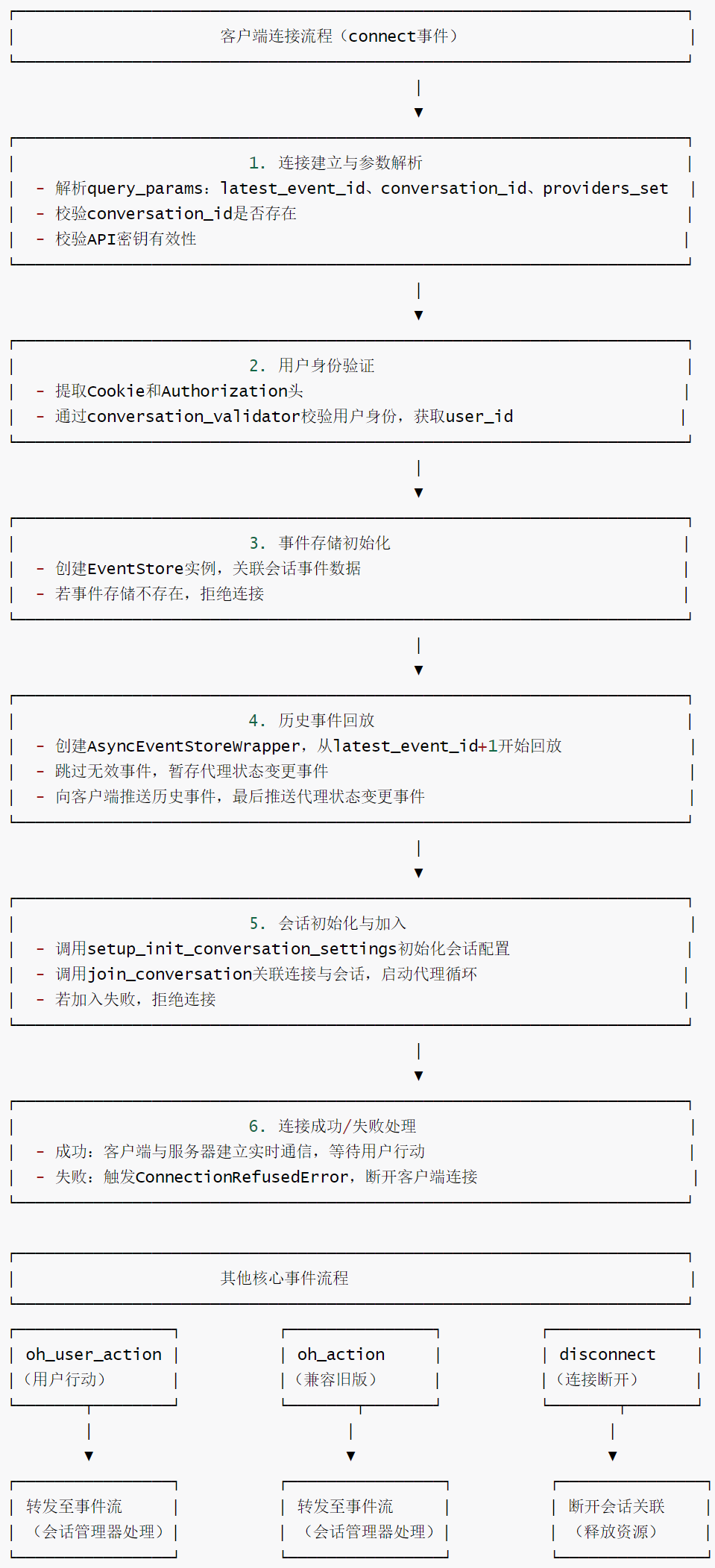
1.4.4 Session Connection
The key step here is to establish a connection with the ConversationManager.
conversation_init_data = await setup_init_conversation_settings(
    user_id, conversation_id, providers_set
)

agent_loop_info = await conversation_manager.join_conversation(
    conversation_id,
    connection_id,
    conversation_init_data,
    user_id,
)
1.4.5 Code
Here is an example of the code in listen_socket.py:
@sio.event
async def connect(connection_id: str, environ: dict) -> None:
    """
    SocketIO连接事件处理器:客户端建立连接时触发,完成会话验证、事件回放、会话加入等初始化流程。

    参数:
        connection_id: 客户端连接唯一标识(SocketIO分配)
        environ: WSGI环境变量字典,包含请求头、查询参数等信息
    """
    try:
        logger.info(f"SocketIO连接建立:connection_id={connection_id}")

        # 解析查询参数(从WSGI环境变量中提取QUERY_STRING)
        query_params = parse_qs(environ.get('QUERY_STRING', ''))

        # 解析最新事件ID(用于断点续传,默认-1表示从最开始回放)
        latest_event_id_str = query_params.get('latest_event_id', [-1])[0]
        try:
            latest_event_id = int(latest_event_id_str)
        except ValueError:
            logger.debug(f"无效的latest_event_id值:{latest_event_id_str},默认设为-1")
            latest_event_id = -1

        # 解析会话ID(必需参数,用于关联特定对话)
        conversation_id = query_params.get('conversation_id', [None])[0]
        logger.info(f"会话连接请求:conversation_id={conversation_id}, connection_id={connection_id}")

        # 解析提供者集合(如支持的LLM提供商列表,用于限制可用资源)
        raw_list = query_params.get('providers_set', [])
        providers_list = []
        for item in raw_list:
            # 拆分逗号分隔的提供者名称,过滤空值
            providers_list.extend(item.split(',') if isinstance(item, str) else [])
        providers_list = [p for p in providers_list if p]
        providers_set = [ProviderType(p) for p in providers_list]  # 转换为ProviderType枚举类型

        # 校验会话ID是否存在
        if not conversation_id:
            logger.error("查询参数中缺少conversation_id")
            raise ConnectionRefusedError("缺少会话ID(conversation_id)")

        # 校验会话API密钥是否有效
        if _invalid_session_api_key(query_params):
            raise ConnectionRefusedError("无效的会话API密钥")

        # 提取请求中的Cookie和Authorization头(用于用户身份验证)
        cookies_str = environ.get('HTTP_COOKIE', '')
        # WSGI环境中,HTTP头会转为"HTTP_前缀+下划线替换短横线"格式
        authorization_header = environ.get('HTTP_AUTHORIZATION', None)

        # 创建会话验证器,校验用户身份(关联会话ID、Cookie、授权头)
        conversation_validator = create_conversation_validator()
        user_id = await conversation_validator.validate(
            conversation_id, cookies_str, authorization_header
        )

        # 创建事件存储实例(用于读取会话历史事件)
        try:
            event_store = EventStore(
                conversation_id, conversation_manager.file_store, user_id
            )
        except FileNotFoundError as e:
            logger.error(f"创建会话事件存储失败:conversation_id={conversation_id}, 错误={e}")
            raise ConnectionRefusedError(f"无法访问会话事件:{e}")

        agent_state_changed = None  # 存储代理状态变更事件(最后单独发送)

        # 创建异步事件存储包装器,从latest_event_id+1开始回放事件(避免重复)
        async_store = AsyncEventStoreWrapper(event_store, latest_event_id + 1)

        # 异步回放历史事件(向客户端推送未接收过的事件)
        async for event in async_store:
            logger.debug(f"回放事件:{event.__class__.__name__}")

            # 跳过无效/召回类事件(无需推送给客户端)
            if isinstance(
                event,
                (NullAction, NullObservation, RecallAction),
            ):
                continue
            # 暂存代理状态变更事件(最后发送,确保客户端状态同步)
            elif isinstance(event, AgentStateChangedObservation):
                agent_state_changed = event
            # 其他事件直接推送给客户端
            else:
                await sio.emit('oh_event', event_to_dict(event), to=connection_id)

        # 最后发送代理状态变更事件(确保客户端获取最新状态)
        if agent_state_changed:
            await sio.emit(
                'oh_event', event_to_dict(agent_state_changed), to=connection_id
            )

        logger.info(f"会话事件回放完成:conversation_id={conversation_id}")

        # 初始化会话设置(用户偏好、提供者配置等)
        conversation_init_data = await setup_init_conversation_settings(
            user_id, conversation_id, providers_set
        )

        # 加入会话:关联connection_id与会话,启动代理循环
        agent_loop_info = await conversation_manager.join_conversation(
            conversation_id,
            connection_id,
            conversation_init_data,
            user_id,
        )

        # 校验会话加入结果
        if agent_loop_info is None:
            raise ConnectionRefusedError("加入会话失败")

        logger.info(f"会话加入成功:conversation_id={conversation_id}, connection_id={connection_id}")

    except ConnectionRefusedError:
        # 发送错误后断开无效连接
        asyncio.create_task(sio.disconnect(connection_id))
        raise


@sio.event
async def oh_user_action(connection_id: str, data: dict[str, Any]) -> None:
    """
    处理客户端发送的用户行动事件(如用户输入、操作指令)。

    参数:
        connection_id: 客户端连接ID
        data: 用户行动数据(字典格式,包含行动类型、内容等)
    """
    # 将用户行动转发到事件流,由会话管理器处理
    await conversation_manager.send_to_event_stream(connection_id, data)


@sio.event
async def oh_action(connection_id: str, data: dict[str, Any]) -> None:
    """
    兼容旧版客户端的行动事件处理器(保留用于向后兼容)。

    注意:待所有客户端升级为使用oh_user_action后,可移除该处理器
    目前用于支持正在进行中的旧会话,避免中断服务
    """
    await conversation_manager.send_to_event_stream(connection_id, data)


@sio.event
async def disconnect(connection_id: str) -> None:
    """
    SocketIO断开连接事件处理器:客户端断开连接时触发。

    参数:
        connection_id: 断开连接的客户端ID
    """
    logger.info(f"SocketIO连接断开:connection_id={connection_id}")
    # 通知会话管理器,断开该连接与会话的关联
    await conversation_manager.disconnect_from_session(connection_id)
0xFF Reference
https://docs.all-hands.dev/openhands/usage/architecture/backend
As AI agents evolve from “toys” to “tools,” what should we focus on? Openhands Architecture Analysis [Part 2: Core Concepts Related to Agents] by Kerry
As AI agents evolve from “toys” to “tools,” what should we focus on? Openhands Architecture Analysis [Part 1: Series Introduction] by Kerry
Coding Agent Openhands Analysis (with code) Arrow
OpenHands Source Code Analysis by Yi Lihui