AI Agents · AI Agent Frameworks
OpenHands Runtime Components
OpenHands runtime deep dive: plugin system, execution system, and browser environment internals.
0x00 Summary
This article continues the explanation of runtime, mainly introducing three components: plugins, execution system, and environment.
Because this series draws on a large number of articles, there may be some articles missing from the references. If so, please point them out.
0x01 Three Major Components
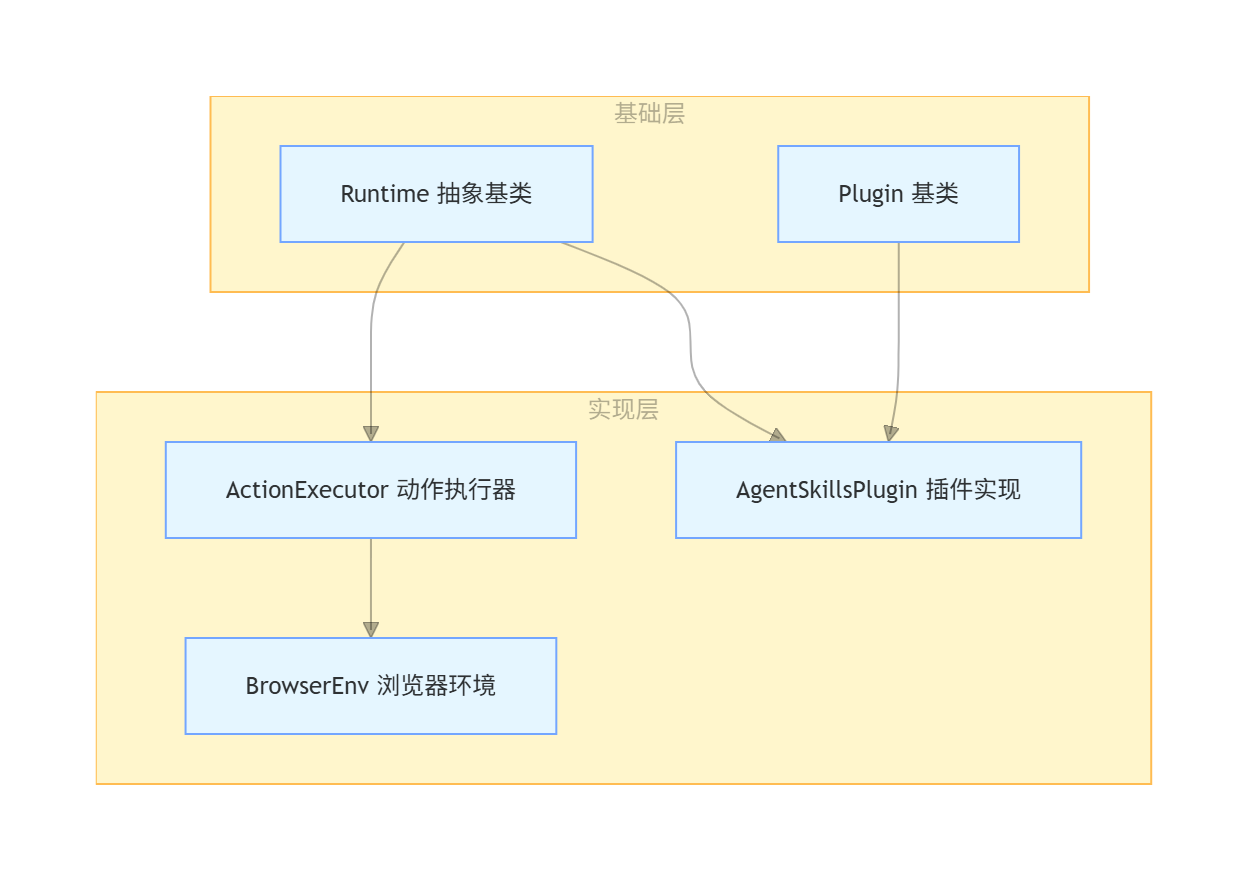
The components to be introduced in this article are as follows:
- ActionExecutor: The core component that executes actions in the Runtime.
- During ActionExecutor initialization, it loads the specified plugins based on the configuration. These plugins are then registered in ActionExecutor’s plugin dictionary.
- When an action request is received, ActionExecutor will call the corresponding method to execute the action.
- For browsing actions, ActionExecutor uses BrowserEnv to handle them.
- If plugins are involved, ActionExecutor will handle it through the plugin system.
- AgentSkillsPlugin: A plugin that provides agent skills functionality.
- AgentSkillsPlugin is a plugin that inherits from the Plugin base class.
- During runtime initialization, plugins are loaded into the plugin dictionary. Plugins are registered with the system through the PluginRequirement mechanism.
- When a specific action is triggered, the corresponding plugin function is invoked.
- BrowserEnv: A browser environment wrapper that uses the BrowserGym library.
- ActionExecutor determines whether to enable the browser environment based on the configuration during initialization.
- When browsing-related actions need to be performed, ActionExecutor calls the BrowserEnv method.
- BrowserEnv runs in a separate, multi-process environment.
0x02 Data Stream
The runtime data flow is as follows:
- The runtime will initiate an action request →
ActionExecutor.run_action(). - ActionExecutor calls the corresponding processing method based on the action type.
- If plugins are involved, handle them through the plugin system.
- If a browser is involved, call BrowserEnv to handle it.
- Return the observation results to the agent.
Runtime components
0x03 Plugin System
The runtime encounters the following problems: when adding new modules (such as custom tools or new LLM models), the core code needs to be modified, resulting in poor scalability; when multiple tasks are executed concurrently, there is frequent interaction between modules, which can easily lead to performance bottlenecks; the framework deployment and operation are complex and it is difficult to adapt to different environments (local, cloud, edge).
Therefore, most industries adopt microservice architecture or plug-in design, with modules communicating through standardized interfaces. Adding new functions only requires developing a plug-in and registering it.
3.1 sandbox_plugins
The sandbox plugins play a crucial role in OpenHands’ CodeActAgent, primarily used to define and configure the tools and functionalities that the agent can use in a sandbox environment. These plugins form the foundational toolset that enables the agent to interact with the environment and complete tasks.
Definition and function of sandbox_plugins
In the CodeActAgent class, sandbox_plugins is a class attribute that defines the plugins the agent needs in a sandbox environment:
sandbox_plugins: list[PluginRequirement] = [
    AgentSkillsRequirement(),
    JupyterRequirement(),
]
These plugins provide agents with the tools and functionality needed to perform tasks in a sandbox environment.
Specific plugin functions
AgentSkillsRequirement and JupyterRequirement are two plugin requirement classes.
- AgentSkillsRequirement provides a set of Python functions and tools that enable the agent to perform various operations, including basic skills such as file operations, directory browsing, and code execution. It needs to be initialized before JupyterRequirement because Jupyter requires these functions.
- JupyterRequirement: Provides an interactive Python interpreter environment that allows agents to execute Python code, and depends on functions provided by AgentSkillsRequirement.
Use of plugins in the system
As can be seen from the code, these plugins are used in multiple places:
During runtime initialization:
# 在 agent_session.py 中
self.runtime = runtime_cls(
    plugins=agent.sandbox_plugins,
)
Configure plugins in Runtime:
# 在 base.py 中
self.plugins = copy.deepcopy(plugins) if plugins is not None and len(plugins) > 0 else []
These plugins provide the following capabilities for the proxy:
- Execute Bash commands: Command execution functionality in AgentSkills.
- Executing Python code: Providing an IPython environment via a Jupyter plugin.
- File system operations: reading, writing, and editing files.
- Directory browsing: Viewing and navigating the file system.
- Other useful tools: various helper functions and tools.
We will now analyze the base classes Plugin, AgentSkillsRequirement, and JupyterPlugin in detail.
3.2 Plugin Base Class
class Plugin:
    """Base class for a plugin.

    This will be initialized by the runtime client, which will run inside docker.
    """

    name: str

    @abstractmethod
    async def initialize(self, username: str) -> None:
        """Initialize the plugin."""
        pass

    @abstractmethod
    async def run(self, action: Action) -> Observation:
        """Run the plugin for a given action."""
        pass


@dataclass
class PluginRequirement:
    """Requirement for a plugin."""

    name: str
The plugin registry is:
ALL_PLUGINS = {
    'jupyter': JupyterPlugin,
    'agent_skills': AgentSkillsPlugin,
    'vscode': VSCodePlugin,
}
3.3 JupyterPlugin
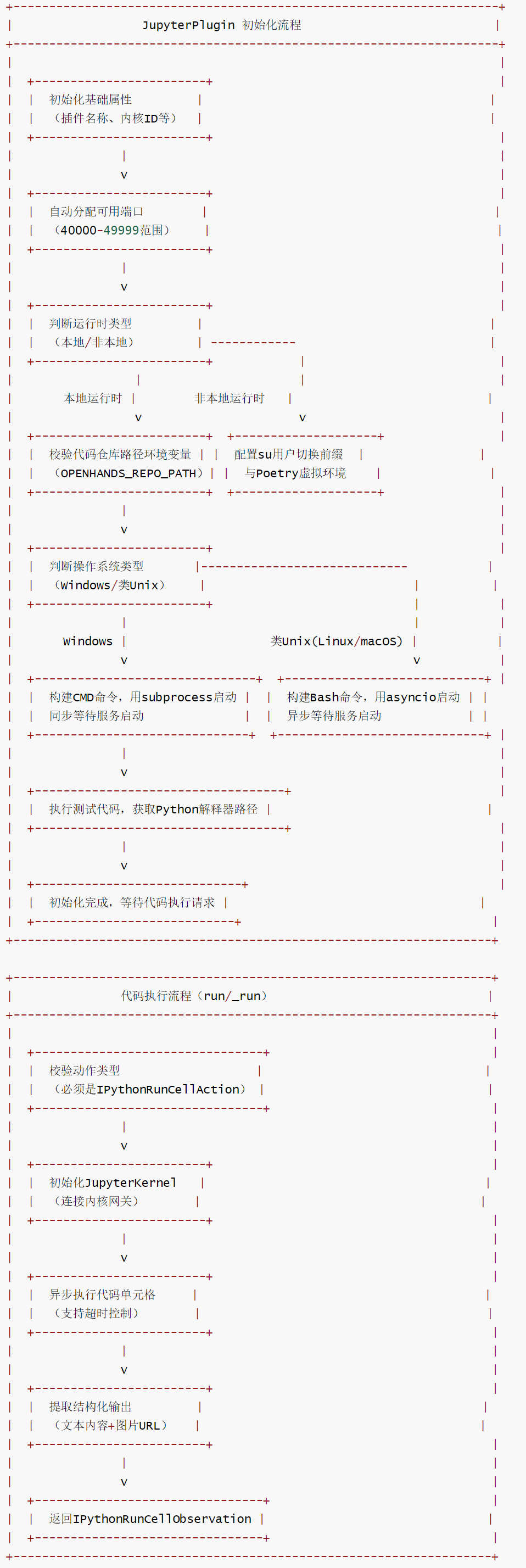
JupyterPlugin is a Jupyter kernel plugin in the OpenHands framework, implemented based on the Plugin base class. Its core responsibility is to start the Jupyter Kernel Gateway service, provide asynchronous execution capabilities for IPython code cells, support code execution, output capture (text/image), and Python interpreter path acquisition. It is a core component in the framework that integrates interactive data analysis, code debugging, and other Jupyter-related functions.
Core Features
- Cross-platform compatibility: Compatible with Windows, Linux, and macOS systems, with differentiated process startup methods for different systems (
Windows subprocess.Popenand Unix-like systemsasyncio.create_subprocess_shell). - Flexible runtime support: It distinguishes between local runtime and non-local runtime, adapts to different deployment scenarios (such as sandbox environment, local development environment), and automatically handles working directory and environment variable configuration.
- Automatic port allocation: Automatically searches for available TCP ports in the range of
40000-49999to avoid port conflicts. - Asynchronous code execution: Based on
JupyterKernelencapsulated asynchronous code execution logic, it supports timeout control and can capture structured results such as text output and image URLs. - Environment isolation and compatibility: Ensures dependency consistency through
micromambavirtual environments or local environment variables, supports path configuration for Poetry projects, and adapts to the engineering deployment of the OpenHands framework.
flow chart
11-1
code
@dataclass
class JupyterRequirement(PluginRequirement):
    """Jupyter插件的依赖声明类,用于框架识别插件依赖。"""
    name: str = 'jupyter'  # 依赖名称,固定为'jupyter'

class JupyterPlugin(Plugin):
    """Jupyter插件,提供Jupyter Kernel Gateway启动与IPython代码执行能力。"""
    name: str = 'jupyter'  # 插件名称,固定为'jupyter'
    kernel_gateway_port: int  # Jupyter Kernel Gateway服务端口
    kernel_id: str  # Jupyter内核ID
    gateway_process: asyncio.subprocess.Process | subprocess.Popen  # 内核网关进程对象
    python_interpreter_path: str  # Python解释器路径

    async def initialize(
        self, username: str, kernel_id: str = 'openhands-default'
    ) -> None:
        """初始化Jupyter插件,启动Kernel Gateway服务,配置运行环境。

        参数:
            username: 执行用户名称(非本地运行时使用)
            kernel_id: Jupyter内核ID(默认:openhands-default)
        """
        # 在40000-49999端口范围内查找可用TCP端口,避免冲突
        self.kernel_gateway_port = find_available_tcp_port(40000, 49999)
        self.kernel_id = kernel_id
        # 判断是否为本地运行时(通过环境变量LOCAL_RUNTIME_MODE标记)
        is_local_runtime = os.environ.get('LOCAL_RUNTIME_MODE') == '1'
        # 判断是否为Windows系统
        is_windows = sys.platform == 'win32'

        if not is_local_runtime:
            # 非本地运行时:配置用户切换前缀与Poetry虚拟环境
            # 若启用SU_TO_USER,则添加"su - 用户名 -s "前缀(切换用户执行命令)
            prefix = f'su - {username} -s ' if SU_TO_USER else ''
            # 命令前缀:切换到代码仓库目录,配置环境变量,使用micromamba虚拟环境
            poetry_prefix = (
                'cd /openhands/code\n'
                'export POETRY_VIRTUALENVS_PATH=/openhands/poetry;\n'
                'export PYTHONPATH=/openhands/code:$PYTHONPATH;\n'
                'export MAMBA_ROOT_PREFIX=/openhands/micromamba;\n'
                '/openhands/micromamba/bin/micromamba run -n openhands '
            )
        else:
            # 本地运行时:无需用户切换,直接使用本地环境
            prefix = ''
            # 从环境变量获取代码仓库路径(本地运行时必须配置)
            code_repo_path = os.environ.get('OPENHANDS_REPO_PATH')
            if not code_repo_path:
                raise ValueError(
                    'OPENHANDS_REPO_PATH environment variable is not set. '
                    'This is required for the jupyter plugin to work with LocalRuntime.'
                )
            # 命令前缀:切换到代码仓库目录(本地环境依赖PATH确保环境正确)
            poetry_prefix = f'cd {code_repo_path}\n'

        if is_windows:
            # Windows系统:构建CMD格式的启动命令
            jupyter_launch_command = (
                f'cd /d "{code_repo_path}" && '  # 切换到代码仓库目录(/d参数支持跨盘符切换)
                f'"{sys.executable}" -m jupyter kernelgateway '  # 启动Jupyter Kernel Gateway
                '--KernelGatewayApp.ip=0.0.0.0 '  # 绑定所有网络接口
                f'--KernelGatewayApp.port={self.kernel_gateway_port}'  # 指定端口
            )

            # Windows系统使用同步subprocess.Popen启动进程(asyncio在Windows有兼容性限制)
            self.gateway_process = subprocess.Popen(  # type: ignore[ASYNC101] # noqa: ASYNC101
                jupyter_launch_command,
                stdout=subprocess.PIPE,  # 捕获标准输出
                stderr=subprocess.STDOUT,  # 标准错误重定向到标准输出
                shell=True,  # 使用shell执行命令
                text=True,  # 输出以文本模式返回
            )

            # Windows系统同步等待Kernel Gateway启动(读取输出直到包含'at'字符,标识服务就绪)
            output = ''
            while should_continue():
                if self.gateway_process.stdout is None:
                    time.sleep(1)  # 无输出时等待1秒
                    continue

                line = self.gateway_process.stdout.readline()  # 读取一行输出
                if not line:
                    time.sleep(1)
                    continue

                output += line
                if 'at' in line:  # 服务启动成功的标识(输出含"at",如"Listening at...")
                    break

                time.sleep(1)
        else:
            # 类Unix系统(Linux/macOS):构建Bash格式的启动命令
            jupyter_launch_command = (
                f"{prefix}/bin/bash << 'EOF'\n"  # 切换到bash执行,EOF避免变量解析
                f'{poetry_prefix}'  # 环境配置前缀(虚拟环境/工作目录)
                f'"{sys.executable}" -m jupyter kernelgateway '  # 启动Kernel Gateway
                '--KernelGatewayApp.ip=0.0.0.0 '  # 绑定所有网络接口
                f'--KernelGatewayApp.port={self.kernel_gateway_port}\n'  # 指定端口
                'EOF'
            )

            # 类Unix系统使用asyncio创建异步子进程(避免阻塞事件循环)
            self.gateway_process = await asyncio.create_subprocess_shell(
                jupyter_launch_command,
                stderr=asyncio.subprocess.STDOUT,  # 标准错误重定向到标准输出
                stdout=asyncio.subprocess.PIPE,  # 捕获标准输出
            )
            # 异步等待Kernel Gateway启动(读取输出直到包含'at'字符)
            output = ''
            while should_continue() and self.gateway_process.stdout is not None:
                line_bytes = await self.gateway_process.stdout.readline()  # 异步读取一行输出
                line = line_bytes.decode('utf-8')  # 字节转字符串
                output += line
                if 'at' in line:
                    break
                await asyncio.sleep(1)  # 等待1秒

        # 执行测试代码,获取当前Python解释器路径(验证环境正确性)
        _obs = await self.run(
            IPythonRunCellAction(code='import sys; print(sys.executable)')
        )
        self.python_interpreter_path = _obs.content.strip()  # 提取并保存解释器路径

    async def _run(self, action: Action) -> IPythonRunCellObservation:
        """内部方法:在Jupyter内核中执行代码单元格。

        参数:
            action: 待执行的动作(必须是IPythonRunCellAction类型)

        返回:
            IPythonRunCellObservation: 代码执行结果的观察值(含文本内容、图片URL等)
        """
        # 校验动作类型:仅支持IPythonRunCellAction
        if not isinstance(action, IPythonRunCellAction):
            raise ValueError(
                f'Jupyter plugin only supports IPythonRunCellAction, but got {action}'
            )

        # 初始化JupyterKernel(若未初始化)
        if not hasattr(self, 'kernel'):
            self.kernel = JupyterKernel(
                f'localhost:{self.kernel_gateway_port}',  # 内核网关地址(本地+端口)
                self.kernel_id  # 内核ID
            )

        # 若内核未初始化,执行初始化(建立连接)
        if not self.kernel.initialized:
            await self.kernel.initialize()

        # 异步执行代码,支持超时控制(超时时间从action获取)
        output = await self.kernel.execute(action.code, timeout=action.timeout)

        # 从结构化输出中提取文本内容与图片URL
        text_content = output.get('text', '')  # 文本输出(stdout/stderr)
        image_urls = output.get('images', [])  # 图片URL列表(如matplotlib绘图结果)

        # 返回封装后的观察结果
        return IPythonRunCellObservation(
            content=text_content,  # 文本内容
            code=action.code,  # 执行的代码
            image_urls=image_urls if image_urls else None,  # 图片URL(无则为None)
        )

    async def run(self, action: Action) -> IPythonRunCellObservation:
        """公开接口:执行IPython代码动作,返回观察结果。

        参数:
            action: 待执行的IPythonRunCellAction动作

        返回:
            IPythonRunCellObservation: 代码执行结果
        """
        # 调用内部_run方法执行代码,返回结果
        obs = await self._run(action)
        return obs
3.4 AgentSkillsPlugin
Function Overview
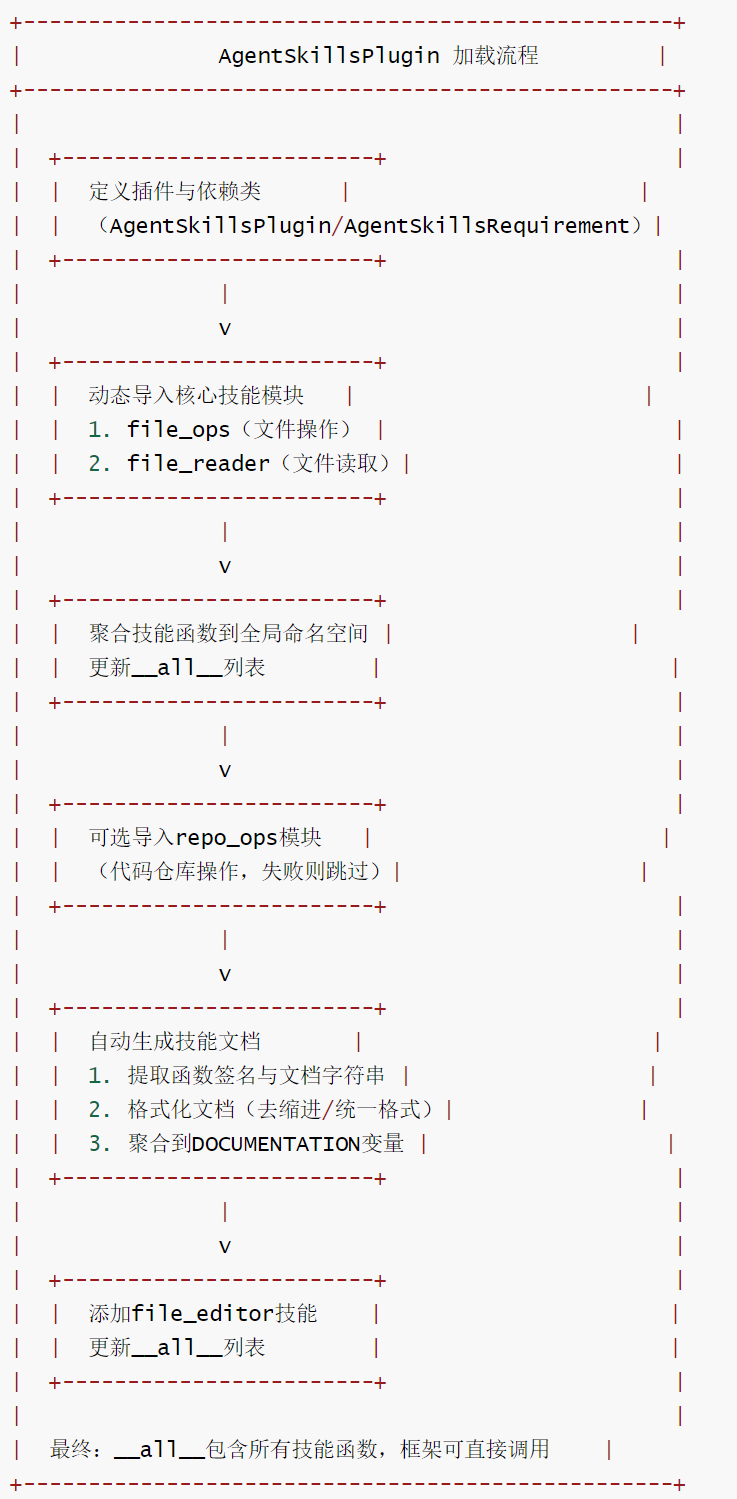
AgentSkillsPlugin is the core plugin in the OpenHands framework for managing agent skills. It is responsible for integrating basic skill modules such as file operations file_ops, file reading file_reader, and code repository operations repo_ops. It exposes the scattered skill functions to the framework in a unified manner through a dynamic import mechanism. It also provides plugin dependency declaration and automatic documentation generation capabilities. It is a key component for agents to acquire core operational capabilities such as file processing and repository management.
class AgentSkillsPlugin(Plugin):
    name: str = 'agent_skills'

    async def initialize(self, username: str) -> None:
        """Initialize the plugin."""
        pass

    async def run(self, action: Action) -> Observation:
        """Run the plugin for a given action."""
        raise NotImplementedError('AgentSkillsPlugin does not support run method')
Core Features
- Modular skill integration: Through a dynamic import mechanism, skill functions from independent modules such as
file_ops,file_reader,repo_ops, etc., are aggregated in a unified manner, simplifying the framework’s calling and management of skills. - Automatic documentation generation: Scan all imported skill functions, extract function signatures and documentation strings
__doc__, and automatically generate standardized documentation to improve development maintainability. - Flexible dependency handling: For
repo_ops, an optional import strategy is adopted. If the import fails, the module is skipped without affecting the normal use of other skills, thus enhancing plugin compatibility. - Minimalist initialization design: The plugin initialization logic is empty, requiring no additional configuration. It focuses on the aggregation and exposure of skill functions, reducing the barrier to entry for users.
- Clear interface constraints: Disable
run(throwing an unimplemented exception), clarifying that the core function of this plugin is skill aggregation rather than direct action execution, to avoid misuse.
AgentSkillsRequirement
AgentSkillsRequirement is a plugin requirement class that defines the set of basic skills required for an agent to run in a sandbox environment. These skills are primarily provided in the form of Python functions, enabling the agent to perform various operations.
- The agent is provided with basic capabilities to interact with the file system.
- Provides tools for executing commands and scripts.
- Provides basic function support for other advanced plugins (such as Jupyter).
- Ensure that the agent can complete most common development tasks in a sandbox environment.
The main functions of AgentSkillsRequirement are as follows:
- File system operations.
- Provides the ability to read, write, and edit files.
- Supports directory browsing and file management operations.
- Allow the agent to view and manipulate files in the workspace.
- Command execution.
- Provides the ability to execute shell commands.
- Allow the agent to run bash commands in a sandbox environment.
- Supports various operations that interact with the operating system.
- Utility function set.
- Provides a series of useful Python functions.
- These functions can be used by other plugins (such as Jupyter).
- Includes various auxiliary functions, such as string processing and data manipulation.
In CodeActAgent, AgentSkillsRequirement is defined in the sandbox_plugins list:
sandbox_plugins: list[PluginRequirement] = [
    AgentSkillsRequirement(),
    JupyterRequirement(),
]
Relationship between AgentSkillsRequirement and other components:
- Relationship with JupyterRequirement.
- AgentSkillsRequirement must be initialized before JupyterRequirement.
- The Python functions provided by AgentSkillsRequirement will be used by the Jupyter environment.
- This order ensures that Jupyter can access all the necessary utility functions.
- Relationship with Runtime.
- These plugins are loaded and initialized in LocalRuntime and other runtime environments.
In summary, AgentSkillsRequirement is the foundation for agents to perform tasks in the OpenHands environment. It provides a core set of functions that enable agents to interact with the file system, command line, and runtime environment.
Framework Registration and Skills Discovery
AgentSkillsPlugin is identified and automatically discovered by the OpenHands framework through a plugin registration mechanism, as follows:
Plugin registration and dependency declaration:
- AgentSkillsPlugin inherits from the framework’s
Pluginbase class. - AgentSkillsRequirement declares plugin dependency and is automatically scanned and loaded when the framework starts.
@dataclass
class AgentSkillsRequirement(PluginRequirement):
    name: str = "agent_skills"  # 插件依赖名称,与插件名一致
    documentation: str = agentskills.DOCUMENTATION

class AgentSkillsPlugin(Plugin):
    name: str = "agent_skills"  # 插件名称,框架通过该名称识别
Framework Analysis Skills List:
After the framework loads AgentSkillsPlugin, it reads its __all__ variables and global namespace to extract key information from all Skill functions:
- Function name (e.g.
create_file): serves as a unique identifier for Skill. - Function signature (parameters, return value): parsed by
inspect.signatureand used as the call parameters for constructing the agent. - Document string (
__doc__): Automatically generates skill documentation for the agent to reference.
Global Skill Registration:
The framework registers the parsed Skill information into the Global Skill Registry to form a key-value mapping (key: Skill function name, value: Skill function object + metadata), enabling agents to quickly find and call the corresponding Skill by function name.
The agent invokes a specific Skill operation:
The agent retrieves the specific aggregated skill from AgentSkillsPlugin through the interface provided by the framework and triggers its execution.
logger.debug('Initializing AgentSkills')
if 'agent_skills' in self.plugins and 'jupyter' in self.plugins:
    obs = await self.run_ipython(
        IPythonRunCellAction(
            code='from openhands.runtime.plugins.agent_skills.agentskills import *\n'
        )
    )
    logger.debug(f'AgentSkills initialized: {obs}')
flow chart
11-1.5
code
@dataclass
class AgentSkillsRequirement(PluginRequirement):
    """AgentSkillsPlugin 的依赖声明类,用于框架识别插件依赖。"""
    name: str = 'agent_skills'  # 依赖名称,固定为'agent_skills'
    documentation: str = agentskills.DOCUMENTATION  # 依赖文档(来自agentskills模块)

class AgentSkillsPlugin(Plugin):
    """智能体技能插件,负责聚合各类基础技能函数(文件操作、仓库操作等)。"""
    name: str = 'agent_skills'  # 插件名称,固定为'agent_skills'

    async def initialize(self, username: str) -> None:
        """初始化插件(空实现,无需额外配置)。"""
        pass

    async def run(self, action: Action) -> Observation:
        """执行插件动作(禁用该方法)。

        该插件的核心作用是聚合技能函数,而非直接执行动作,因此抛出未实现异常。
        """
        raise NotImplementedError('AgentSkillsPlugin does not support run method')

# 动态导入file_ops模块的所有技能函数,添加到当前模块全局命名空间
import_functions(
    module=file_ops,  # 源模块:文件操作模块(如创建/删除/修改文件)
    function_names=file_ops.__all__,  # 导入的函数列表(file_ops定义的所有公开函数)
    target_globals=globals()  # 目标命名空间:当前模块全局变量
)

# 动态导入file_reader模块的所有技能函数,添加到当前模块全局命名空间
import_functions(
    module=file_reader,  # 源模块:文件读取模块(如读取文本文件、解析JSON等)
    function_names=file_reader.__all__,  # 导入的函数列表
    target_globals=globals()
)

# 初始化__all__列表,包含已导入的所有技能函数(供外部模块导入)
__all__ = file_ops.__all__ + file_reader.__all__

# 可选导入repo_ops模块(代码仓库操作,如Git克隆、提交等)
try:
    from openhands.runtime.plugins.agent_skills import repo_ops

    # 动态导入repo_ops模块的所有技能函数
    import_functions(
        module=repo_ops,
        function_names=repo_ops.__all__,
        target_globals=globals()
    )

    # 将repo_ops的技能函数添加到__all__
    __all__ += repo_ops.__all__
except ImportError:
    # 若repo_ops模块不可用(如未安装依赖),则跳过导入,不影响其他功能
    pass

# 自动生成所有技能函数的标准化文档
DOCUMENTATION = ''
for func_name in __all__:
    # 从全局命名空间获取技能函数
    func = globals()[func_name]

    # 获取函数的文档字符串
    cur_doc = func.__doc__
    # 清理文档字符串:去除空行、统一去除每行缩进
    cur_doc = '\n'.join(filter(None, map(lambda x: x.strip(), cur_doc.split('\n'))))
    # 格式化文档:每行添加4个空格缩进,保证格式统一
    cur_doc = '\n'.join(map(lambda x: ' ' * 4 + x, cur_doc.split('\n')))

    # 提取函数签名(函数名+参数列表)
    fn_signature = f'{func.__name__}' + str(signature(func))
    # 将函数签名与格式化文档添加到总文档
    DOCUMENTATION += f'{fn_signature}:\n{cur_doc}\n\n'

# 单独添加file_editor技能函数(特殊处理,未包含在上述模块中)
from openhands.runtime.plugins.agent_skills.file_editor import file_editor  # noqa: E402
__all__ += ['file_editor']  # 将file_editor添加到__all__,供外部导入
0x04 Execution System
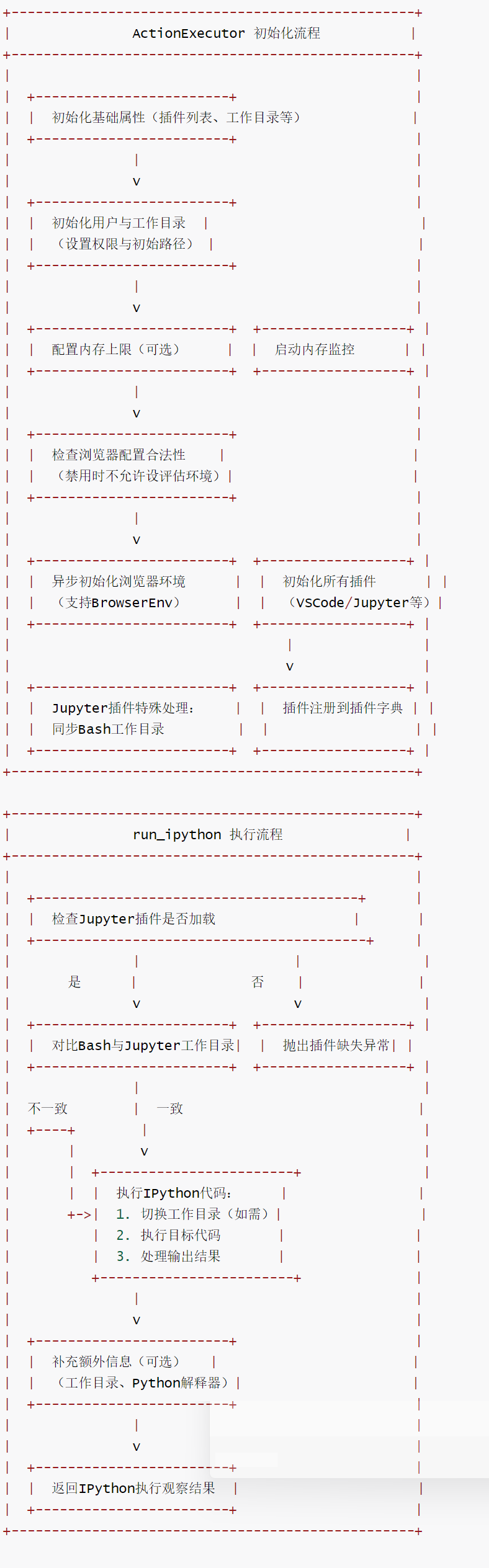
ActionExecutor is the core action execution component in the OpenHands framework that runs within a Docker sandbox. It is responsible for receiving and executing various actions from the backend (such as command line execution, IPython code execution, browser operations, etc.), generating corresponding observations, and managing plugin lifecycle, user environment, working directory, and resource monitoring. It is a key bridge connecting backend commands and the sandbox execution environment.
4.1 Call
Summary of the calling and usage process of the ActionExecutor class in the OpenHands project:
- Server-side: ActionExecutor runs as a standalone service in
action_execution_server.py. - Client: Various runtime implementations (such as LocalRuntime) communicate with ActionExecutor via HTTP requests.
Execution steps:
- The Runtime (which is actually a derived class of ActionExecutionClient) directly or indirectly calls the
execute_action()method.
class RemoteRuntime(ActionExecutionClient)
class LocalRuntime(ActionExecutionClient)
class DockerRuntime(ActionExecutionClient)
- Send to the
/execute_actionendpoint via an HTTP POST request. - ActionExecutor receives requests and executes corresponding operations.
- The observation results are returned to the client.
This architecture separates operation execution from the main application, providing better isolation and security.
4.2 action_execution_client.py
action_execution_client.py contains the ActionExecutionClient class that implements a runtime interface. It is an abstract implementation, meaning that it still needs to be extended through concrete implementations to be used.
ActionExecutionClient interacts with action_execution_server via HTTP calls to actually perform runtime operations.
ActionExecutionClient is used in various runtime implementations. For example, in LocalRuntime, operations are sent to ActionExecutor via the client.
4.3 action_execution_server.py
The ActionExecutor acts as the core component in the openhands/runtime/action_execution_server.py file. This file instantiates it and uses it as the core executor for FastAPI applications. Specifically, the action_executor.py file contains the ActionExecutor class responsible for actions received via HTTP /execute_action endpoint. It returns the observed results in the HTTP response.
The core features are as follows:
- Sandbox environment management: Initializes user permissions and working directory, supports cross-platform adaptation for Windows/Linux environments, and ensures execution isolation and security.
- Plug-in architecture: Supports loading various plugins such as VSCode and Jupyter, manages plugin initialization and invocation through a unified interface, and flexibly extends execution capabilities.
- Multi-environment collaboration: Integrates Bash/Windows PowerShell command-line environment, browser environment (BrowserEnv), and Jupyter interactive environment to meet diverse action execution needs.
- Asynchronous initialization optimization: The browser environment uses asynchronous initialization to avoid blocking the main process and improve startup efficiency.
- Resource and status monitoring: Supports memory limit configuration and memory monitoring, and synchronizes Bash and Jupyter working directories to ensure execution context consistency.
- Exception handling and compatibility: Special compatibility handling is performed for scenarios such as Windows systems and missing plugins, and explicit exceptions are thrown and logged.
Specifically:
Start in main:
if __name__ == '__main__':
    logger.debug(f'Starting action execution API on port {args.port}')
    # When LOG_JSON=1, provide a JSON log config to Uvicorn so error/access logs are structured
    log_config = None
    if os.getenv('LOG_JSON', '0') in ('1', 'true', 'True'):
        log_config = get_uvicorn_json_log_config()
    run(app, host='0.0.0.0', port=args.port, log_config=log_config, use_colors=False)
Initialize in the lifespan function:
@asynccontextmanager
async def lifespan(app: FastAPI):
    global client, mcp_proxy_manager
    logger.info('Initializing ActionExecutor...')
    client = ActionExecutor(
        plugins_to_load,
        work_dir=args.working_dir,
        username=args.username,
        user_id=args.user_id,
        enable_browser=args.enable_browser,
        browsergym_eval_env=args.browsergym_eval_env,
    )
    await client.ainit()
    logger.info('ActionExecutor initialized.')

    # Check if we're on Windows
    is_windows = sys.platform == 'win32'

    # Initialize and mount MCP Proxy Manager (skip on Windows)
    if is_windows:
        logger.info('Skipping MCP Proxy initialization on Windows')
        mcp_proxy_manager = None
    else:
        logger.info('Initializing MCP Proxy Manager...')
        # Create a MCP Proxy Manager
        mcp_proxy_manager = MCPProxyManager(
            auth_enabled=bool(SESSION_API_KEY),
            api_key=SESSION_API_KEY,
            logger_level=logger.getEffectiveLevel(),
        )
        mcp_proxy_manager.initialize()
        # Mount the proxy to the app
        allowed_origins = ['*']
        try:
            await mcp_proxy_manager.mount_to_app(app, allowed_origins)
        except Exception as e:
            logger.error(f'Error mounting MCP Proxy: {e}', exc_info=True)
            raise RuntimeError(f'Cannot mount MCP Proxy: {e}')

    yield

    # Clean up & release the resources
    logger.info('Shutting down MCP Proxy Manager...')
    if mcp_proxy_manager:
        del mcp_proxy_manager
        mcp_proxy_manager = None
    else:
        logger.info('MCP Proxy Manager instance not found for shutdown.')

    logger.info('Closing ActionExecutor...')
    if client:
        try:
            client.close()
            logger.info('ActionExecutor closed successfully.')
        except Exception as e:
            logger.error(f'Error closing ActionExecutor: {e}', exc_info=True)
    else:
        logger.info('ActionExecutor instance not found for closing.')
    logger.info('Shutdown complete.')
Called in the /execute_action endpoint:
@app.post('/execute_action')
async def execute_action(action_request: ActionRequest):
    assert client is not None
    try:
        action = event_from_dict(action_request.action)
        if not isinstance(action, Action):
            raise HTTPException(status_code=400, detail='Invalid action type')
        client.last_execution_time = time.time()
        observation = await client.run_action(action)
        return event_to_dict(observation)
    except Exception as e:
        logger.exception(f'Error while running /execute_action: {str(e)}')
        raise HTTPException(
            status_code=500,
            detail=f'Internal server error: {str(e)}',
        )
    finally:
        update_last_execution_time()
4.4 Flowchart
11-3
4.5 Code
ActionExecutor key characteristics of a class:
- Initialize the user environment and bash shell.
- Plugin management and initialization.
- Perform various operation types (bash commands, IPython units, file operations, browsing).
- Integration with BrowserEnv for web interaction.
class ActionExecutor:
    """动作执行器(ActionExecutor)运行于 Docker 沙箱内,
    负责执行从 OpenHands 后端接收的动作,并生成对应的观察结果(Observation)。
    """

    def __init__(
        self,
        plugins_to_load: list[Plugin],
        work_dir: str,
        username: str,
        user_id: int,
        enable_browser: bool,
        browsergym_eval_env: str | None,
    ) -> None:
        """初始化动作执行器,配置执行环境、插件列表、用户信息等核心参数。

        参数:
            plugins_to_load: 待加载的插件列表
            work_dir: 初始工作目录路径
            username: 执行用户名称
            user_id: 执行用户ID
            enable_browser: 是否启用浏览器环境
            browsergym_eval_env: BrowserGym 评估环境名称(可选,启用浏览器时生效)
        """
        # 待加载的插件列表
        self.plugins_to_load = plugins_to_load
        # 初始工作目录(沙箱内路径)
        self._initial_cwd = work_dir
        # 执行用户名称
        self.username = username
        # 执行用户ID
        self.user_id = user_id

        # 初始化用户与工作目录(设置用户权限、创建工作目录,返回更新后的用户ID)
        _updated_user_id = init_user_and_working_directory(
            username=username, user_id=self.user_id, initial_cwd=work_dir
        )
        if _updated_user_id is not None:
            self.user_id = _updated_user_id  # 更新为实际生效的用户ID

        # 命令行会话(支持 Bash 或 Windows PowerShell)
        self.bash_session: BashSession | 'WindowsPowershellSession' | None = None  # type: ignore[name-defined]
        # 异步锁,确保动作执行的线程安全
        self.lock = asyncio.Lock()
        # 已加载的插件字典(key: 插件名称,value: 插件实例)
        self.plugins: dict[str, Plugin] = {}
        # 文件编辑器实例(基于工作目录根路径初始化)
        self.file_editor = OHEditor(workspace_root=self._initial_cwd)
        # 是否启用浏览器环境
        self.enable_browser = enable_browser
        # 浏览器环境实例(BrowserEnv)
        self.browser: BrowserEnv | None = None
        # 浏览器异步初始化任务(避免阻塞主流程)
        self.browser_init_task: asyncio.Task | None = None
        # BrowserGym 评估环境名称
        self.browsergym_eval_env = browsergym_eval_env

        # 合法性校验:未启用浏览器时,不允许设置 BrowserGym 评估环境
        if (not self.enable_browser) and self.browsergym_eval_env:
            raise BrowserUnavailableException(
                'Browser environment is not enabled in config, but browsergym_eval_env is set'
            )

        # 记录启动时间与最后执行时间
        self.start_time = time.time()
        self.last_execution_time = self.start_time
        # 初始化完成标记
        self._initialized = False
        # 已下载文件列表
        self.downloaded_files: list[str] = []
        # 下载目录路径(沙箱内)
        self.downloads_directory = '/workspace/.downloads'

        # 内存上限配置(从环境变量读取,可选)
        self.max_memory_gb: int | None = None
        if _override_max_memory_gb := os.environ.get('RUNTIME_MAX_MEMORY_GB', None):
            self.max_memory_gb = int(_override_max_memory_gb)
        else:
            logger.info('No max memory limit set, using all available system memory')

        # 初始化内存监控(根据环境变量决定是否启用)
        self.memory_monitor = MemoryMonitor(
            enable=os.environ.get('RUNTIME_MEMORY_MONITOR', 'False').lower()
            in ['true', '1', 'yes']
        )
        self.memory_monitor.start_monitoring()  # 启动内存监控

    async def _init_browser_async(self):
        """异步初始化浏览器环境(避免阻塞主流程)。"""
        if not self.enable_browser:
            logger.info('Browser environment is not enabled in config')
            return

        # Windows 系统不支持浏览器环境,输出警告
        if sys.platform == 'win32':
            logger.warning('Browser environment not supported on windows')
            return
        try:
            # 初始化浏览器环境(传入评估环境名称)
            self.browser = BrowserEnv(self.browsergym_eval_env)
            logger.debug('Browser initialized asynchronously')
        except Exception as e:
            logger.exception(f'Failed to initialize browser: {e}')
            self.browser = None  # 初始化失败则置空

    async def _init_plugin(self, plugin: Plugin):
        """初始化单个插件,并注册到插件字典。

        参数:
            plugin: 待初始化的插件实例
        """
        assert self.bash_session is not None, "命令行会话未初始化,无法加载插件"

        # VSCode 插件特殊处理:需要 Runtime ID 用于 Gateway API 的路径路由
        if isinstance(plugin, VSCodePlugin):
            runtime_id = os.environ.get('RUNTIME_ID')  # 从环境变量获取 Runtime ID
            await plugin.initialize(self.username, runtime_id=runtime_id)
        else:
            # 其他插件直接传入用户名初始化
            await plugin.initialize(self.username)

        # 将初始化后的插件注册到字典
        self.plugins[plugin.name] = plugin
        logger.debug(f'Initializing plugin: {plugin.name}')

        # Jupyter 插件特殊处理:同步命令行工作目录到 Jupyter 环境
        if isinstance(plugin, JupyterPlugin):
            # Windows 路径转义(将反斜杠替换为正斜杠)
            cwd = self.bash_session.cwd.replace('\\', '/')
            # 执行 IPython 代码,切换工作目录
            await self.run_ipython(
                IPythonRunCellAction(code=f'import os; os.chdir(r"{cwd}")')
            )

    async def run_ipython(self, action: IPythonRunCellAction) -> Observation:
        """执行 IPython 代码动作,返回执行结果观察值。

        参数:
            action: IPython 代码执行动作(包含待执行代码、是否补充额外信息等)

        返回:
            IPythonRunCellObservation: 代码执行结果的观察值(含输出内容、状态等)
        """
        assert self.bash_session is not None, "命令行会话未初始化,无法执行 IPython 动作"

        # 检查 Jupyter 插件是否已加载
        if 'jupyter' in self.plugins:
            _jupyter_plugin: JupyterPlugin = self.plugins['jupyter']  # 类型断言
            # 同步 Bash 与 Jupyter 的工作目录(确保执行上下文一致)
            jupyter_cwd = getattr(self, '_jupyter_cwd', None)  # 获取当前 Jupyter 工作目录
            if self.bash_session.cwd != jupyter_cwd:
                # Windows 路径转义
                cwd = self.bash_session.cwd.replace('\\', '/')
                # 生成切换工作目录的代码
                reset_jupyter_cwd_code = f'import os; os.chdir("{cwd}")'
                _aux_action = IPythonRunCellAction(code=reset_jupyter_cwd_code)
                # 执行工作目录切换
                _reset_obs: IPythonRunCellObservation = await _jupyter_plugin.run(
                    _aux_action
                )
                self._jupyter_cwd = self.bash_session.cwd  # 更新 Jupyter 工作目录缓存

            # 执行目标 IPython 代码
            obs: IPythonRunCellObservation = await _jupyter_plugin.run(action)
            obs.content = obs.content.rstrip()  # 去除输出内容末尾的空白字符

            # 若需要补充额外信息,添加工作目录与 Python 解释器路径
            if action.include_extra:
                obs.content += (
                    f'\n[Jupyter current working directory: {self.bash_session.cwd}]'
                )
                obs.content += f'\n[Jupyter Python interpreter: {_jupyter_plugin.python_interpreter_path}]'
            return obs
        else:
            # 未加载 Jupyter 插件时抛出异常
            raise RuntimeError(
                'JupyterRequirement not found. Unable to run IPython action.'
            )
0x05 Environment
Let’s take BrowserEnv as an example to see how the environment is implemented.
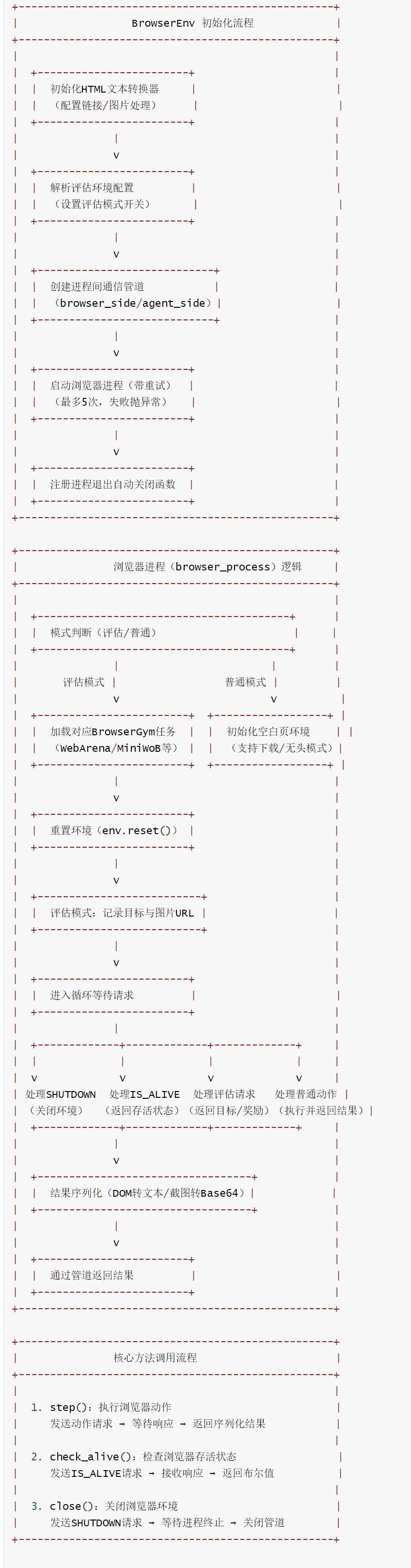
BrowserEnv is the core encapsulation class of the browser environment in the OpenHands framework. It is responsible for creating independent browser processes (based on Playwright + BrowserGym), providing standardized interfaces for browser operations (such as performing actions, checking liveness, and shutting down the environment), supporting common web page interaction and evaluation scenarios (such as WebArena and MiniWoB), and achieving efficient data transmission with the main program through inter-process communication (Pipe). It is the core component of the framework for handling browser-related tasks such as web page interaction and data crawling.
5.1 Call
ActionExecutor has a member variable self.browser: BrowserEnv.
class ActionExecutor:
    """ActionExecutor is running inside docker sandbox.
    It is responsible for executing actions received from OpenHands backend and producing observations.
    """

    def __init__(
        self,
        plugins_to_load: list[Plugin],
        work_dir: str,
        username: str,
        user_id: int,
        enable_browser: bool,
        browsergym_eval_env: str | None,
    ) -> None:

        self.browser: BrowserEnv | None = None

    async def _init_browser_async(self):
        """Initialize the browser asynchronously."""
        if not self.enable_browser:
            logger.info('Browser environment is not enabled in config')
            return

        if sys.platform == 'win32':
            logger.warning('Browser environment not supported on windows')
            return

        logger.debug('Initializing browser asynchronously')
        try:
            self.browser = BrowserEnv(self.browsergym_eval_env)
            logger.debug('Browser initialized asynchronously')
        except Exception as e:
            logger.exception(f'Failed to initialize browser: {e}')
            self.browser = None
Use the following code to utilize the browser environment.
async def browse(self, action: BrowseURLAction) -> Observation:
    if self.browser is None:
        return ErrorObservation(
            'Browser functionality is not supported or disabled.'
        )
    await self._ensure_browser_ready()
    return await browse(action, self.browser, self.initial_cwd)

async def browse_interactive(self, action: BrowseInteractiveAction) -> Observation:
    if self.browser is None:
        return ErrorObservation(
            'Browser functionality is not supported or disabled.'
        )
    await self._ensure_browser_ready()
    browser_observation = await browse(action, self.browser, self.initial_cwd)
    if not browser_observation.error:
        return browser_observation
    else:
        curr_files = os.listdir(self.downloads_directory)
        new_download = False
        for file in curr_files:
            if file not in self.downloaded_files:
                new_download = True
                self.downloaded_files.append(file)
                break

        if not new_download:
            return browser_observation
        else:
            # A new file is downloaded in self.downloads_directory, shift file to /workspace
            src_path = os.path.join(
                self.downloads_directory, self.downloaded_files[-1]
            )
            # Guess extension of file using puremagic and add it to tgt_path file name
            file_ext = ''
            try:
                guesses = puremagic.magic_file(src_path)
                if len(guesses) > 0:
                    ext = guesses[0].extension.strip()
                    if len(ext) > 0:
                        file_ext = ext
            except Exception as _:
                pass

            tgt_path = os.path.join(
                '/workspace', f'file_{len(self.downloaded_files)}{file_ext}'
            )
            shutil.copy(src_path, tgt_path)
            file_download_obs = FileDownloadObservation(
                content=f'Execution of the previous action {action.browser_actions} resulted in a file download. The downloaded file is saved at location: {tgt_path}',
                file_path=tgt_path,
            )
            return file_download_obs
5.2 Core Features
- Dual-mode support: compatible with ordinary open browser scenarios (starting from a blank page, supporting free web page interaction) and evaluation scenarios (integrated with the BrowserGym ecosystem, supporting standardized task evaluations such as WebArena and MiniWoB).
- Process isolation design: Create independent browser processes through multiple processes (
multiprocessing) to avoid mutual interference with the main program and improve stability and security. - Robust initialization and destruction: Built-in retry mechanism (up to 5 times) and ensures resource release by registering an automatic shutdown function via
atexit. - Structured data processing: Converting browser DOM to text and screenshots to Base64 encoding to ensure the serializability and transmissibility of observations.
- Download and caching support: Configure browser download path, support file download function, and adapt to scenarios such as web page data crawling.
- Evaluation-specific features: In evaluation mode, BrowserGym tasks are automatically registered, and goals and rewards are recorded for easy evaluation and analysis.
5.3 Flowchart
11-5
5.4 Code
When BrowserEnv is initialized, a spawn process is started to launch the browser so that large models can obtain external data through tools when needed. A reinforcement learning library gymnasium is used to operate the browser.
import gymnasium as gym

class BrowserEnv:
    def __init__(self, browsergym_eval_env: str | None = None):
        """初始化浏览器环境,创建独立进程与通信管道,支持普通交互与评估模式。

        参数:
            browsergym_eval_env: BrowserGym 评估环境名称(如 "browsergym/webarena"),
                                传入则启用评估模式,否则为普通开放式浏览器环境。
        """
        # 初始化HTML转文本转换器(用于提取网页文本内容)
        self.html_text_converter = self.get_html_text_converter()
        # 评估模式开关(是否启用BrowserGym评估)
        self.eval_mode = False
        # 评估目录(用于存储评估相关数据)
        self.eval_dir = ''

        # 评估模式配置:必须传入评估环境名称
        self.browsergym_eval_env = browsergym_eval_env
        self.eval_mode = bool(browsergym_eval_env)  # 有评估环境则启用评估模式

        # 初始化浏览器环境进程:设置多进程启动方式为"spawn"(跨平台兼容)
        multiprocessing.set_start_method('spawn', force=True)
        # 创建进程间通信管道(双向通信:浏览器端 <-> 代理端)
        self.browser_side, self.agent_side = multiprocessing.Pipe()

        # 启动浏览器环境(带重试机制)
        self.init_browser()
        # 注册进程退出时的自动关闭函数(确保资源释放)
        atexit.register(self.close)

    def get_html_text_converter(self) -> html2text.HTML2Text:
        """创建并配置HTML转文本转换器,定义网页内容的处理规则。"""
        html_text_converter = html2text.HTML2Text()
        # 配置规则:不忽略链接(保留链接文本),忽略图片
        html_text_converter.ignore_links = False
        html_text_converter.ignore_images = True
        # 图片使用alt文本替代(提升文本可读性)
        html_text_converter.images_to_alt = True
        # 禁用自动文本换行(保持原始网页文本结构)
        html_text_converter.body_width = 0
        return html_text_converter

    @retry(
        wait=wait_fixed(1),  # 重试间隔1秒
        stop=stop_after_attempt(5) | stop_if_should_exit(),  # 最多重试5次或进程退出时停止
        retry=retry_if_exception_type(BrowserInitException),  # 仅对浏览器初始化异常重试
    )
    def init_browser(self) -> None:
        """启动浏览器进程,失败则重试(最多5次),最终失败抛出异常。"""
        logger.debug('Starting browser env...')
        try:
            # 创建浏览器进程,目标函数为browser_process(独立进程中运行)
            self.process = multiprocessing.Process(target=self.browser_process)
            self.process.start()
        except Exception as e:
            logger.error(f'Failed to start browser process: {e}')
            raise  # 抛出异常触发重试

        # 检查浏览器进程是否存活(超时200秒)
        if not self.check_alive(timeout=200):
            self.close()  # 进程未存活则关闭资源
            raise BrowserInitException('Failed to start browser environment.')

    def browser_process(self) -> None:
        """浏览器进程核心逻辑:初始化BrowserGym环境,处理动作请求,返回观察结果。"""
        if self.eval_mode:
            # 评估模式:初始化BrowserGym评估环境
            assert self.browsergym_eval_env is not None
            logger.info('Initializing browser env for web browsing evaluation.')
            # 补全评估环境名称前缀(确保符合BrowserGym规范)
            if not self.browsergym_eval_env.startswith('browsergym/'):
                self.browsergym_eval_env = 'browsergym/' + self.browsergym_eval_env
            # 根据评估环境类型导入对应的BrowserGym任务(注册为gym环境)
            if 'visualwebarena' in self.browsergym_eval_env:
                import browsergym.visualwebarena  # noqa F401 注册visualwebarena任务
                import nltk
                nltk.download('punkt_tab')  # 下载NLTK依赖数据
            elif 'webarena' in self.browsergym_eval_env:
                import browsergym.webarena  # noqa F401 注册webarena任务
            elif 'miniwob' in self.browsergym_eval_env:
                import browsergym.miniwob  # noqa F401 注册miniwob任务
            else:
                raise ValueError(
                    f'Unsupported browsergym eval env: {self.browsergym_eval_env}'
                )
            # 创建评估环境(标记所有元素,超时100000秒)
            env = gym.make(self.browsergym_eval_env, tags_to_mark='all', timeout=100000)
        else:
            # 普通模式:创建开放式浏览器环境
            env = gym.make(
                'browsergym/openended',  # 开放式任务类型
                task_kwargs={'start_url': 'about:blank', 'goal': 'PLACEHOLDER_GOAL'},  # 空白页启动
                wait_for_user_message=False,  # 不等待用户消息
                headless=True,  # 无头模式(无GUI界面,节省资源)
                disable_env_checker=True,  # 禁用环境检查(提升启动速度)
                tags_to_mark='all',  # 标记所有DOM元素(便于交互)
                timeout=100000,  # 超时时间
                pw_context_kwargs={'accept_downloads': True},  # 允许文件下载
                pw_chromium_kwargs={'downloads_path': '/workspace/.downloads/'},  # 下载文件保存路径
            )
        # 重置环境,获取初始观察结果与信息
        obs, info = env.reset()

        logger.info('Successfully called env.reset')
        # 评估模式专用:记录目标与图片URL(用于后续评估)
        self.eval_goal = None
        self.goal_image_urls = []
        self.eval_rewards: list[float] = []
        if self.eval_mode:
            self.eval_goal = obs['goal']
            # 处理目标对象中的文本与图片URL
            if 'goal_object' in obs:
                obs['goal_object'] = list(obs['goal_object'])
                if len(obs['goal_object']) > 0:
                    self.eval_goal = obs['goal_object'][0]['text']  # 取第一个目标文本
                # 收集目标中的图片URL
                for message in obs['goal_object']:
                    if message['type'] == 'image_url':
                        image_src = message['image_url']
                        if isinstance(image_src, dict):
                            image_src = image_src['url']  # 处理嵌套URL格式
                        self.goal_image_urls.append(image_src)
            logger.debug(f'Browsing goal: {self.eval_goal}')
        logger.info('Browser env started.')

        # 循环处理请求(进程退出时终止)
        while should_continue():
            try:
                # 检查是否有来自代理端的请求(超时0.01秒,非阻塞)
                if self.browser_side.poll(timeout=0.01):
                    unique_request_id, action_data = self.browser_side.recv()

                    # 处理关闭请求:关闭环境并退出进程
                    if unique_request_id == 'SHUTDOWN':
                        logger.debug('SHUTDOWN recv, shutting down browser env...')
                        env.close()
                        return
                    # 处理存活检查请求:返回ALIVE状态
                    elif unique_request_id == 'IS_ALIVE':
                        self.browser_side.send(('ALIVE', None))
                        continue

                    # 评估模式专用请求:获取目标信息
                    if action_data['action'] == BROWSER_EVAL_GET_GOAL_ACTION:
                        self.browser_side.send(
                            (
                                unique_request_id,
                                {
                                    'text_content': self.eval_goal,  # 目标文本
                                    'image_content': self.goal_image_urls,  # 目标图片URL列表
                                },
                            )
                        )
                        continue
                    # 评估模式专用请求:获取奖励列表
                    elif action_data['action'] == BROWSER_EVAL_GET_REWARDS_ACTION:
                        self.browser_side.send(
                            (
                                unique_request_id,
                                {'text_content': json.dumps(self.eval_rewards)},  # 奖励列表JSON字符串
                            )
                        )
                        continue

                    # 处理普通浏览器动作请求
                    action = action_data['action']
                    # 执行动作,获取结果(观察值、奖励、终止状态等)
                    obs, reward, terminated, truncated, info = env.step(action)

                    # 评估模式:记录奖励
                    if self.eval_mode:
                        self.eval_rewards.append(reward)

                    # 处理网页文本内容:DOM对象转字符串后转为纯文本
                    html_str = flatten_dom_to_str(obs['dom_object'])
                    obs['text_content'] = self.html_text_converter.handle(html_str)
                    # 处理观察结果序列化(确保可通过管道传输)
                    # 1. 标记元素截图转为Base64 URL
                    obs['set_of_marks'] = image_to_png_base64_url(
                        overlay_som(
                            obs['screenshot'], obs.get('extra_element_properties', {})
                        ),
                        add_data_prefix=True,
                    )
                    # 2. 网页截图转为Base64 URL
                    obs['screenshot'] = image_to_png_base64_url(
                        obs['screenshot'], add_data_prefix=True
                    )
                    # 3. 转换为Python原生类型(numpy数组转普通整数)
                    obs['active_page_index'] = obs['active_page_index'].item()
                    obs['elapsed_time'] = obs['elapsed_time'].item()
                    # 将结果发送回代理端
                    self.browser_side.send((unique_request_id, obs))
            except KeyboardInterrupt:
                logger.debug('Browser env process interrupted by user.')
                try:
                    env.close()
                except Exception:
                    pass
                return

    def step(self, action_str: str, timeout: float = 120) -> dict:
        """在浏览器环境中执行动作,返回序列化的观察结果。

        参数:
            action_str: 待执行的浏览器动作(如点击、输入、导航等)
            timeout: 超时时间(默认120秒)

        返回:
            dict: 浏览器观察结果(含网页文本、截图、元素信息等)
        """
        # 生成唯一请求ID(用于匹配响应)
        unique_request_id = str(uuid.uuid4())
        # 发送动作请求到浏览器进程
        self.agent_side.send((unique_request_id, {'action': action_str}))
        start_time = time.time()
        # 循环等待响应
        while True:
            # 检查进程是否退出或超时
            if should_exit() or time.time() - start_time > timeout:
                raise TimeoutError('Browser environment took too long to respond.')
            # 检查是否有响应(非阻塞,超时0.01秒)
            if self.agent_side.poll(timeout=0.01):
                response_id, obs = self.agent_side.recv()
                # 匹配请求ID,返回对应的观察结果
                if response_id == unique_request_id:
                    return dict(obs)

    def check_alive(self, timeout: float = 60) -> bool:
        """检查浏览器进程是否存活。

        参数:
            timeout: 超时时间(默认60秒)

        返回:
            bool: 存活返回True,否则返回False
        """
        # 发送存活检查请求
        self.agent_side.send(('IS_ALIVE', None))
        # 等待响应(超时时间内)
        if self.agent_side.poll(timeout=timeout):
            response_id, _ = self.agent_side.recv()
            # 响应ID为"ALIVE"表示进程存活
            if response_id == 'ALIVE':
                return True
            logger.debug(f'Browser env is not alive. Response ID: {response_id}')
        return False

    def close(self) -> None:
        """关闭浏览器环境,释放进程与通信资源。"""
        # 若进程已终止,直接返回
        if not hasattr(self, 'process') or not self.process.is_alive():
            return
        try:
            # 发送关闭请求到浏览器进程
            self.agent_side.send(('SHUTDOWN', None))
            # 等待进程终止(最多5秒)
            self.process.join(5)
            # 若进程仍存活,强制终止
            if self.process.is_alive():
                logger.error(
                    'Browser process did not terminate, forcefully terminating...'
                )
                self.process.terminate()
                self.process.join(5)
                # 若仍存活,强制杀死进程
                if self.process.is_alive():
                    self.process.kill()
                    self.process.join(5)
            # 关闭通信管道
            self.agent_side.close()
            self.browser_side.close()
        except Exception as e:
            logger.error(f'Encountered an error when closing browser env: {e}')
0xFF Reference
https://docs.all-hands.dev/openhands/usage/architecture/runtime