AI Agents · AI Agent Frameworks
OpenHands Runtime Sandbox
OpenHands Runtime internals: sandbox execution, runtime types, event flow, and core code paths.
0x00 Summary
Google’s white paper provides a concise and practical definition of an Agent: Agent = Model + Tool + Orchestration Layer + Deployment Runtime. This adds a deployment runtime layer, which is different from most current definitions of AI Agents (LLM + Tool + Memory). Therefore, the importance of runtime is evident.
In OpenHands, the Runtime is what truly brings AI ideas to life. It’s like a mobile laboratory: four walls separate the mainframe world, but leave the Agent with a complete control panel (files, terminals, network). The Agent simply hands over a slip of paper filled with instructions, and the Runtime takes over all the dirty work: starting processes, capturing echoes, isolating risks, reclaiming resources, and then packaging the results into an “observation report” and sending it back to the foreground. Because all actions are completed within a unified sandbox, external systems don’t need to worry about permission violations or environmental differences.
In short, Runtime is a secure converter between decision-making and execution. It is the bridge between the Agent and the external environment, and the ballast stone for the stable operation of the entire system, ensuring the efficient collaborative operation of the entire system.
Because this series draws on a large number of articles, there may be some articles missing from the references. If so, please point them out.
0x01 Working Mechanism
In today’s digital age, secure code execution has become a critical issue. To address this challenge, the OpenHands project has meticulously designed a Docker container-based sandbox system to provide a secure and isolated environment for code execution. This system not only ensures code security but also guarantees execution consistency and reproducibility, while achieving effective resource control and isolation between different projects.
1.1 Environment and Sandbox
Environment refers to the container that the agent can operate, which is equivalent to giving the agent a computer that it can operate on its own. The agent can complete tasks end-to-end in it. This field includes different sub-fields such as Sandbox, Browser Infra, and Agent Operating System.
Sandbox is a security mechanism that provides an isolated environment for running programs; essentially, it provides an isolated virtual machine environment for agents to run, allowing developers to develop, deploy, and run agents. However, as agents continue to evolve, traditional virtual machines can no longer adequately meet their needs. The reasons are as follows:
- Agents place higher demands on the performance of virtual machines, such as requiring greater isolation, faster startup speeds, and stronger stability.
- The agent’s virtual machine also needs to have certain AI performance, such as having the function of a code interpreter, or integrating AI architectures commonly used by developers, such as the Vercel AI SDK.
1.2 Safe Execution
Five reasons for secure code execution:
- Security: When executing untrusted code, it is essential to ensure that this code does not harm the host system. Sandbox environments protect the host from potential threats by preventing malicious code from accessing or modifying the host system’s resources through strict access controls.
- Consistency: The sandbox environment ensures that the execution results of code are consistent across different machines and configurations. This consistency eliminates the common problem of “it works on my machine,” enabling code to run stably in any environment.
- Resource control: Sandboxing allows for precise control over resource allocation and usage. This not only prevents uncontrolled processes from impacting the host system but also ensures the rational allocation of resources, improving overall system performance.
- Isolation: Different projects or users can work in their own isolated environments without interfering with each other. This isolation not only protects the host system but also ensures the independence between different projects, avoiding resource contention and potential conflicts.
- Reproducibility: The consistency and controllability of the sandbox environment make it easier to reproduce errors and problems. This is especially important during debugging and problem-solving, as a consistent environment ensures the reproducibility and resolution of issues.
1.3 Solution
OpenHands builds a robust “security barrier” for code execution through a Docker container-based sandbox environment. Each project automatically creates an independent Docker container as its dedicated sandbox upon startup. This sandbox has an isolated file system, network environment, and resource quotas, ensuring that code can only access files within the container, network requests are restricted to preset security domains, and CPU and memory usage are strictly controlled.
This isolation provides triple protection:
- To avoid interference between projects: a code error in one project (such as a memory overflow caused by an infinite loop) will only affect the sandbox in which it resides and will not affect other projects or the host system.
- Preventing malicious code risks: Even if the code generated by AI contains potentially dangerous operations (such as deleting system files), it will be intercepted by the sandbox environment and will not cause any substantial damage to the host.
- Simplify environment consistency management: The base image of the sandbox can be pre-configured with specific versions of programming languages, dependency libraries and toolchains, ensuring that the execution results of the code are consistent in development, testing and production environments, avoiding the problem of “it can run on my computer”.
While the sandbox environment offers a high level of security and isolation, it is not an isolated “island.” The OpenHands framework provides fine-grained “port mapping” and “directory mounting” mechanisms, allowing developers to expose specific ports within the sandbox to the host (for debugging purposes) or mount specified directories from the host into the sandbox (for input/output file transfer). This mechanism ensures security while providing sufficient flexibility, making the development and debugging process more efficient.
Through this design, OpenHands not only ensures the secure execution of code but also improves development efficiency and the ease of environment management. This balance is an indispensable part of modern software development, providing developers with a safe and efficient development environment.
1.4 Core Functions
The core functionality of Runtime can be summarized in four main aspects:
- Building and managing the working environment: Runtime is responsible for creating and managing the agent’s working area. Whether it is a more isolated container environment or a convenient local environment, it can provide customized workspaces according to needs, ensuring that the agent is not disturbed by external factors when performing tasks.
- Action execution: Instructions issued by the agent, such as file editing and command execution, are parsed and precisely executed by the Runtime, which acts as a bridge between decision-making and practice.
- Environment variable maintenance: Runtime is responsible for maintaining the environment variables required for task execution and providing necessary configuration support for task execution.
- Environment lifecycle management: The Runtime manages the entire environment lifecycle, from initialization to disconnection, forming a complete closed loop. Simultaneously, it outputs execution logs and observation results in real time via
EventStream, providing crucial status feedback to components such as the controller, memory system, and MCP, ensuring the coordinated operation of the entire system.
1.5 Working Mechanism
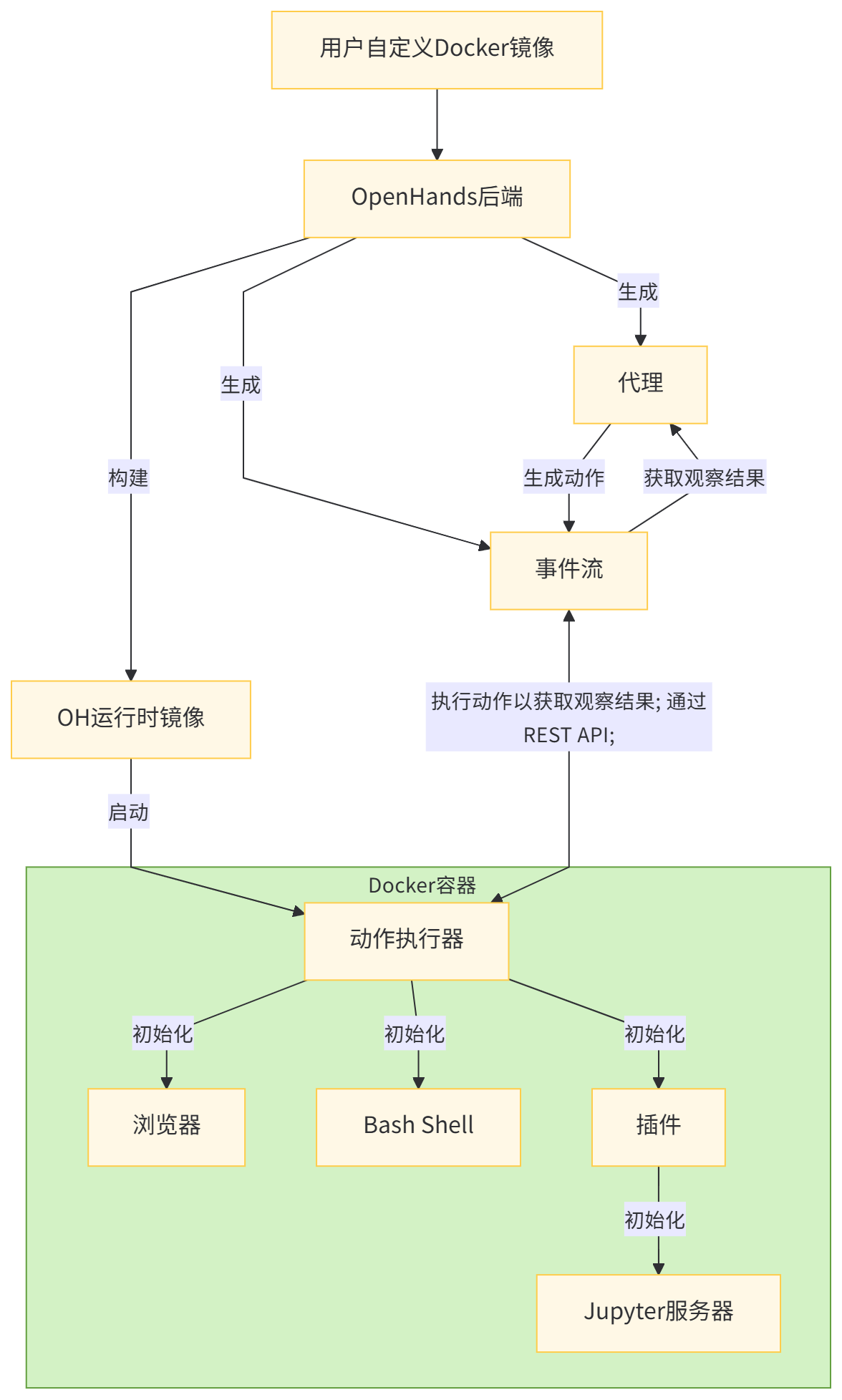
The OpenHands runtime system adopts a client-server architecture based on Docker containers, and its working mechanism is summarized as follows:
- User input: The user provides a custom base Docker image.
- Image building: OpenHands builds a new Docker image (i.e., the “OH runtime image”) based on the user-provided image. This new image contains OpenHands-specific code, with the core being the “runtime client”.
- Container startup: When OpenHands starts, it uses the OH runtime image to start a Docker container.
- Action execution server initialization: The action execution server initializes an action executor inside the container
ActionExecutor, configures necessary components (such as Bash Shell), and loads the specified plugins. - Communication process: The OpenHands backend communicates with the action execution server through a RESTful API, sending action instructions and receiving execution feedback data.
- Action execution: The runtime client receives action instructions from the backend, executes these instructions in the sandbox environment, and sends back execution feedback data.
- Feedback data return: The action execution server sends the execution results back to the OpenHands backend in the form of feedback data (
Observation).
The core role of the client:
- It acts as an intermediary between the OpenHands backend and the sandbox environment, enabling bidirectional data transfer.
- Safely execute various action instructions (including Shell commands, file operations, Python code, etc.) within the container.
- Manage the status of the sandbox environment, including information such as the current working directory and loaded plugins.
- The feedback data is formatted and returned to the backend, providing a unified interface specification for result processing.
The working mechanism is shown in the diagram below.
Runtime-workflow
0x02 Core Logic
Runtime is the underlying engine that powers a user’s agent application during user interaction. It’s a system that receives user-defined agents, tools, and callbacks, coordinates their execution of user input, manages information flow, state changes, and interactions with external services (such as LLMs or storage). Think of the runtime as the “engine” of your agent application. User-defined components (agents, tools) are handled by the runtime, which processes how they connect and work together to fulfill user requests.
Runtime supports various execution environments, including Docker containers and local environments, enabling agents to securely execute code and commands. Its derived classes include: DockerRuntime, RemoteRuntime, LocalRuntime, KubernetesRuntime, and CLIRuntime.
Core Functions:
- Command execution: Provides Bash shell access capabilities.
- Browser interaction: Supports web browsing and interactive operations.
- File system operations: file reading, writing, editing, and other operations.
- Git operations and management: repository cloning, branch management, and change tracking.
- Environment variable management: Runtime environment variable configuration.
- Plugin system management: Supports integration with plugins such as VSCode and Jupyter.
2.1 base.py
base.py defines a Runtime class that serves as the primary interface for the proxy to interact with the external environment. It handles various operations, including:
- Sandbox Execution
- Browser Interaction
- File system operations
- Environment variable management
- Plugin Management
Runtime key characteristics:
- Initialize using configuration and event streams.
- Use an
initmethod to asynchronously initialize environment variables. - Execution methods for different types of operations (
run,read,write,browse, etc.). - Abstract methods for file operations (implemented by subclasses).
2.2 ActionExecutionClient
action_execution_client.py contains the ActionExecutionClient class that implements a runtime interface. It is an abstract implementation, meaning that it still needs to be extended through concrete implementations to be used.
This client interacts with the action_execution_server via HTTP calls to actually perform runtime operations.
class ActionExecutionClient(Runtime):
    """Base class for runtimes that interact with the action execution server.

    This class contains shared logic between DockerRuntime and RemoteRuntime
    for interacting with the HTTP server defined in action_execution_server.py.
    """

    def __init__(
        self,
        config: OpenHandsConfig,
        event_stream: EventStream,
        llm_registry: LLMRegistry,
        sid: str = 'default',
        plugins: list[PluginRequirement] | None = None,
        env_vars: dict[str, str] | None = None,
        status_callback: Any | None = None,
        attach_to_existing: bool = False,
        headless_mode: bool = True,
        user_id: str | None = None,
        git_provider_tokens: PROVIDER_TOKEN_TYPE | None = None,
    ):
        self.session = HttpSession()
        self.action_semaphore = threading.Semaphore(1)  # Ensure one action at a time
        self._runtime_closed: bool = False
        self._vscode_token: str | None = None  # initial dummy value
        self._last_updated_mcp_stdio_servers: list[MCPStdioServerConfig] = []
        super().__init__(
            config,
            event_stream,
            llm_registry,
            sid,
            plugins,
            env_vars,
            status_callback,
            attach_to_existing,
            headless_mode,
            user_id,
            git_provider_tokens,
        )
All other Runtime instances inherit from ActionExecutionClient.
class KubernetesRuntime(ActionExecutionClient):
class LocalRuntime(ActionExecutionClient):
class RemoteRuntime(ActionExecutionClient):
class DockerRuntime(ActionExecutionClient):
2.3 Runtime Type
2.3.1 Docker runtime environment
To create a Docker runtime environment designed for use with Docker containers, OpenHands is configured as follows:
- Create and manage Docker containers for each session.
- Perform actions inside the container.
- Supports direct file system access and local resource management.
- Suitable for development, testing, and scenarios requiring complete control over the execution environment.
The key features of the Docker runtime environment are:
- Real-time logging and debugging capabilities.
- Direct access to the local file system.
- Because local resources execute faster.
- Container isolation to improve security.
2.3.2 Local runtime environment
The local runtime environment is designed for direct execution on the local machine. Currently, it only supports running as a local user.
- Run the
action_execution_serverdirectly on the host machine. - No Docker container overhead.
- Direct access to local system resources.
- Suitable for situations where Docker is unavailable or development and testing are not required.
Key features:
- Minimal settings required.
- Direct access to local resources.
- No container overhead.
- Fastest execution speed.
Important: This runtime does not provide isolation because it runs directly on the host machine. All actions are performed with the same permissions as the user running OpenHands. For secure execution requiring proper isolation, use the Docker runtime instead.
2.3.3 Remote Runtime Environment
Remote runtime environments are designed for execution in remote environments:
- Connect to the remote server running
ActionExecutor. - The action is executed by sending a request to the remote client.
- Supports distributed execution and cloud-based deployment.
- Suitable for production environments, scalability, and local resource limitations are the key considerations for these scenarios.
Key features:
- Scalability and resource flexibility.
- Reduce local resource usage.
- Support cloud-based deployment.
- The potential to improve security through isolation.
Currently, this is mainly used for parallel evaluation, such as this SWE-Bench example.
2.3.4 Singleton Pattern
Subclasses of Runtime are not singletons. As can be seen from the function _create_runtime, a new instance is created each time the instance runs. Each Runtime instance has its own state, such as sid (session ID). Each instance can also call close() to clean up resources.
    async def _create_runtime(
        self,
        runtime_name: str,
        config: OpenHandsConfig,
        agent: Agent,
        git_provider_tokens: PROVIDER_TOKEN_TYPE | None = None,
        custom_secrets: CUSTOM_SECRETS_TYPE | None = None,
        selected_repository: str | None = None,
        selected_branch: str | None = None,
    ) -> bool:
        """Creates a runtime instance

        Parameters:
        - runtime_name: The name of the runtime associated with the session
        - config:
        - agent:

        Return True on successfully connected, False if could not connect.
        Raises if already created, possibly in other situations.
        """

            self.runtime = runtime_cls(
                config=config,
                event_stream=self.event_stream,
                llm_registry=self.llm_registry,
                sid=self.sid,
                plugins=agent.sandbox_plugins,
                status_callback=self._status_callback,
                headless_mode=False,
                attach_to_existing=False,
                env_vars=env_vars,
                git_provider_tokens=git_provider_tokens,
            )

        return True
2.4 Workflow
As an EventStreamSubscriber.RUNTIME subscriber, Runtime processes Actions from the event stream and generates Observations. The Runtime workflow is as follows:
- Initialization:
- Runtime initializes using configuration and event streams.
- Set environment variables.
- Load and initialize plugins.
- Action processing:
- Runtime receives actions through the event stream.
- Verify and route to the appropriate execution method.
- Action execution:
- Perform different types of actions:
- Use
runto execute bash commands. - Use
run_ipythonto execute an IPython unit. - Use
readandwriteto perform file operations. - Use
browseandbrowse_interactivefor browsing web pages.
- Observation generation:
- After the action is executed, the corresponding observation results are generated.
- The observations are added to the event stream.
- Plugin integration:
- Plugins such as Jupyter and AgentSkills are initialized and integrated into the runtime.
- Sandbox environment:
ActionExecutorsets up a sandbox environment inside a Docker container.- Initialize the user environment and bash shell.
- Actions received from the OpenHands backend are executed in this sandbox environment.
- Browser interaction:
- Use
BrowserEnvclasses to handle web browsing actions.
- Use
2.5 Relationship between Runtime and other components
The main relationships between Runtime and other components are as follows:
- The runtime
openhands.eventsinteracts closely with the event system defined in the module. - It depends on
openhands.core.configconfiguration classes. - Logs are processed by
openhands.core.logger.
Let’s take a closer look.
2.5.1 EventStream
Runtime interacts with other modules through event-driven processes via EventStream.
class Runtime(FileEditRuntimeMixin):
     # Runtime订阅事件流
     event_stream.subscribe(
                        EventStreamSubscriber.RUNTIME, self.on_event, self.sid
            )
     # Runtime处理传入的事件
     def on_event(self, event: Event) -> None:
        if isinstance(event, Action):
            asyncio.get_event_loop().run_until_complete(self._handle_action(event))
    # Runtime返回观察结果给事件流
    self.event_stream.add_event(observation, source)
2.5.2 AgentController
The AgentController sends operation commands to the Runtime via EventStream, and the Runtime executes the commands and returns the results.
- AgentController sends
Action→EventStream. - Runtime executes the action after receiving it.
- Runtime sends
Observation→EventStream. - The AgentController receives the Observation and continues the decision-making process.
2.5.3 Session
WebSession and AgentSession are responsible for managing the lifecycle of the runtime.
# AgentSession
runtime_cls = get_runtime_cls(runtime_name)
# 创建Runtime实例
self.runtime = runtime_cls(
                config=config,
                event_stream=self.event_stream,
                llm_registry=self.llm_registry,
                sid=self.sid,
                plugins=agent.sandbox_plugins,
                status_callback=self._status_callback,
                headless_mode=False,
                attach_to_existing=False,
                git_provider_tokens=overrided_tokens,
                env_vars=env_vars,
                user_id=self.user_id,
            )
# 连接到Runtime
await self.runtime.connect()

# 关闭Runtime
EXECUTOR.submit(self.runtime.close)
2.5.4 Plugin System
Runtime manages and executes various plugin functions.
# 初始化加载插件
self.plugins = (
    copy.deepcopy(plugins) if plugins is not None and len(plugins) > 0 else []
)
# add VSCode plugin if not in headless mode
if not headless_mode:
    self.plugins.append(VSCodeRequirement())

# 执行插件相关操作
if any(isinstance(plugin, JupyterRequirement) for plugin in self.plugins):
    code = 'import os\n'
    for key, value in env_vars.items():
        # Note: json.dumps gives us nice escaping for free
        code += f'os.environ["{key}"] = {json.dumps(value)}\n'
    code += '\n'
    self.run_ipython(IPythonRunCellAction(code))
    ......
2.5.5 File System and Storage
Runtime provides file operation capabilities.
def read(self, action: FileReadAction) -> Observation:
def write(self, action: FileWriteAction) -> Observation:
2.5.6 Git repository
Runtime provides the ability to perform operations on Git repositories.
async def clone_or_init_repo(
    self,
    git_provider_tokens: PROVIDER_TOKEN_TYPE | None,
    selected_repository: str | None,
    selected_branch: str | None,
) -> str:
2.5.7 Python & MCP
Runtime provides the ability to run Python code and perform call_tool_mcp operations.
def run_ipython(self, action: IPythonRunCellAction) -> Observation:

async def call_tool_mcp(self, action: MCPAction) -> Observation:
0x03 Code
3.1 Definition & Initialization
class Runtime(FileEditRuntimeMixin):
    """智能代理运行时环境的抽象基类。

    这是OpenHands中的一个扩展点,允许应用程序自定义代理与外部环境的交互方式。
    该运行时提供一个沙箱环境,包含以下功能:
    - Bash shell访问
    - 浏览器交互
    - 文件系统操作
    - Git操作
    - 环境变量管理

    应用程序可通过以下方式替换为自定义实现:
    1. 创建一个继承自Runtime的类
    2. 实现所有必需的方法
    3. 在配置中设置运行时名称或使用get_runtime_cls()方法

    该类通过get_runtime_cls()中的get_impl()方法实例化。

    内置实现包括:
    - DockerRuntime:基于Docker的容器化环境
    - RemoteRuntime:远程执行环境
    - LocalRuntime:用于开发的本地执行环境
    - KubernetesRuntime:基于Kubernetes的执行环境
    - CLIRuntime:命令行界面运行时

    参数:
        sid:唯一标识当前用户会话的会话ID
    """

    sid: str  # 会话ID,唯一标识用户会话
    config: OpenHandsConfig  # OpenHands配置对象
    initial_env_vars: dict[str, str]  # 初始环境变量字典
    attach_to_existing: bool  # 是否连接到现有运行时环境
    status_callback: Callable[[str, RuntimeStatus, str], None] | None  # 状态回调函数,接收会话ID、运行时状态和消息
    runtime_status: RuntimeStatus | None  # 当前运行时状态
    _runtime_initialized: bool = False  # 运行时初始化状态标记
    security_analyzer: 'SecurityAnalyzer | None' = None  # 安全分析器实例,用于检测潜在风险

    def __init__(
        self,
        config: OpenHandsConfig,
        event_stream: EventStream,
        llm_registry: LLMRegistry,
        sid: str = 'default',
        plugins: list[PluginRequirement] | None = None,
        env_vars: dict[str, str] | None = None,
        status_callback: Callable[[str, RuntimeStatus, str], None] | None = None,
        attach_to_existing: bool = False,
        headless_mode: bool = False,
        user_id: str | None = None,
        git_provider_tokens: PROVIDER_TOKEN_TYPE | None = None,
    ):
        # 初始化Git处理器,绑定shell执行和文件创建的回调方法
        self.git_handler = GitHandler(
            execute_shell_fn=self._execute_shell_fn_git_handler,  # Git操作所需的shell执行函数
            create_file_fn=self._create_file_fn_git_handler,  # Git操作所需的文件创建函数
        )
        # 初始化会话ID
        self.sid = sid
        # 绑定事件流(组件间通信的核心)
        self.event_stream = event_stream
        # 若事件流存在,订阅运行时相关事件
        if event_stream:
            event_stream.subscribe(
                EventStreamSubscriber.RUNTIME,  # 订阅者类型(运行时)
                self.on_event,  # 事件处理回调函数
                self.sid  # 订阅者ID(当前会话ID)
            )
        # 初始化插件列表(深拷贝传入的插件,为空时设为默认空列表)
        self.plugins = (
            copy.deepcopy(plugins) if plugins is not None and len(plugins) > 0 else []
        )
        # 非无头模式下添加VSCode插件
        if not headless_mode:
            self.plugins.append(VSCodeRequirement())

        # 绑定状态回调函数
        self.status_callback = status_callback
        # 记录是否连接到现有运行时
        self.attach_to_existing = attach_to_existing

        # 深拷贝配置对象(避免外部修改影响内部状态)
        self.config = copy.deepcopy(config)
        # 注册程序退出时的关闭回调(确保资源正确释放)
        atexit.register(self.close)

        # 初始化默认环境变量(基于沙箱配置)
        self.initial_env_vars = _default_env_vars(config.sandbox)
        # 合并用户传入的环境变量(覆盖默认值)
        if env_vars is not None:
            self.initial_env_vars.update(env_vars)

        # 初始化Provider处理器(管理Git等服务的访问令牌)
        self.provider_handler = ProviderHandler(
            provider_tokens=git_provider_tokens
            or cast(PROVIDER_TOKEN_TYPE, MappingProxyType({})),  # 令牌为空时使用空映射
            external_auth_id=user_id,  # 外部认证ID(关联用户)
            external_token_manager=True,  # 启用外部令牌管理
        )
        # 同步调用异步方法获取Provider相关环境变量
        raw_env_vars: dict[str, str] = call_async_from_sync(
            self.provider_handler.get_env_vars,  # 获取环境变量的异步方法
            GENERAL_TIMEOUT,  # 超时时间
            True,  # 允许重试
            None,  # 重试间隔(使用默认)
            False  # 不抛出异常
        )
        # 合并Provider返回的环境变量
        self.initial_env_vars.update(raw_env_vars)

        # 检查是否启用VSCode插件(通过判断插件列表中是否包含VSCodeRequirement实例)
        self._vscode_enabled = any(
            isinstance(plugin, VSCodeRequirement) for plugin in self.plugins
        )

        # 初始化文件编辑混合类(提供文件编辑相关功能)
        FileEditRuntimeMixin.__init__(
            self,
            enable_llm_editor=config.get_agent_config().enable_llm_editor,  # 是否启用LLM辅助编辑
            llm_registry=llm_registry,  # LLM注册中心(用于获取语言模型实例)
        )

        # 记录用户ID
        self.user_id = user_id
        # 记录Git服务提供商令牌
        self.git_provider_tokens = git_provider_tokens
        # 初始化运行时状态(默认为None)
        self.runtime_status = None

        # 初始化安全分析器(若配置启用)
        self.security_analyzer = None
        if self.config.security.security_analyzer:
            # 根据配置获取安全分析器类(默认使用SecurityAnalyzer)
            analyzer_cls = options.SecurityAnalyzers.get(
                self.config.security.security_analyzer, SecurityAnalyzer
            )
            # 实例化安全分析器
            self.security_analyzer = analyzer_cls()
            # 为安全分析器绑定事件流(用于发布安全相关事件)
            self.security_analyzer.set_event_stream(self.event_stream)
3.2 Key Code
3.2.1 Environment Initialization
setup_initial_env provides environment initialization capabilities.
    def setup_initial_env(self) -> None:
        if self.attach_to_existing:
            return
        logger.debug(f'Adding env vars: {self.initial_env_vars.keys()}')
        self.add_env_vars(self.initial_env_vars)
        if self.config.sandbox.runtime_startup_env_vars:
            self.add_env_vars(self.config.sandbox.runtime_startup_env_vars)

        # Configure git settings
        self._setup_git_config()
3.2.2 Event Handling
The on_event function accepts an Action from the event stream, and the _handle_action function executes the corresponding operation, generating an Observation.
    def on_event(self, event: Event) -> None:
        if isinstance(event, Action):
            asyncio.get_event_loop().run_until_complete(self._handle_action(event))
3.2.3 Micro-agent Support
get_microagents_from_selected_repo loads microagent configurations from the repository.
get_microagents_from_org_or_user
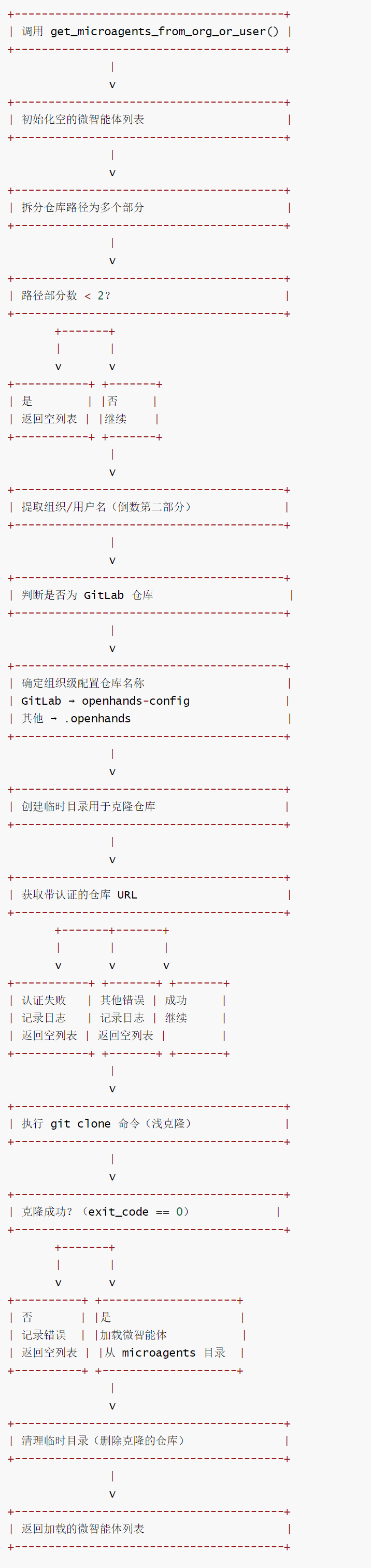
For example, get_microagents_from_org_or_user is the core logic for loading organization/user-level microagents in the OpenHands system. It is responsible for loading microagents (lightweight agent components) from the organization or user-level configuration repository in the code repository. Its main functions include:
- Repository path resolution: Extract the organization/username from the target repository path to determine the location of the configured repository.
- Platform adaptation: Differentiate between GitLab and other platforms (such as GitHub) and use different configuration repository names (GitLab uses
openhands-config, others use.openhands). - Repository cloning: Clone the configured repository via an authenticated URL, using shallow cloning
--depth 1to improve efficiency. - Micro-agent loading: Load micro-agents from the cloned repository’s
microagentsdirectory and clean up temporary files after loading is complete. - Exception handling: Logs are recorded for scenarios such as authentication failures and cloning errors to ensure process robustness.
The process is as follows:
10-1
The code is as follows:
    def get_microagents_from_org_or_user(
        self, selected_repository: str
    ) -> List[BaseMicroagent]:
        """从组织或用户级仓库加载微智能体。

        例如:若目标仓库为 github.com/acme-co/api,会检查 github.com/acme-co/.openhands 是否存在。
        若存在,会克隆该仓库并从 ./microagents/ 文件夹加载微智能体。

        对于 GitLab 仓库,会使用 openhands-config 而非 .openhands,因为 GitLab 不支持
        以非字母数字字符开头的仓库名称。

        参数:
            selected_repository: 仓库路径(例如:"github.com/acme-co/api")

        返回:
            从组织/用户级仓库加载的微智能体列表
        """
        loaded_microagents: List[BaseMicroagent] = []

        # 拆分仓库路径为多个部分(按 '/' 分割)
        repo_parts = selected_repository.split('/')

        # 校验路径格式:至少需要包含域名、组织/用户名、仓库名三部分(如 github.com/org/repo)
        if len(repo_parts) < 2:
            return loaded_microagents

        # 提取组织/用户名(路径中倒数第二部分)
        org_name = repo_parts[-2]

        # 判断是否为 GitLab 仓库
        is_gitlab = self._is_gitlab_repository(selected_repository)

        # 确定组织级配置仓库名称:GitLab 用 openhands-config,其他用 .openhands
        if is_gitlab:
            org_openhands_repo = f'{org_name}/openhands-config'
        else:
            org_openhands_repo = f'{org_name}/.openhands'
        # 尝试克隆组织级配置仓库
        try:
            # 创建组织仓库的临时目录(避免冲突)
            org_repo_dir = self.workspace_root / f'org_openhands_{org_name}'

            # 获取带认证的仓库 URL 并执行浅克隆(--depth 1 提高效率)
            try:
                # 同步调用异步方法获取认证 URL(带超时控制)
                remote_url = call_async_from_sync(
                    self.provider_handler.get_authenticated_git_url,
                    GENERAL_TIMEOUT,
                    org_openhands_repo,
                )
            except AuthenticationError as e:
                raise  # 重新抛出认证异常,终止当前流程
            except Exception as e:
                raise  # 重新抛出其他异常

            # 构建克隆命令:禁用终端交互提示,浅克隆到临时目录
            clone_cmd = (
                f'GIT_TERMINAL_PROMPT=0 git clone --depth 1 {remote_url} {org_repo_dir}'
            )

            # 执行克隆命令
            action = CmdRunAction(command=clone_cmd)
            obs = self.run_action(action)

            # 检查克隆结果:退出码为 0 表示成功
            if isinstance(obs, CmdOutputObservation) and obs.exit_code == 0:

                # 从组织仓库的 microagents 目录加载微智能体
                org_microagents_dir = org_repo_dir / 'microagents'

                loaded_microagents = self._load_microagents_from_directory(
                    org_microagents_dir, 'org-level'
                )

                # 清理临时目录:加载完成后删除克隆的仓库
                action = CmdRunAction(f'rm -rf {org_repo_dir}')
                self.run_action(action)
            else:
                # 克隆失败:提取错误信息和退出码
                clone_error_msg = (
                    obs.content
                    if isinstance(obs, CmdOutputObservation)
                    else 'Unknown error'
                )
                exit_code = (
                    obs.exit_code if isinstance(obs, CmdOutputObservation) else 'N/A'
                )

        return loaded_microagents
0xFF Reference
https://docs.all-hands.dev/openhands/usage/architecture/runtime
Agent Infrastructure Graph: Which components are worth redoing for the Agent?